Day 34: Window Functions & CTEs
✅ Today you will learn
- CTEs: readable multi-step queries
- Window functions vs GROUP BY
- ROW_NUMBER, RANK, DENSE_RANK and top-N per group
- Running totals and moving averages
- LAG/LEAD growth and NTILE segments
🏢 In the real world
“Top 2 products in every city”, “month-over-month growth”, “cumulative revenue towards the annual target”, “salary rank inside each department” – these four questions appear in almost every data-analyst SQL round, and all four need window functions.
import sqlite3
import pandas as pd
con = sqlite3.connect("bazaar.db")
pd.read_csv("sales_data.csv").to_sql("sales", con, if_exists="replace", index=False)
pd.read_csv("employees.csv").to_sql("employees", con, if_exists="replace", index=False)
pd.read_csv("departments.csv").to_sql("departments", con, if_exists="replace", index=False)
print([r[0] for r in con.execute("SELECT name FROM sqlite_master WHERE type = 'table'")])CTEs – WITH
A CTE gives a name to a sub-query so you can build a query in steps – like variables in Python.
import sqlite3
import pandas as pd
con = sqlite3.connect("bazaar.db")
q = lambda sql: pd.read_sql(sql, con)
print(q("""
WITH orders AS (
    SELECT order_id, city, category, order_date,
           quantity * unit_price * (1 - discount) AS revenue
    FROM sales
),
city_rev AS (
    SELECT city, SUM(revenue) AS revenue FROM orders GROUP BY city
)
SELECT city, ROUND(revenue / 100000.0, 2) AS revenue_lakh
FROM city_rev
WHERE revenue > (SELECT AVG(revenue) FROM city_rev)      -- alias usable now!
ORDER BY revenue DESC
"""))Window functions: keep the rows
GROUP BY
- Collapses rows: one row per group
- SUM(salary) per department
- Like pandas agg
Window: OVER (PARTITION BY …)
- Keeps every row and adds a group value
- Each employee + department total
- Like pandas transform / rank / shift
import sqlite3
import pandas as pd
con = sqlite3.connect("bazaar.db")
q = lambda sql: pd.read_sql(sql, con)
print(q("""
SELECT name, dept_id, salary,
       ROUND(AVG(salary) OVER (PARTITION BY dept_id))            AS dept_avg,
       salary - ROUND(AVG(salary) OVER (PARTITION BY dept_id))   AS vs_avg,
       ROUND(100.0 * salary / SUM(salary) OVER (PARTITION BY dept_id), 1) AS share_pct
FROM employees
WHERE dept_id IN (10, 30)
ORDER BY dept_id, salary DESC
"""))Ranking functions
import sqlite3
import pandas as pd
con = sqlite3.connect("bazaar.db")
q = lambda sql: pd.read_sql(sql, con)
print(q("""
WITH team(name, salary) AS (
    VALUES ('Aman', 90000), ('Riya', 90000), ('Om', 85000),
           ('Zoya', 80000), ('Kabir', 80000), ('Isha', 75000)
)
SELECT name, salary,
       ROW_NUMBER() OVER (ORDER BY salary DESC) AS row_num,
       RANK()       OVER (ORDER BY salary DESC) AS rnk,
       DENSE_RANK() OVER (ORDER BY salary DESC) AS dense_rnk
FROM team
"""))With equal salaries ROW_NUMBER still gives 1, 2, 3; RANK gives 1, 1, 3 (skips); DENSE_RANK gives 1, 1, 2 (no gap). Interviewers love asking for the 2nd-highest salary – use DENSE_RANK.
import sqlite3
import pandas as pd
con = sqlite3.connect("bazaar.db")
q = lambda sql: pd.read_sql(sql, con)
print(q("""
WITH r AS (
    SELECT city, product, ROUND(SUM(quantity * unit_price * (1 - discount))) AS revenue,
           ROW_NUMBER() OVER (PARTITION BY city ORDER BY SUM(quantity * unit_price * (1 - discount)) DESC) AS rn
    FROM sales
    GROUP BY city, product
)
SELECT city, product, revenue FROM r WHERE rn <= 2 AND city IN ('Delhi', 'Mumbai', 'Patna', 'Jaipur')
ORDER BY city, rn
"""))import sqlite3
import pandas as pd
con = sqlite3.connect("bazaar.db")
q = lambda sql: pd.read_sql(sql, con)
print(q("""
WITH ranked AS (
SELECT d.dept_name, e.name, e.salary,
DENSE_RANK() OVER (PARTITION BY e.dept_id ORDER BY e.salary DESC) AS r
FROM employees e JOIN departments d ON e.dept_id = d.dept_id
)
SELECT dept_name, name, salary FROM ranked WHERE r = 2 -- 2nd highest per department
"""))Running totals and moving averages
import sqlite3
import pandas as pd
con = sqlite3.connect("bazaar.db")
q = lambda sql: pd.read_sql(sql, con)
m = q("""
WITH monthly AS (
    SELECT strftime('%Y-%m', order_date) AS month,
           SUM(quantity * unit_price * (1 - discount)) / 100000.0 AS rev
    FROM sales GROUP BY month
)
SELECT month, ROUND(rev, 2) AS revenue_lakh,
       ROUND(SUM(rev) OVER (ORDER BY month), 2)                                   AS cumulative,
       ROUND(AVG(rev) OVER (ORDER BY month ROWS BETWEEN 2 PRECEDING AND CURRENT ROW), 2) AS moving_avg_3m
FROM monthly
""")
print(m.to_string(index=False))import sqlite3
import pandas as pd
con = sqlite3.connect("bazaar.db")
q = lambda sql: pd.read_sql(sql, con)
import matplotlib.pyplot as plt
m = q("""
WITH monthly AS (SELECT strftime('%m', order_date) AS month, SUM(quantity * unit_price * (1 - discount)) / 100000.0 AS rev
FROM sales GROUP BY month)
SELECT month, rev, SUM(rev) OVER (ORDER BY month) AS cum FROM monthly
""")
fig, ax = plt.subplots(figsize=(9, 3.8))
ax.bar(m["month"], m["rev"], color="#c7d2fe", label="monthly")
ax.plot(m["month"], m["cum"], color="#4f46e5", marker="o", label="cumulative")
ax.axhline(65, color="#dc2626", ls="--", label="annual target ₹65 lakh")
cross = m.loc[m["cum"] >= 65, "month"].iloc[0]
ax.set_title(f"Annual target crossed in month {cross}"); ax.set_ylabel("₹ lakh"); ax.legend()
plt.show()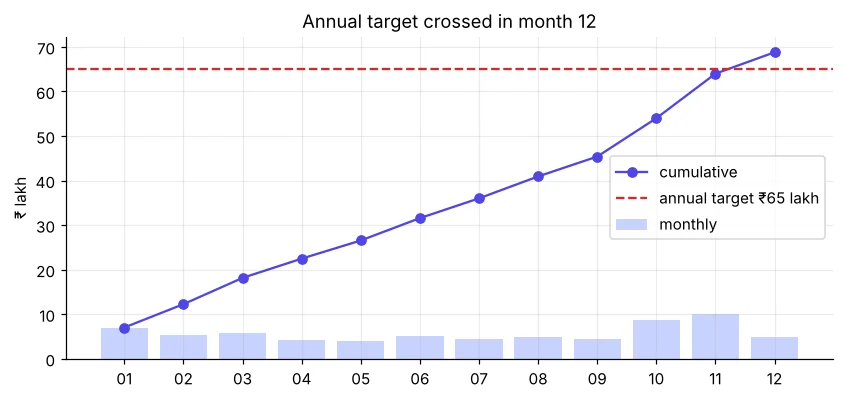
LAG and LEAD: growth
import sqlite3
import pandas as pd
con = sqlite3.connect("bazaar.db")
q = lambda sql: pd.read_sql(sql, con)
print(q("""
WITH monthly AS (
    SELECT strftime('%Y-%m', order_date) AS month,
           SUM(quantity * unit_price * (1 - discount)) AS rev
    FROM sales GROUP BY month
)
SELECT month,
       ROUND(rev / 1e5, 2)                               AS rev_lakh,
       ROUND(LAG(rev) OVER (ORDER BY month) / 1e5, 2)    AS prev_lakh,
       ROUND(100.0 * (rev - LAG(rev) OVER (ORDER BY month)) / LAG(rev) OVER (ORDER BY month), 1) AS mom_growth_pct
FROM monthly
""").to_string(index=False))NTILE: segments
import sqlite3
import pandas as pd
con = sqlite3.connect("bazaar.db")
q = lambda sql: pd.read_sql(sql, con)
print(q("""
WITH c AS (
    SELECT city, SUM(quantity * unit_price * (1 - discount)) AS rev FROM sales GROUP BY city
)
SELECT city, ROUND(rev) AS revenue,
       NTILE(3) OVER (ORDER BY rev DESC) AS tier,
       ROUND(PERCENT_RANK() OVER (ORDER BY rev), 2) AS pct_rank
FROM c ORDER BY rev DESC
"""))| SQL window | pandas |
|---|---|
| AVG(x) OVER (PARTITION BY g) | df.groupby("g")["x"].transform("mean") |
| ROW_NUMBER() OVER (PARTITION BY g ORDER BY x DESC) | df.groupby("g")["x"].rank(method="first", ascending=False) |
| SUM(x) OVER (ORDER BY t) | df["x"].cumsum() |
| AVG(x) OVER (… ROWS 2 PRECEDING) | df["x"].rolling(3).mean() |
| LAG(x) | df["x"].shift(1) |
| NTILE(4) | pd.qcut(df.x, 4) |
🏅 Job skills unlocked today
Practice tasks
🏋️ Practice – do it yourself
Show solution
import sqlite3
import pandas as pd
con = sqlite3.connect("bazaar.db")
q = lambda sql: pd.read_sql(sql, con)
print(q("""WITH c AS (SELECT region, city, SUM(quantity*unit_price*(1-discount)) AS rev FROM sales GROUP BY region, city)
SELECT region, city, ROUND(rev) AS rev, RANK() OVER (PARTITION BY region ORDER BY rev DESC) AS rnk FROM c ORDER BY region, rnk"""))Show solution
import sqlite3
import pandas as pd
con = sqlite3.connect("bazaar.db")
q = lambda sql: pd.read_sql(sql, con)
print(q("""SELECT DISTINCT salary FROM (SELECT salary, DENSE_RANK() OVER (ORDER BY salary DESC) AS r FROM employees) WHERE r = 3"""))Show solution
import sqlite3
import pandas as pd
con = sqlite3.connect("bazaar.db")
q = lambda sql: pd.read_sql(sql, con)
print(q("""WITH w AS (SELECT strftime('%W', order_date) AS week, COUNT(*) AS orders FROM sales
WHERE order_date BETWEEN '2024-10-01' AND '2024-10-31' GROUP BY week)
SELECT week, orders, SUM(orders) OVER (ORDER BY week) AS running FROM w"""))Quick quiz
🧠 Quick Quiz – test yourself
Interview corner
💼 Interview Corner
Write a query for the top 3 products by revenue in each category.
WITH r AS (SELECT category, product, SUM(rev) AS rev, ROW_NUMBER() OVER (PARTITION BY category ORDER BY SUM(rev) DESC) AS rn FROM sales GROUP BY category, product) SELECT * FROM r WHERE rn <= 3;
How do you compute month-over-month growth in SQL?
Aggregate to one row per month in a CTE, then (rev − LAG(rev) OVER (ORDER BY month)) / LAG(rev) OVER (ORDER BY month) × 100.
Summary
- WITH … AS builds readable step-by-step queries.
- OVER (PARTITION BY … ORDER BY …) adds group values without collapsing rows.
- ROW_NUMBER/RANK/DENSE_RANK for rankings and top-N.
- SUM OVER for running totals, LAG for growth, NTILE for tiers.
Day 35: SQL + pandas project – build a small sales database and answer 8 business questions end to end.
