Day 47: PCA & Dimensionality Reduction
✅ Today you will learn
- The curse of too many columns
- PCA idea: new axes along maximum variance
- Explained variance and how many components
- Loadings: what each component means
- Use PCA for visualisation and faster models
🏢 In the real world
A school board has marks in maths, science and English for 500 students – three numbers that move together. They want a single “academic index” to rank schools fairly. A handwriting app has 64 pixel values per digit and wants to see if the digits form groups. PCA solves both by squeezing many correlated columns into a few meaningful ones.
The idea
import numpy as np
import pandas as pd
import matplotlib.pyplot as plt
from sklearn.decomposition import PCA
from sklearn.preprocessing import StandardScaler
st = pd.read_csv("students_performance.csv")
X = StandardScaler().fit_transform(st[["maths", "science"]])
pca = PCA().fit(X)
fig, ax = plt.subplots(figsize=(6.2, 5.2))
ax.scatter(X[:, 0], X[:, 1], s=8, alpha=0.4, color="#64748b")
for vec, var, c in zip(pca.components_, pca.explained_variance_, ["#dc2626", "#2563eb"]):
    ax.annotate("", xy=vec * 2 * np.sqrt(var), xytext=(0, 0), arrowprops=dict(arrowstyle="->", lw=3, color=c))
ax.set_xlabel("maths (scaled)"); ax.set_ylabel("science (scaled)"); ax.set_aspect("equal")
ax.set_title(f"PC1 (red) explains {pca.explained_variance_ratio_[0]:.0%} of the spread")
plt.show()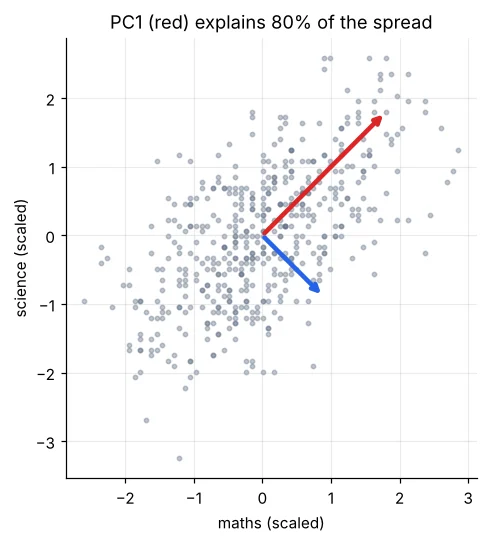
Real example: an academic index
import pandas as pd
from sklearn.decomposition import PCA
from sklearn.preprocessing import StandardScaler
st = pd.read_csv("students_performance.csv")
subj = ["maths", "science", "english"]
Xs = StandardScaler().fit_transform(st[subj])
pca = PCA().fit(Xs)
print("explained variance ratio:", pca.explained_variance_ratio_.round(3))
print(pd.DataFrame(pca.components_, columns=subj, index=["PC1", "PC2", "PC3"]).round(2))
st["academic_index"] = pca.transform(Xs)[:, 0]
print("corr(index, simple average) =", round(st["academic_index"].corr(st["average"]), 3))
print(st.groupby("school_type")["academic_index"].mean().round(2))PC1 has similar positive weights on all three subjects → it is “overall performance”. PC2 has opposite signs → it separates students stronger in one subject than another. Loadings turn components back into words.
Seeing 64 dimensions in 2-D
import matplotlib.pyplot as plt
from sklearn.datasets import load_digits
digits = load_digits()
print(digits.data.shape, "→ 1,797 images, 8×8 = 64 pixel columns each")
fig, ax = plt.subplots(1, 8, figsize=(10, 1.6))
for a, img, lab in zip(ax, digits.images, digits.target):
    a.imshow(img, cmap="gray_r"); a.set_title(lab); a.axis("off")
plt.show()
import matplotlib.pyplot as plt
from sklearn.datasets import load_digits
from sklearn.decomposition import PCA
d = load_digits()
Z = PCA(n_components=2, random_state=0).fit_transform(d.data)
plt.figure(figsize=(8, 6))
sc = plt.scatter(Z[:, 0], Z[:, 1], c=d.target, cmap="tab10", s=8)
plt.colorbar(sc, ticks=range(10), label="digit")
for k in range(10):
    plt.text(Z[d.target == k, 0].mean(), Z[d.target == k, 1].mean(), str(k), fontsize=16, weight="bold")
plt.title("64 pixels squeezed into 2 components – digits already form groups"); plt.xlabel("PC1"); plt.ylabel("PC2")
plt.show()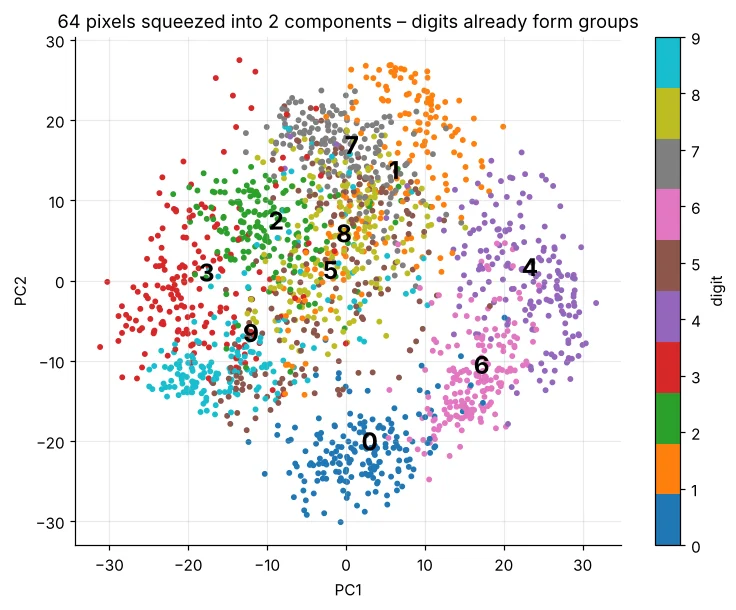
How many components to keep?
import numpy as np
import matplotlib.pyplot as plt
from sklearn.datasets import load_digits
from sklearn.decomposition import PCA
d = load_digits()
pca = PCA().fit(d.data)
cum = np.cumsum(pca.explained_variance_ratio_)
k90, k95 = np.argmax(cum >= 0.90) + 1, np.argmax(cum >= 0.95) + 1
plt.figure(figsize=(8.5, 3.6))
plt.plot(range(1, 65), cum, color="#4f46e5"); plt.axhline(0.9, ls="--", color="#94a3b8"); plt.axvline(k90, ls="--", color="#dc2626")
plt.xlabel("number of components"); plt.ylabel("cumulative explained variance")
plt.title(f"{k90} of 64 components keep 90% of the information"); plt.show()
print(f"90% → {k90} components | 95% → {k95} components")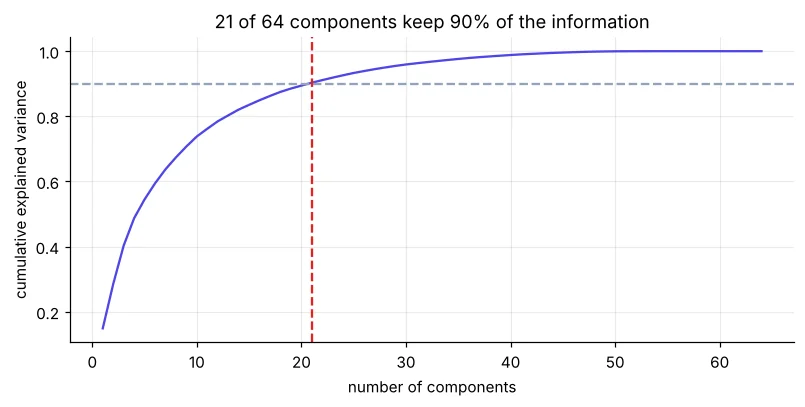
import numpy as np
import matplotlib.pyplot as plt
from sklearn.datasets import load_digits
from sklearn.decomposition import PCA
d = load_digits()
fig, ax = plt.subplots(1, 5, figsize=(10, 2.3))
for a, k in zip(ax, [2, 5, 10, 21, 64]):
    p = PCA(n_components=k).fit(d.data)
    rec = p.inverse_transform(p.transform(d.data[:1]))
    a.imshow(rec.reshape(8, 8), cmap="gray_r"); a.set_title(f"{k} comps"); a.axis("off")
plt.suptitle("Rebuilding the digit 0 from k components"); plt.show()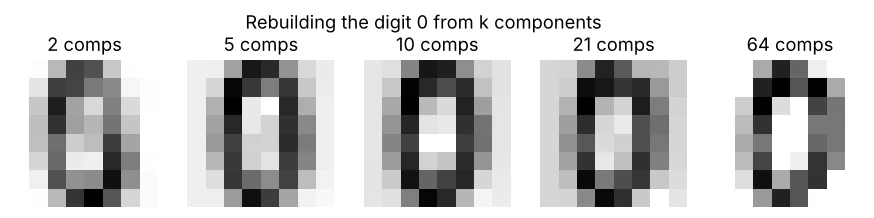
PCA inside a model
import time
from sklearn.datasets import load_digits
from sklearn.model_selection import cross_val_score
from sklearn.pipeline import make_pipeline
from sklearn.preprocessing import StandardScaler
from sklearn.decomposition import PCA
from sklearn.linear_model import LogisticRegression
X, y = load_digits(return_X_y=True)
for name, pipe in [("all 64 pixels", make_pipeline(StandardScaler(), LogisticRegression(max_iter=3000))),
                   ("PCA 20 comps", make_pipeline(StandardScaler(), PCA(20), LogisticRegression(max_iter=3000)))]:
    t = time.time(); s = cross_val_score(pipe, X, y, cv=5)
print(f"{name:14s} accuracy {s.mean():.3f}")Components are mixtures of features, so they are hard to explain to a business user. Do not use PCA when you need clear feature effects (pricing, credit) or with tree models that already handle many features well. Always scale first.
🏅 Job skills unlocked today
Practice tasks
🏋️ Practice – do it yourself
Show solution
import numpy as np, pandas as pd
from sklearn.decomposition import PCA
from sklearn.preprocessing import StandardScaler
t = pd.read_csv("telecom_churn.csv").dropna()
X = StandardScaler().fit_transform(t[["tenure_months", "monthly_charges", "total_charges", "complaints", "data_usage_gb"]])
cum = np.cumsum(PCA().fit(X).explained_variance_ratio_); print(cum.round(3), "→", np.argmax(cum >= 0.9) + 1)Show solution
import pandas as pd
from sklearn.decomposition import PCA
from sklearn.preprocessing import StandardScaler
h = pd.read_csv("house_prices.csv"); cols = ["area_sqft", "bedrooms", "bathrooms", "age_years", "metro_km"]
p = PCA().fit(StandardScaler().fit_transform(h[cols]))
print(pd.Series(p.components_[0], index=cols).round(2), "→ PC1 ≈ “size of the home”")Quick quiz
🧠 Quick Quiz – test yourself
Interview corner
💼 Interview Corner
Explain PCA simply.
PCA rotates the data to new axes ordered by how much variation they capture. Keeping the first few gives a compact summary with little information lost – useful for visualisation, noise reduction and speeding up models.
PCA vs feature selection?
Feature selection keeps a subset of original columns (interpretable). PCA creates new combined features (less interpretable) that can capture shared information more compactly.
Summary
- PCA finds uncorrelated directions of maximum variance.
- Scale first; keep components explaining ~90–95% variance.
- Loadings explain what each component means.
- Great for indices, visualisation and compact models; poor for explanation.
Day 48: NLP – clean text, turn reviews into numbers with TF-IDF and build a sentiment classifier.
