Day 31: Correlation & A/B Testing
✅ Today you will learn
- Pearson vs Spearman correlation
- Why correlation is not causation
- Design an A/B test and its sample size
- Analyse: z-test, CI for the lift, segments
- Make and communicate the launch decision
🏢 In the real world
BazaarKart’s design team built a new one-page checkout (B) to replace the old three-step checkout (A). 4,000 visitors were randomly split. B converted 13.6%, A 10.7%. Should the company switch for all 50 lakh monthly visitors? A/B testing is how Flipkart, Swiggy and every serious product team decide.
Correlation
import pandas as pd
h = pd.read_csv("house_prices.csv")
cols = ["area_sqft", "bedrooms", "age_years", "metro_km", "price_lakh"]
print(h[cols].corr(method="pearson").round(2)["price_lakh"])
print(h[cols].corr(method="spearman").round(2)["price_lakh"])Pearson r
- Measures straight-line relationship
- Sensitive to outliers
- Use for roughly linear numeric data
Spearman ρ
- Uses ranks – any steady increase/decrease
- Robust to outliers
- Use for skewed data or ranks/ratings
import numpy as np
import matplotlib.pyplot as plt
rng = np.random.default_rng(1)
x = rng.uniform(-3, 3, 200)
cases = [("r ≈ 0.9", x, 2 * x + rng.normal(0, 1.4, 200)), ("r ≈ −0.6", x, -x + rng.normal(0, 2, 200)),
         ("r ≈ 0 but strong pattern!", x, x ** 2 + rng.normal(0, 0.6, 200))]
fig, ax = plt.subplots(1, 3, figsize=(12, 3.3))
for a, (t, xx, yy) in zip(ax, cases):
    a.scatter(xx, yy, s=8, color="#4f46e5", alpha=0.6); a.set_title(f"{t}  (r={np.corrcoef(xx, yy)[0, 1]:.2f})")
plt.tight_layout(); plt.show()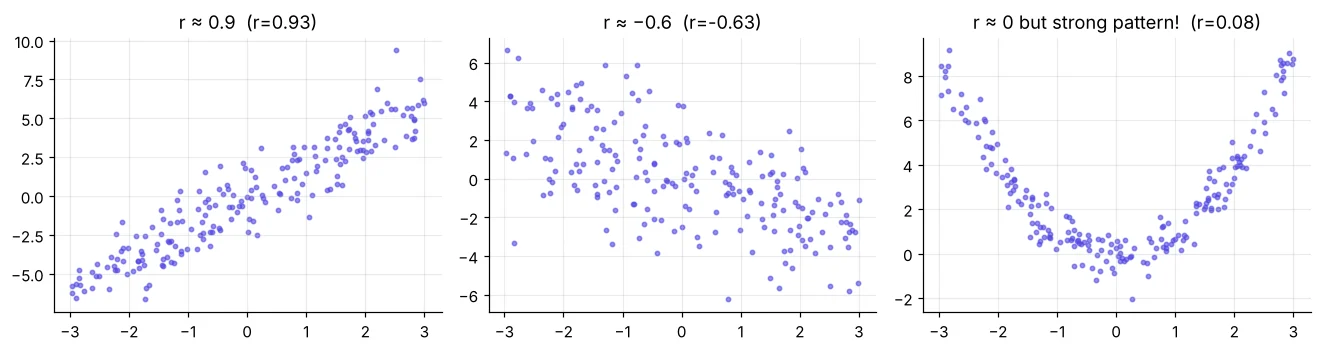
Correlation is not causation
import pandas as pd
w = pd.read_csv("delhi_weather.csv")
r = w["avg_temp_c"].corr(w["aqi"])
print(f"Temperature vs AQI: r = {r:.2f}")
print("Cold does not create pollution directly: winter brings stubble burning, low wind and")
print("temperature inversion. Temperature is a marker of the season, not the cause.")A/B test: design first
- 1One metric: checkout conversion
- 2H₀: pB = pA, H₁: pB ≠ pA
- 3Minimum lift worth it: +2 points
- 4Sample size per group
- 5Random 50/50 split, run full weeks
- 6Analyse once at the end
from statsmodels.stats.power import NormalIndPower
from statsmodels.stats.proportion import proportion_effectsize
effect = proportion_effectsize(0.13, 0.11)                 # detect 11% → 13%
n = NormalIndPower().solve_power(effect_size=effect, alpha=0.05, power=0.8, ratio=1)
print(f"Need about {n:,.0f} visitors per group ({2 * n:,.0f} total) for 80% power")We have ~2,000 per group – only about half of the ~4,100 needed for 80% power at +2 points. A real but small effect could be missed, so if the result is not significant we would extend the test rather than declare “no effect”.
Analyse the experiment
import pandas as pd
ab = pd.read_csv("ab_test.csv")
print(ab.head(3))
summary = ab.groupby("group")["converted"].agg(visitors="count", conversions="sum", rate="mean")
summary["rate_%"] = (summary["rate"] * 100).round(2)
print(summary.drop(columns="rate"))
print("Device mix by group (randomisation check):")
print((pd.crosstab(ab["group"], ab["device"], normalize="index") * 100).round(1))import numpy as np
import pandas as pd
from statsmodels.stats.proportion import proportions_ztest, confint_proportions_2indep
ab = pd.read_csv("ab_test.csv")
g = ab.groupby("group")["converted"].agg(["sum", "count"])
z, p = proportions_ztest(count=[g.loc["B", "sum"], g.loc["A", "sum"]], nobs=[g.loc["B", "count"], g.loc["A", "count"]])
pA, pB = g["sum"] / g["count"]
lo, hi = confint_proportions_2indep(g.loc["B", "sum"], g.loc["B", "count"], g.loc["A", "sum"], g.loc["A", "count"])
print(f"A {pA:.2%} → B {pB:.2%} | absolute lift {pB - pA:+.2%} | relative lift {(pB / pA - 1):+.1%}")
print(f"z = {z:.2f}, p = {p:.4f}")
print(f"95% CI for the lift: {lo:+.2%} to {hi:+.2%}")import pandas as pd
import matplotlib.pyplot as plt
import numpy as np
ab = pd.read_csv("ab_test.csv")
r = ab.groupby(["device", "group"])["converted"].agg(["mean", "count"]).reset_index()
r["se"] = np.sqrt(r["mean"] * (1 - r["mean"]) / r["count"])
fig, ax = plt.subplots(figsize=(8, 3.8))
for i, (grp, c) in enumerate([("A", "#94a3b8"), ("B", "#4f46e5")]):
d = r[r["group"] == grp]
ax.bar(np.arange(len(d)) + (i - 0.5) * 0.38, d["mean"] * 100, 0.38, yerr=1.96 * d["se"] * 100, capsize=4, color=c, label=grp)
ax.set_xticks(range(2), r["device"].unique()); ax.set_ylabel("conversion %"); ax.legend(title="checkout")
ax.set_title("New checkout B wins on both devices (95% CI bars)"); plt.show()
print(r.assign(rate_pct=(r["mean"] * 100).round(2))[["device", "group", "count", "rate_pct"]].to_string(index=False))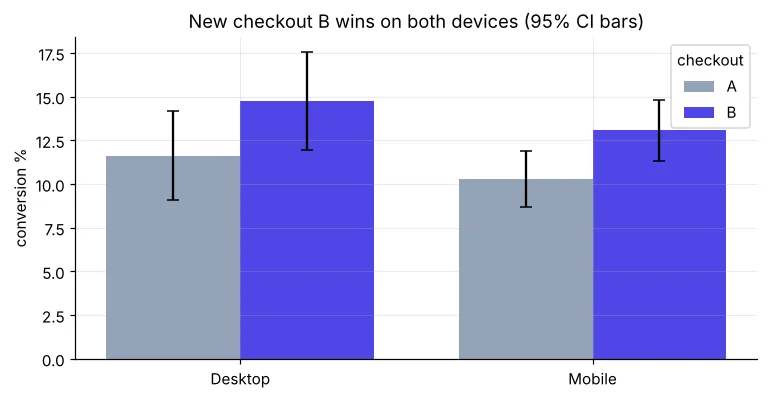
Decision and business impact
import pandas as pd
ab = pd.read_csv("ab_test.csv")
rate = ab.groupby("group")["converted"].mean()
visitors, aov = 5_000_000, 1200                      # monthly visitors, average order value ₹
extra_orders = visitors * (rate["B"] - rate["A"])
print(f"Extra orders per month ≈ {extra_orders:,.0f}")
print(f"Extra revenue per month ≈ ₹{extra_orders * aov / 1e7:.1f} crore (point estimate)")“The new checkout lifted conversion from 10.7% to 13.6% (p ≈ 0.006; 95% CI roughly +0.9 to +4.9 points), on both mobile and desktop. Launch to 100%. Expected impact: about 1.4 lakh more orders a month. Keep monitoring for 2 weeks.”
Peeking: stopping the test as soon as p < 0.05 inflates false wins. Too many metrics: one will win by chance. Novelty effect: users click new things at first. Unequal split: check the randomisation.
🏅 Job skills unlocked today
Practice tasks
🏋️ Practice – do it yourself
tenure_months and total_charges. Why are they close?Show solution
import pandas as pd
t = pd.read_csv("telecom_churn.csv").dropna()
print(round(t["tenure_months"].corr(t["total_charges"]), 3), round(t["tenure_months"].corr(t["total_charges"], method="spearman"), 3))Show solution
import pandas as pd
from statsmodels.stats.proportion import proportions_ztest
ab = pd.read_csv("ab_test.csv"); m = ab[ab["device"] == "Mobile"]
g = m.groupby("group")["converted"].agg(["sum", "count"])
z, p = proportions_ztest(g["sum"].values[::-1], g["count"].values[::-1])
print(g); print(f"z = {z:.2f}, p = {p:.4f}")Show solution
from statsmodels.stats.power import NormalIndPower
from statsmodels.stats.proportion import proportion_effectsize
print(round(NormalIndPower().solve_power(proportion_effectsize(0.12, 0.11), alpha=0.05, power=0.8)))
Quick quiz
🧠 Quick Quiz – test yourself
Interview corner
💼 Interview Corner
Walk me through how you would run an A/B test.
Define one primary metric and hypothesis, decide the minimum detectable effect, compute sample size with power analysis, randomise users 50/50, run for full weeks without peeking, check randomisation, run the z-test and CI for the lift, check key segments and guardrail metrics, then recommend launch with expected impact.
Your test shows p = 0.08. What do you do?
Do not call it a win or a loss. Report the estimate and CI, check if the test reached its planned sample size; if underpowered, extend it; consider the cost of being wrong before deciding.
Summary
- Pearson for linear, Spearman for ranks/skewed data; always plot.
- Correlation ≠ causation; randomised experiments establish cause.
- A/B: plan metric, MDE and sample size first; never peek.
- Report lift, CI, p-value, segments and rupee impact.
- Week 5 complete – you now think like a statistician!
Week 6: SQL. Day 32: SQL basics with SQLite – SELECT, WHERE, ORDER BY right inside Python.
