Day 42: KNN & Decision Trees
✅ Today you will learn
- KNN: “you are like your neighbours”
- Distance, k and the need for scaling
- Decision trees: questions that split data
- Gini impurity, depth and pruning
- Compare decision boundaries and importances
🏢 In the real world
A coaching institute wants to flag students who may score below 60 so mentors can help early. Two simple, explainable models suit this: KNN (“students most similar to you scored…”) and a decision tree (“if study hours < 2 and attendance < 75 → at risk”).
K-nearest neighbours
- 1Measure distance to every training point
- 2Pick the k closest
- 3Majority vote (or average for regression)
import numpy as np
import pandas as pd
st = pd.read_csv("students_performance.csv")
st["risk"] = (st["average"] < 60).astype(int)
new = np.array([1.8, 72])                               # study hours, attendance
d = np.sqrt(((st[["study_hours", "attendance"]].to_numpy() - new) ** 2).sum(axis=1))
nearest = st.assign(dist=d).nsmallest(5, "dist")[["student_id", "study_hours", "attendance", "average", "risk", "dist"]]
print(nearest.round(2).to_string(index=False))
print("Vote → at risk" if nearest["risk"].mean() > 0.5 else "Vote → not at risk")Attendance ranges 40–100, study hours 0–8. Without scaling, a 10-point attendance gap counts more than a 5-hour study gap – distance is dominated by the column with bigger numbers. Always StandardScaler before KNN.
import pandas as pd
from sklearn.model_selection import train_test_split
from sklearn.neighbors import KNeighborsClassifier
from sklearn.preprocessing import StandardScaler
from sklearn.pipeline import make_pipeline
st = pd.read_csv("students_performance.csv")
X = st[["study_hours", "attendance"]]; y = (st["average"] < 60).astype(int)
X_tr, X_te, y_tr, y_te = train_test_split(X, y, test_size=0.3, random_state=0, stratify=y)
print(" k   raw   scaled")
for k in [1, 3, 7, 15, 31, 61]:
    raw = KNeighborsClassifier(n_neighbors=k).fit(X_tr, y_tr).score(X_te, y_te)
    sc = make_pipeline(StandardScaler(), KNeighborsClassifier(n_neighbors=k)).fit(X_tr, y_tr).score(X_te, y_te)
print(f"{k:2d} {raw:.3f} {sc:.3f}")Small k (1–3) = wiggly boundary, overfits noise. Large k = smooth boundary, may underfit. Pick k with cross-validation (Day 45); odd k avoids ties in two-class problems.
Decision trees
import pandas as pd
import matplotlib.pyplot as plt
from sklearn.tree import DecisionTreeClassifier, plot_tree, export_text
st = pd.read_csv("students_performance.csv")
X = st[["study_hours", "attendance"]].assign(internet=(st["internet"] == "Yes").astype(int))
y = (st["average"] < 60).astype(int)
tree = DecisionTreeClassifier(max_depth=3, min_samples_leaf=15, random_state=0).fit(X, y)
print(export_text(tree, feature_names=list(X.columns), class_names=["ok", "at_risk"]))
plt.figure(figsize=(12, 5))
plot_tree(tree, feature_names=X.columns, class_names=["ok", "at risk"], filled=True, rounded=True, fontsize=8, impurity=False, proportion=True)
plt.title("Each box is a question; leaves give the share of at-risk students"); plt.show()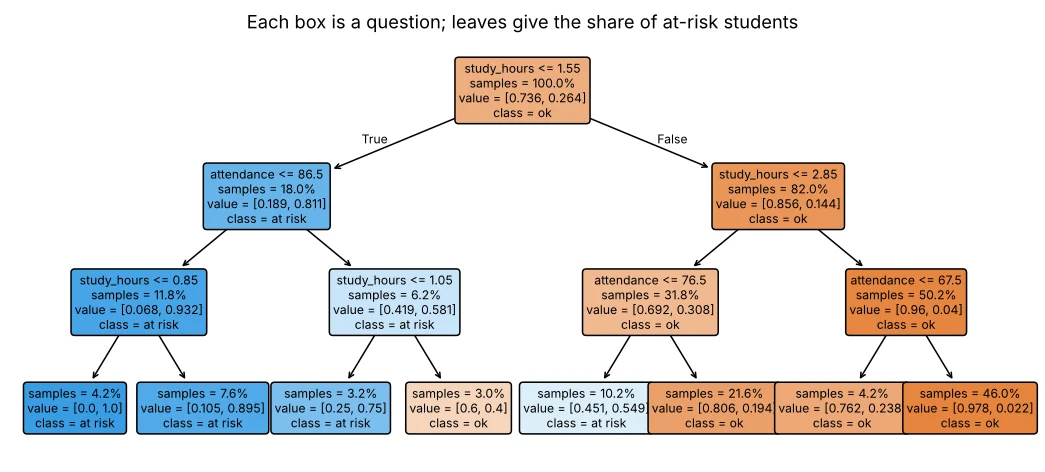
How a tree chooses a split: Gini impurity
import numpy as np
import pandas as pd
st = pd.read_csv("students_performance.csv"); y = (st["average"] < 60).astype(int)
gini = lambda s: 1 - (s.mean() ** 2 + (1 - s.mean()) ** 2)
print(f"Gini of all students: {gini(y):.3f}")
for cut in [1.5, 2.0, 2.5, 3.0]:
    left, right = y[st["study_hours"] <= cut], y[st["study_hours"] > cut]
    w = (len(left) * gini(left) + len(right) * gini(right)) / len(y)
    print(f"split study_hours ≤ {cut}: left risk {left.mean():.2f}, right risk {right.mean():.2f}, weighted Gini {w:.3f}")
Gini = 0 means a node has only one class (pure). The tree tries every feature and cut-off and picks the split with the lowest weighted Gini – then repeats inside each branch.
Controlling tree size
| Parameter | Effect |
|---|---|
| max_depth | Maximum number of questions in a path |
| min_samples_leaf | Each leaf must hold at least this many rows |
| min_samples_split | A node needs this many rows to be split |
| ccp_alpha | Cost-complexity pruning: removes weak branches |
import pandas as pd
from sklearn.model_selection import train_test_split
from sklearn.tree import DecisionTreeClassifier
l = pd.read_csv("loan_applications.csv"); l["lti"] = l["loan_amount"] / (l["monthly_income"] * 12)
X = l[["credit_score", "lti", "years_employed", "monthly_income"]]; y = l["approved"]
X_tr, X_te, y_tr, y_te = train_test_split(X, y, test_size=0.25, random_state=42, stratify=y)
for leaf in [1, 5, 20, 50]:
    t = DecisionTreeClassifier(min_samples_leaf=leaf, random_state=0).fit(X_tr, y_tr)
print(f"min_samples_leaf={leaf:2d} leaves={t.get_n_leaves():3d} train={t.score(X_tr, y_tr):.3f} test={t.score(X_te, y_te):.3f}")Decision boundaries side by side
import numpy as np
import pandas as pd
import matplotlib.pyplot as plt
from sklearn.neighbors import KNeighborsClassifier
from sklearn.tree import DecisionTreeClassifier
from sklearn.linear_model import LogisticRegression
from sklearn.preprocessing import StandardScaler
from sklearn.pipeline import make_pipeline
l = pd.read_csv("loan_applications.csv"); l["lti"] = l["loan_amount"] / (l["monthly_income"] * 12)
X = l[["credit_score", "lti"]]; y = l["approved"]
xx, yy = np.meshgrid(np.linspace(480, 900, 220), np.linspace(0, 3, 220))
grid = pd.DataFrame({"credit_score": xx.ravel(), "lti": yy.ravel()})
models = [("Logistic", make_pipeline(StandardScaler(), LogisticRegression())),
          ("KNN k=15", make_pipeline(StandardScaler(), KNeighborsClassifier(15))),
          ("Tree depth 4", DecisionTreeClassifier(max_depth=4, random_state=0))]
fig, ax = plt.subplots(1, 3, figsize=(13, 3.8), sharey=True)
for a, (name, m) in zip(ax, models):
    z = m.fit(X, y).predict(grid).reshape(xx.shape)
    a.contourf(xx, yy, z, alpha=0.35, cmap="RdYlGn"); a.scatter(X["credit_score"], X["lti"], c=y, cmap="RdYlGn", s=5)
    a.set_title(f"{name} (train acc {m.score(X, y):.2f})"); a.set_xlabel("credit score"); a.set_ylim(0, 3)
ax[0].set_ylabel("loan ÷ yearly income"); plt.tight_layout(); plt.show()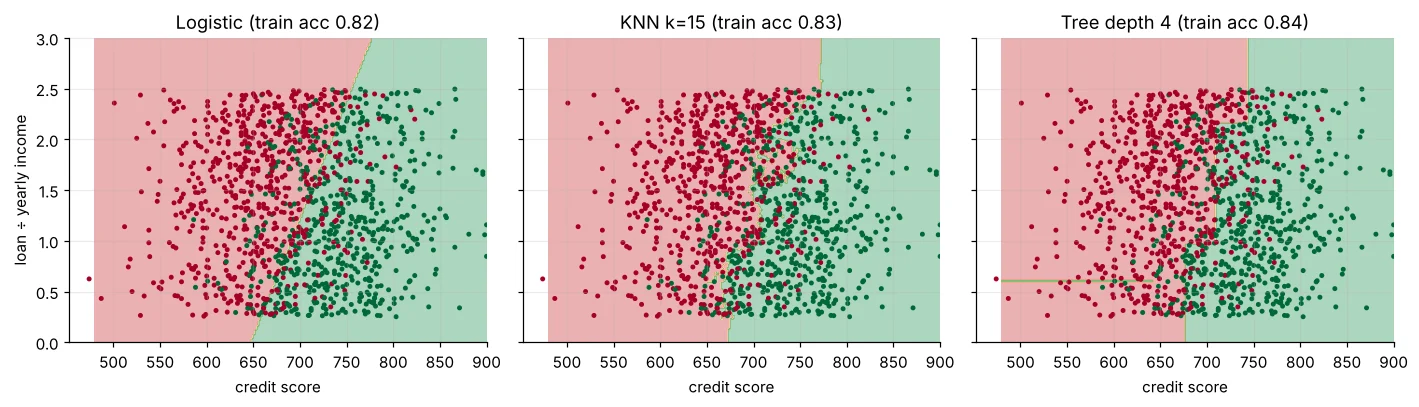
Feature importance
import pandas as pd
from sklearn.tree import DecisionTreeClassifier
l = pd.read_csv("loan_applications.csv"); l["lti"] = l["loan_amount"] / (l["monthly_income"] * 12)
l["salaried"] = (l["employment"] == "Salaried").astype(int)
feats = ["credit_score", "lti", "years_employed", "monthly_income", "loan_amount", "salaried"]
t = DecisionTreeClassifier(max_depth=5, min_samples_leaf=20, random_state=0).fit(l[feats], l["approved"])
print(pd.Series(t.feature_importances_, index=feats).round(3).sort_values(ascending=False).to_string())🏅 Job skills unlocked today
Practice tasks
🏋️ Practice – do it yourself
Show solution
import pandas as pd
from sklearn.model_selection import train_test_split
from sklearn.neighbors import KNeighborsRegressor
from sklearn.preprocessing import StandardScaler
from sklearn.pipeline import make_pipeline
h = pd.read_csv("house_prices.csv"); p = h[h["city"] == "Pune"]
a, b, c, d = train_test_split(p[["area_sqft", "metro_km"]], p["price_lakh"], test_size=0.25, random_state=0)
for k in [3, 10, 30]:
print(k, round(make_pipeline(StandardScaler(), KNeighborsRegressor(k)).fit(a, c).score(b, d), 3))Show solution
import pandas as pd
from sklearn.tree import DecisionTreeClassifier, export_text
m = pd.read_csv("mall_customers.csv")
t = DecisionTreeClassifier(max_depth=3, random_state=0).fit(m[["age", "annual_income_lakh"]], (m["spending_score"] > 60).astype(int))
print(export_text(t, feature_names=["age", "annual_income_lakh"]))min_samples_leaf gives the best test accuracy for the loan tree? Try 1 to 60.Quick quiz
🧠 Quick Quiz – test yourself
Interview corner
💼 Interview Corner
How does a decision tree decide where to split?
For every feature and possible threshold it computes the impurity (Gini or entropy for classification, variance for regression) of the child nodes and picks the split with the largest impurity reduction, recursively, until a stopping rule.
Pros and cons of KNN?
Pros: simple, no training, naturally non-linear. Cons: slow predictions on large data, needs scaling, suffers in many dimensions (curse of dimensionality), sensitive to irrelevant features.
Summary
- KNN predicts from the k most similar examples; scale features and tune k.
- Trees ask yes/no questions chosen by impurity reduction.
- Control trees with max_depth, min_samples_leaf, ccp_alpha.
- Trees are readable and need no scaling, but single trees are unstable.
Day 43: random forests and gradient boosting – the models that win most tabular-data competitions.
