Day 17: apply, map, Binning & New Features
✅ Today you will learn
- Vectorised maths for new columns
- map and replace for lookups
- np.where and np.select for rules
- cut and qcut for bands and quantiles
- apply (when needed) and get_dummies
🏢 In the real world
A raw order says: quantity 2, price ₹1,299, discount 10%, age 23, date 12 Oct. A useful order says: revenue ₹2,338, “Gen-Z”, “Mid-price”, “Festive”, “Big discount”. Turning the first into the second is feature creation – and good features matter more than fancy models.
Vectorised maths
import pandas as pd
s = pd.read_csv("sales_data.csv", parse_dates=["order_date"])
s["gross"] = s["quantity"] * s["unit_price"]
s["discount_amt"] = (s["gross"] * s["discount"]).round(2)
s["revenue"] = s["gross"] - s["discount_amt"]
s["gst_18"] = (s["revenue"] * 0.18).round(2)
s["days_to_diwali"] = (pd.Timestamp("2024-10-31") - s["order_date"]).dt.days
print(s[["quantity", "unit_price", "discount", "revenue", "gst_18", "days_to_diwali"]].head(4))map: look-up values
import pandas as pd
s = pd.read_csv("sales_data.csv")
tier = {"Delhi": "Tier-1", "Mumbai": "Tier-1", "Bengaluru": "Tier-1", "Chennai": "Tier-1",
        "Hyderabad": "Tier-1", "Kolkata": "Tier-1", "Pune": "Tier-1", "Ahmedabad": "Tier-1",
        "Jaipur": "Tier-2", "Lucknow": "Tier-2", "Patna": "Tier-2"}
s["city_tier"] = s["city"].map(tier)
s["prepaid"] = s["payment_mode"].map(lambda p: 0 if p == "Cash on Delivery" else 1)
print(s["city_tier"].value_counts().to_dict(), "| unmapped:", s["city_tier"].isna().sum())
print(s.groupby("city_tier")["prepaid"].mean().round(3))np.where and np.select: business rules
import pandas as pd
import numpy as np
s = pd.read_csv("sales_data.csv")
s["revenue"] = s["quantity"] * s["unit_price"] * (1 - s["discount"])
s["big_discount"] = np.where(s["discount"] >= 0.2, "Yes", "No")
conds = [s["revenue"] >= 20000, s["revenue"] >= 3000, s["revenue"] >= 1000]
labels = ["Platinum", "Gold", "Silver"]
s["order_class"] = np.select(conds, labels, default="Bronze")
print(s["big_discount"].value_counts().to_dict())
print(s["order_class"].value_counts().reindex(labels + ["Bronze"]))np.select takes the first condition that is true. Put the strictest rule (≥ 20,000) first – otherwise every Platinum order would be labelled Silver.
cut and qcut: bands
pd.cut – fixed edges
- You choose the edges
- Age 18–24, 25–34, 35–44…
- Groups can have very different sizes
pd.qcut – equal-sized groups
- pandas finds the edges
- Bottom 25%, next 25%…
- Each group has about the same count
import pandas as pd
s = pd.read_csv("sales_data.csv")
s["age_group"] = pd.cut(s["customer_age"], bins=[17, 24, 34, 44, 60],
                        labels=["Gen-Z 18-24", "25-34", "35-44", "45+"])
s["price_band"] = pd.qcut(s["unit_price"], q=4, labels=["Budget", "Value", "Mid", "Premium"])
print(s["age_group"].value_counts().sort_index())
print(s.groupby("price_band", observed=True)["unit_price"].agg(["min", "max", "count"]))import pandas as pd
import matplotlib.pyplot as plt
s = pd.read_csv("sales_data.csv")
s["age_group"] = pd.cut(s["customer_age"], bins=[17, 24, 34, 44, 60], labels=["18-24", "25-34", "35-44", "45+"])
mix = pd.crosstab(s["age_group"], s["category"], normalize="index") * 100
mix.plot(kind="barh", stacked=True, figsize=(9, 3.8), colormap="tab20c")
plt.title("What each age group buys (% of its orders)")
plt.xlabel("% of orders"); plt.legend(bbox_to_anchor=(1, 1), fontsize=8)
plt.tight_layout(); plt.show()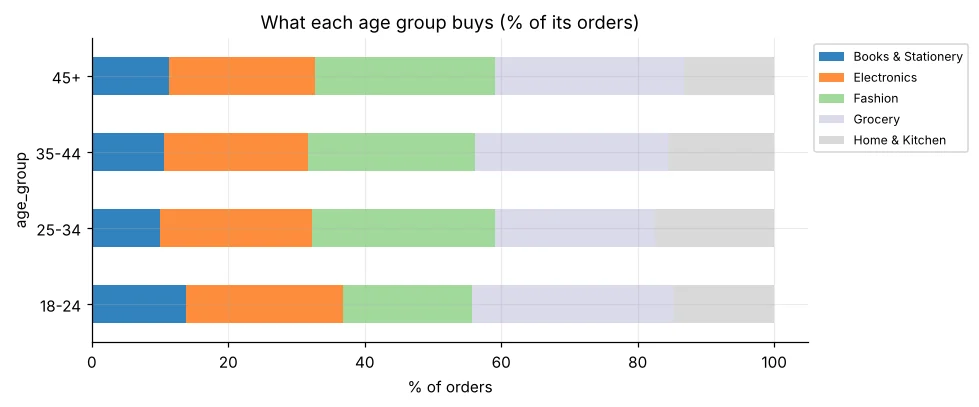
apply – for logic that needs several columns
import pandas as pd
s = pd.read_csv("sales_data.csv")
def delivery_fee(row):
    if row["payment_mode"] == "Cash on Delivery":
        return 49
    if row["quantity"] * row["unit_price"] >= 499:
        return 0
    return 29
s["delivery_fee"] = s.apply(delivery_fee, axis=1)
print(s["delivery_fee"].value_counts().to_dict(), "| fee income ₹", s["delivery_fee"].sum())apply(axis=1) calls Python once per row – fine for thousands of rows, slow for millions. Prefer vectorised maths, map, np.where or np.select whenever possible.
get_dummies: categories to numbers
import pandas as pd
s = pd.read_csv("sales_data.csv")
small = s[["order_id", "payment_mode", "region"]].head(4)
print(pd.get_dummies(small, columns=["payment_mode", "region"], dtype=int))Real example: customer value score per city
import pandas as pd
s = pd.read_csv("sales_data.csv", parse_dates=["order_date"])
s["revenue"] = s["quantity"] * s["unit_price"] * (1 - s["discount"])
c = s.groupby("city").agg(last_order=("order_date", "max"), orders=("order_id", "count"),
                          revenue=("revenue", "sum"))
c["recency_days"] = (pd.Timestamp("2025-01-01") - c["last_order"]).dt.days
c["F"] = pd.qcut(c["orders"], 3, labels=[1, 2, 3]).astype(int)
c["M"] = pd.qcut(c["revenue"], 3, labels=[1, 2, 3]).astype(int)
c["score"] = c["F"] + c["M"]
print(c.sort_values("score", ascending=False)[["orders", "revenue", "F", "M", "score"]].round(0))🏅 Job skills unlocked today
Practice tasks
🏋️ Practice – do it yourself
price_per_sqft (₹) and a size_band using cut: Compact (<800), Standard (800–1400), Large (>1400). Average price per sqft per band?Show solution
import pandas as pd
h = pd.read_csv("house_prices.csv")
h["price_per_sqft"] = h["price_lakh"] * 100000 / h["area_sqft"]
h["size_band"] = pd.cut(h["area_sqft"], [0, 800, 1400, 10000], labels=["Compact", "Standard", "Large"])
print(h.groupby("size_band", observed=True)["price_per_sqft"].mean().round())tenure_group (0–12, 13–24, 25–48, 49–72 months) and show the churn rate per group.Show solution
import pandas as pd
t = pd.read_csv("telecom_churn.csv")
t["tenure_group"] = pd.cut(t["tenure_months"], [0, 12, 24, 48, 72], labels=["0-12", "13-24", "25-48", "49-72"])
print((t.groupby("tenure_group", observed=True)["churn"].apply(lambda c: (c == "Yes").mean()) * 100).round(1))Show solution
import pandas as pd, numpy as np
st = pd.read_csv("students_performance.csv")
st["grade"] = np.select([st["average"] >= 85, st["average"] >= 70, st["average"] >= 55], ["A", "B", "C"], default="D")
print(st["grade"].value_counts().sort_index())Quick quiz
🧠 Quick Quiz – test yourself
Interview corner
💼 Interview Corner
What is feature engineering and why does it matter?
Creating new input columns from raw data using domain knowledge – ratios, bands, flags, date parts, aggregates. Models only see what you give them; a good feature like “days since last order” often improves accuracy more than switching algorithms.
map vs apply vs replace?
map transforms each value of a Series using a dict/function (unmapped → NaN). replace swaps only listed values and keeps others. apply runs a function on each value or each row/column – most flexible but slowest.
Summary
- Vectorised maths first; it is fast and readable.
- map for look-ups, np.where for yes/no, np.select for many rules.
- cut = your edges; qcut = equal-sized groups.
- apply only when the logic truly needs a Python function.
- get_dummies turns categories into 0/1 columns for ML.
Day 18: Exploratory Data Analysis – a repeatable process to understand any new dataset.
