Day 35: Project: SQL + Pandas HR Analytics
✅ Today you will learn
- Design a small star schema (fact + dimensions)
- Create tables with keys and load data
- Build a reusable analysis VIEW
- Answer 8 business questions in SQL
- Hand results to pandas for charts and a report
🏢 In the real world
BazaarKart is moving from Excel to a database. You are asked to set up a mini data warehouse, load 2024 orders, and prepare the quarterly business review: which cities hit their targets, who is growing, which products lead, and how customer segments behave. This is exactly what junior analysts do in their first months.
Step 1: design the schema
Region and category are stored once in dimension tables instead of on every order row – less duplication and one place to fix a typo.
Step 2: create and load
import sqlite3
import pandas as pd
s = pd.read_csv("sales_data.csv")
con = sqlite3.connect("bazaarkart_dw.db")
con.executescript("""
DROP TABLE IF EXISTS fact_orders; DROP TABLE IF EXISTS dim_product;
DROP TABLE IF EXISTS dim_city;    DROP TABLE IF EXISTS city_targets;
CREATE TABLE dim_city (city TEXT PRIMARY KEY, region TEXT NOT NULL);
CREATE TABLE dim_product (product TEXT PRIMARY KEY, category TEXT NOT NULL);
CREATE TABLE fact_orders (
    order_id TEXT PRIMARY KEY, order_date TEXT, city TEXT REFERENCES dim_city(city),
    product TEXT REFERENCES dim_product(product), quantity INTEGER, unit_price REAL,
    discount REAL, payment_mode TEXT, customer_age REAL, customer_gender TEXT, rating REAL);
CREATE TABLE city_targets (city TEXT, quarter INTEGER, target_lakh REAL);
""")
s[["city", "region"]].drop_duplicates().to_sql("dim_city", con, if_exists="append", index=False)
s[["product", "category"]].drop_duplicates().to_sql("dim_product", con, if_exists="append", index=False)
s.drop(columns=["region", "category"]).to_sql("fact_orders", con, if_exists="append", index=False)
targets = [(c, qtr, t) for c, t in [("Mumbai", 2.4), ("Bengaluru", 2.4), ("Delhi", 2.3), ("Kolkata", 2.0),
           ("Hyderabad", 1.5), ("Chennai", 1.4), ("Patna", 1.1), ("Ahmedabad", 1.1), ("Pune", 1.2),
           ("Lucknow", 1.0), ("Jaipur", 0.7)] for qtr in (1, 2, 3, 4)]
con.executemany("INSERT INTO city_targets VALUES (?, ?, ?)", targets)
con.execute("CREATE INDEX idx_orders_date ON fact_orders(order_date)")
con.commit()
for t in ["dim_city", "dim_product", "fact_orders", "city_targets"]:
print(t, con.execute(f"SELECT COUNT(*) FROM {t}").fetchone()[0], "rows")import sqlite3
import pandas as pd
con = sqlite3.connect("bazaarkart_dw.db")
q = lambda sql: pd.read_sql(sql, con)
con.executescript("""
DROP VIEW IF EXISTS v_orders;
CREATE VIEW v_orders AS
SELECT o.*, c.region, p.category,
o.quantity * o.unit_price * (1 - o.discount) AS revenue,
CAST(strftime('%m', o.order_date) AS INTEGER) AS month,
(CAST(strftime('%m', o.order_date) AS INTEGER) + 2) / 3 AS quarter
FROM fact_orders o
JOIN dim_city c ON o.city = c.city
JOIN dim_product p ON o.product = p.product;
""")
print(q("SELECT order_id, city, region, category, ROUND(revenue) AS revenue, quarter FROM v_orders LIMIT 4"))Q1: Did each city hit its quarterly target?
import sqlite3
import pandas as pd
con = sqlite3.connect("bazaarkart_dw.db")
q = lambda sql: pd.read_sql(sql, con)
tv = q("""
WITH actual AS (
    SELECT city, quarter, SUM(revenue) / 1e5 AS actual_lakh FROM v_orders GROUP BY city, quarter
)
SELECT t.city, t.quarter, t.target_lakh, ROUND(a.actual_lakh, 2) AS actual_lakh,
       ROUND(100 * a.actual_lakh / t.target_lakh) AS achievement_pct
FROM city_targets t LEFT JOIN actual a ON a.city = t.city AND a.quarter = t.quarter
""")
pv = tv.pivot(index="city", columns="quarter", values="achievement_pct")
print(pv.astype(int))
print("City-quarters on target:", (tv["achievement_pct"] >= 100).sum(), "of", len(tv))import sqlite3
import pandas as pd
con = sqlite3.connect("bazaarkart_dw.db")
q = lambda sql: pd.read_sql(sql, con)
import seaborn as sns
import matplotlib.pyplot as plt
tv = q("""WITH a AS (SELECT city, quarter, SUM(revenue) / 1e5 AS act FROM v_orders GROUP BY city, quarter)
SELECT t.city, t.quarter, ROUND(100 * a.act / t.target_lakh) AS pct
FROM city_targets t JOIN a ON a.city = t.city AND a.quarter = t.quarter""")
pv = tv.pivot(index="city", columns="quarter", values="pct")
pv = pv.loc[pv.mean(axis=1).sort_values(ascending=False).index]
plt.figure(figsize=(7, 5))
sns.heatmap(pv, annot=True, fmt=".0f", cmap="RdYlGn", center=100, cbar_kws=dict(label="% of target"))
plt.title("Target achievement by city and quarter (%)"); plt.xlabel("Quarter"); plt.ylabel("")
plt.show()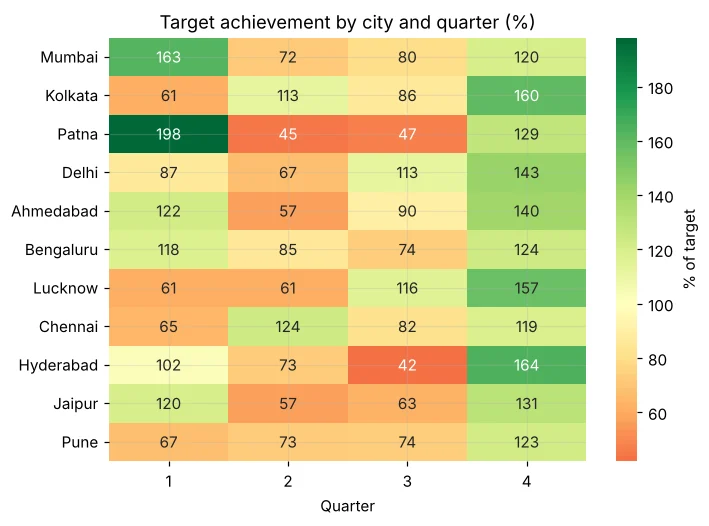
Q2: Which region grew fastest from H1 to H2?
import sqlite3
import pandas as pd
con = sqlite3.connect("bazaarkart_dw.db")
q = lambda sql: pd.read_sql(sql, con)
print(q("""
SELECT region,
       ROUND(SUM(CASE WHEN month <= 6 THEN revenue END) / 1e5, 2) AS h1_lakh,
       ROUND(SUM(CASE WHEN month > 6  THEN revenue END) / 1e5, 2) AS h2_lakh,
       ROUND(100.0 * (SUM(CASE WHEN month > 6 THEN revenue END) - SUM(CASE WHEN month <= 6 THEN revenue END))
             / SUM(CASE WHEN month <= 6 THEN revenue END), 1) AS growth_pct
FROM v_orders GROUP BY region ORDER BY growth_pct DESC
"""))SUM(CASE WHEN … THEN revenue END) pivots data inside SQL – one of the most useful patterns for reports.
Q3: Top product per category and its share
import sqlite3
import pandas as pd
con = sqlite3.connect("bazaarkart_dw.db")
q = lambda sql: pd.read_sql(sql, con)
print(q("""
WITH p AS (
    SELECT category, product, SUM(revenue) AS rev,
           SUM(SUM(revenue)) OVER (PARTITION BY category) AS cat_rev,
           ROW_NUMBER() OVER (PARTITION BY category ORDER BY SUM(revenue) DESC) AS rn
    FROM v_orders GROUP BY category, product
)
SELECT category, product, ROUND(rev) AS revenue, ROUND(100 * rev / cat_rev, 1) AS share_of_category_pct
FROM p WHERE rn = 1 ORDER BY revenue DESC
"""))Q4: Prepaid vs COD – value and satisfaction
import sqlite3
import pandas as pd
con = sqlite3.connect("bazaarkart_dw.db")
q = lambda sql: pd.read_sql(sql, con)
print(q("""
SELECT CASE WHEN payment_mode = 'Cash on Delivery' THEN 'COD' ELSE 'Prepaid' END AS pay_type,
       COUNT(*) AS orders, ROUND(AVG(revenue)) AS aov, ROUND(AVG(rating), 2) AS avg_rating,
       ROUND(100.0 * SUM(CASE WHEN rating <= 3 THEN 1 ELSE 0 END) / COUNT(rating), 1) AS low_rating_pct
FROM v_orders GROUP BY pay_type
"""))Q5: Customer age segments
import sqlite3
import pandas as pd
con = sqlite3.connect("bazaarkart_dw.db")
q = lambda sql: pd.read_sql(sql, con)
print(q("""
SELECT CASE WHEN customer_age IS NULL THEN 'Unknown'
            WHEN customer_age < 25 THEN '18-24' WHEN customer_age < 35 THEN '25-34'
            WHEN customer_age < 45 THEN '35-44' ELSE '45+' END AS age_group,
       COUNT(*) AS orders, ROUND(SUM(revenue) / 1e5, 2) AS revenue_lakh,
       ROUND(100.0 * SUM(CASE WHEN category = 'Electronics' THEN revenue ELSE 0 END) / SUM(revenue), 1) AS electronics_share_pct
FROM v_orders GROUP BY age_group ORDER BY age_group
"""))Q6: Best and worst weeks
import sqlite3
import pandas as pd
con = sqlite3.connect("bazaarkart_dw.db")
q = lambda sql: pd.read_sql(sql, con)
w = q("""
SELECT strftime('%W', order_date) AS week, MIN(order_date) AS week_start,
       COUNT(*) AS orders, ROUND(SUM(revenue) / 1e5, 2) AS revenue_lakh
FROM v_orders GROUP BY week
""")
print("Best 3 weeks:\n", w.nlargest(3, "revenue_lakh").to_string(index=False))
print("Worst 3 weeks:\n", w.nsmallest(3, "revenue_lakh").to_string(index=False))Q7: Cities ranked by quarter-on-quarter growth in Q4
import sqlite3
import pandas as pd
con = sqlite3.connect("bazaarkart_dw.db")
q = lambda sql: pd.read_sql(sql, con)
print(q("""
WITH cq AS (SELECT city, quarter, SUM(revenue) AS rev FROM v_orders GROUP BY city, quarter),
g AS (SELECT city, quarter, rev, LAG(rev) OVER (PARTITION BY city ORDER BY quarter) AS prev FROM cq)
SELECT city, ROUND(prev / 1e5, 2) AS q3_lakh, ROUND(rev / 1e5, 2) AS q4_lakh,
       ROUND(100 * (rev - prev) / prev, 1) AS qoq_pct,
       RANK() OVER (ORDER BY (rev - prev) / prev DESC) AS rnk
FROM g WHERE quarter = 4 ORDER BY rnk
"""))Q8: Export a summary table for management
import sqlite3
import pandas as pd
con = sqlite3.connect("bazaarkart_dw.db")
q = lambda sql: pd.read_sql(sql, con)
summary = q("""
SELECT region, city,
       COUNT(*) AS orders, ROUND(SUM(revenue)) AS revenue, ROUND(AVG(revenue)) AS aov,
       ROUND(AVG(rating), 2) AS rating,
       ROUND(100.0 * SUM(CASE WHEN payment_mode <> 'Cash on Delivery' THEN 1 ELSE 0 END) / COUNT(*), 1) AS prepaid_pct
FROM v_orders GROUP BY region, city ORDER BY revenue DESC
""")
summary.to_csv("qbr_city_summary.csv", index=False)
print(summary.head(6).to_string(index=False))
print("Saved qbr_city_summary.csv with", len(summary), "rows")Findings for the quarterly business review
🏅 Job skills unlocked today
Practice tasks
🏋️ Practice – do it yourself
Show solution
import sqlite3
import pandas as pd
con = sqlite3.connect("bazaarkart_dw.db")
q = lambda sql: pd.read_sql(sql, con)
print(q("""SELECT category, ROUND(100.0 * SUM(CASE WHEN rating <= 3 THEN 1 ELSE 0 END) / COUNT(rating), 1) AS low_pct
FROM v_orders GROUP BY category ORDER BY low_pct DESC"""))dim_date table (date, month, quarter, weekday, is_festive) and join it to answer: festive vs normal average daily revenue.Quick quiz
🧠 Quick Quiz – test yourself
Interview corner
💼 Interview Corner
What is the difference between OLTP and OLAP databases?
OLTP systems (app databases) handle many small reads/writes and are normalised. OLAP systems (warehouses like BigQuery, Redshift, Snowflake) are optimised for big analytical queries, often with star schemas.
Describe a SQL project you built.
Use this project: designed a star schema, loaded 2,000 orders, created a reusable view with one revenue definition, and answered target achievement, growth, product ranking and segment questions with CTEs and window functions; exported results for a QBR deck.
Summary
- Star schema: fact table + dimension tables linked by keys.
- Views give everyone one definition of metrics.
- Conditional aggregation, CTEs and window functions answer real business questions.
- Week 6 done – SQL ✔. Next stop: machine learning!
Week 7: Machine Learning. Day 36: what ML really is, types of learning and the ML workflow.
