Day 9: NumPy Maths, Broadcasting & Random
✅ Today you will learn
- Vectorised maths on whole arrays
- Broadcasting: maths between different shapes
- Aggregations: sum, mean, std, percentile, cumsum
- np.where, clip, unique and sorting
- Random numbers and a Monte Carlo simulation
🏢 In the real world
An e-commerce company wants to know: “If we give 10% off in every city but 20% off in metro cities, what will the new prices be for 50,000 products?” Broadcasting answers it in one line, and a random simulation estimates the risk.
Vectorised maths
import numpy as np
prices = np.array([499, 1299, 2499, 89, 15999])
qty = np.array([3, 1, 2, 10, 1])
print("Revenue per item:", prices * qty)
print("With 18% GST    :", (prices * 1.18).round(2))
print("Log prices      :", np.log10(prices).round(2))
print("Total revenue :", (prices * qty).sum())Broadcasting
Broadcasting lets NumPy combine arrays of different shapes by stretching the smaller one – no copies, no loops. Rule: compare shapes from the right; sizes must be equal or 1.
| A shape | B shape | Result | Works? |
|---|---|---|---|
| (5,) | () scalar | (5,) | ✅ |
| (4, 3) | (3,) | (4, 3) | ✅ row repeated |
| (4, 3) | (4, 1) | (4, 3) | ✅ column repeated |
| (4, 3) | (4,) | — | ❌ 3 ≠ 4 |
import numpy as np
# 3 cities × 4 products base prices
base = np.array([[100, 250, 400, 1200],
                 [110, 260, 420, 1250],
                 [ 95, 240, 390, 1180]])
city_discount = np.array([[0.20], [0.20], [0.10]])     # shape (3, 1): metro, metro, small city
product_gst = np.array([0.05, 0.12, 0.18, 0.18])       # shape (4,)
final = base * (1 - city_discount) * (1 + product_gst)
print(final.round(1))import numpy as np
scores = np.array([[78, 82, 69], [92, 88, 95], [65, 70, 58], [88, 79, 84]])
col_mean = scores.mean(axis=0)
print("Centred (score - subject mean):")
print((scores - col_mean).round(1))
z = (scores - scores.mean(axis=0)) / scores.std(axis=0)
print("Z-scores:")
print(z.round(2))Aggregations
import numpy as np
daily_sales = np.array([42, 55, 38, 61, 70, 95, 88, 47, 52, 49, 66, 91, 99, 58])   # in thousands ₹
print("sum", daily_sales.sum(), "| mean", daily_sales.mean().round(2), "| median", np.median(daily_sales))
print("std", daily_sales.std().round(2), "| min", daily_sales.min(), "| max", daily_sales.max())
print("25th/75th percentile:", np.percentile(daily_sales, [25, 75]))
print("Running total:", daily_sales.cumsum()[:7])
print("Day-on-day change:", np.diff(daily_sales)[:6])np.where, clip, unique, sort
import numpy as np
marks = np.array([35, 82, 47, 91, 28, 66, 73])
print(np.where(marks >= 40, "Pass", "Fail"))
print(np.select([marks >= 75, marks >= 40], ["Distinction", "Pass"], default="Fail"))
print(np.clip(marks + 15, 0, 100))                 # grace marks, max 100
cities = np.array(["Pune", "Delhi", "Pune", "Agra", "Delhi", "Pune"])
vals, counts = np.unique(cities, return_counts=True)
print({str(v): int(c) for v, c in zip(vals, counts)})
print(np.sort(marks)[::-1], np.argsort(marks)[::-1][:3])Random numbers
import numpy as np
rng = np.random.default_rng(42)           # modern, reproducible generator
print(rng.integers(1, 7, size=10))        # 10 dice rolls
print(rng.random(3).round(3))             # 0–1 uniform
heights = rng.normal(loc=165, scale=8, size=1000)   # mean 165 cm, sd 8
print("mean", heights.mean().round(1), "| sd", heights.std().round(1))
print(rng.choice(["UPI", "Card", "Cash"], size=8, p=[0.6, 0.25, 0.15]))import numpy as np
import matplotlib.pyplot as plt
rng = np.random.default_rng(42)
heights = rng.normal(165, 8, 5000)
plt.hist(heights, bins=40, color="#0ea5e9", edgecolor="white")
plt.axvline(heights.mean(), color="red", linestyle="--", label=f"mean {heights.mean():.1f} cm")
plt.title("5,000 simulated student heights")
plt.xlabel("Height (cm)"); plt.ylabel("Students"); plt.legend()
plt.show()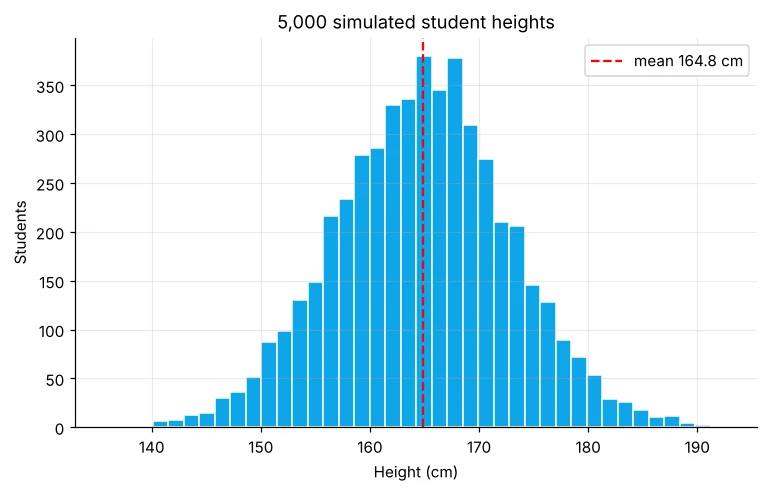
Real example: Monte Carlo risk simulation
A small café sells between 80 and 160 cups a day (average 120). Each cup earns ₹35 profit and fixed costs (rent, staff, electricity) are ₹4,100 a day. What is the chance of making a loss in a month? We simulate 10,000 months.
import numpy as np
rng = np.random.default_rng(7)
months, days = 10_000, 30
cups = rng.normal(120, 22, size=(months, days)).clip(80, 160)    # broadcasting-friendly 2-D array
profit = (cups * 35 - 4100).sum(axis=1)                          # one value per month
print("Average monthly profit: ₹", round(profit.mean()))
print("Worst 5% month       : ₹", round(np.percentile(profit, 5)))
print("Chance of a loss     :", f"{(profit < 0).mean():.2%}")
print("Chance profit > ₹10,000:", f"{(profit > 10000).mean():.1%}")When maths formulas get hard, generating thousands of random “what-if” worlds gives a reliable answer. Banks, insurers and supply-chain teams use Monte Carlo every day.
🏅 Job skills unlocked today
Practice tasks
🏋️ Practice – do it yourself
[30, 35, 41, 28] °C to °F (F = C × 9/5 + 32) in one line.Show solution
import numpy as np
c = np.array([30, 35, 41, 28])
print(c * 9 / 5 + 32)
Show solution
import numpy as np
s = np.array([[120, 150, 130], [80, 95, 125], [200, 180, 220]])
print((s / s.sum(axis=1, keepdims=True) * 100).round(1))
Show solution
import numpy as np
rng = np.random.default_rng(1)
rolls = rng.integers(1, 7, size=(100000, 2)).sum(axis=1)
print(round((rolls == 7).mean(), 4), "(exact = 1/6 = 0.1667)")
Quick quiz
🧠 Quick Quiz – test yourself
Interview corner
💼 Interview Corner
Explain broadcasting with an example.
Subtracting a (3,) array of column means from a (100, 3) matrix: NumPy virtually repeats the mean row 100 times and subtracts element-wise, without loops or extra memory. Shapes are compared from the right and must be equal or 1.
What is a Monte Carlo simulation?
Estimating an uncertain quantity by running the process many times with random inputs and summarising the outcomes – for example the probability of a monthly loss or the range of project costs.
Summary
- Maths on arrays works element-wise – no loops.
- Broadcasting combines shapes like (4,3) with (3,) or (4,1).
- sum, mean, std, percentile, cumsum summarise data fast.
- default_rng(seed) gives reproducible simulations.
Day 10: pandas – Series and DataFrames, the tables every data scientist uses all day.
