Day 57: Project 2: EDA & Insights
✅ Today you will learn
- Profile churn across every important variable
- Find interactions (contract × support, tenure × contract)
- Test which differences are real (chi-square, t-test)
- Rank drivers by effect size
- Write five insights the retention team can act on
🏢 In the real world
Before building any model, the Head of Retention wants answers in plain language: “Which customers leave? Is it price, service or contract? What should we change tomorrow, even without a model?” Good EDA often delivers half the business value of the whole project.
Churn rate by every category
import numpy as np
import pandas as pd

def load_churn(path="telecom_churn.csv"):
    # "None" means no internet plan – stop pandas from turning it into NaN
    df = pd.read_csv(path, keep_default_na=False, na_values=[""])
    df["total_charges"] = df["total_charges"].fillna(df["monthly_charges"] * df["tenure_months"])
    df["churned"] = (df["churn"] == "Yes").astype(int)
    return df

df = load_churn()
rows = []
for col in ["contract", "internet_service", "tech_support", "payment_method", "senior_citizen", "gender"]:
    g = df.groupby(col)["churned"].agg(["mean", "size"])
    for k, r in g.iterrows():
        rows.append((col, str(k), int(r["size"]), round(r["mean"] * 100, 1)))
tab = pd.DataFrame(rows, columns=["variable", "value", "customers", "churn_%"])
print(tab.to_string(index=False))import numpy as np
import pandas as pd
def load_churn(path="telecom_churn.csv"):
# "None" means no internet plan – stop pandas from turning it into NaN
df = pd.read_csv(path, keep_default_na=False, na_values=[""])
df["total_charges"] = df["total_charges"].fillna(df["monthly_charges"] * df["tenure_months"])
df["churned"] = (df["churn"] == "Yes").astype(int)
return df
import matplotlib.pyplot as plt
df = load_churn()
cols = ["contract", "internet_service", "tech_support", "payment_method"]
fig, ax = plt.subplots(1, 4, figsize=(14, 3.6), sharey=True)
avg = df["churned"].mean() * 100
for a, c in zip(ax, cols):
r = (df.groupby(c)["churned"].mean() * 100).sort_values(ascending=False)
a.bar(r.index, r.values, color=["#dc2626" if v > avg + 5 else "#94a3b8" for v in r.values])
a.axhline(avg, color="#111827", ls="--", lw=1); a.set_title(c); a.tick_params(axis="x", rotation=25)
ax[0].set_ylabel("churn %"); fig.suptitle("Red = well above the 29% average", y=1.02)
plt.tight_layout(); plt.show()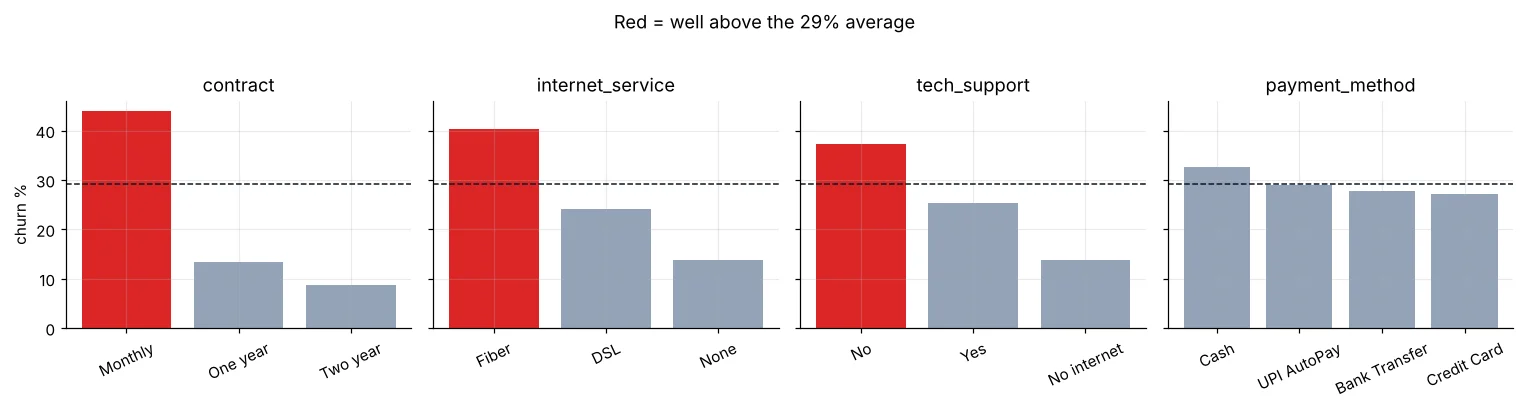
Tenure, charges and complaints
import numpy as np
import pandas as pd

def load_churn(path="telecom_churn.csv"):
    # "None" means no internet plan – stop pandas from turning it into NaN
    df = pd.read_csv(path, keep_default_na=False, na_values=[""])
    df["total_charges"] = df["total_charges"].fillna(df["monthly_charges"] * df["tenure_months"])
    df["churned"] = (df["churn"] == "Yes").astype(int)
    return df

import matplotlib.pyplot as plt
df = load_churn()
fig, ax = plt.subplots(1, 3, figsize=(14, 3.8))
tb = pd.cut(df["tenure_months"], [0, 6, 12, 24, 48, 72], labels=["0-6", "7-12", "13-24", "25-48", "49-72"])
(df.groupby(tb, observed=True)["churned"].mean() * 100).plot(ax=ax[0], marker="o", color="#4f46e5"); ax[0].set_title("Churn % by tenure (months)")
mb = pd.qcut(df["monthly_charges"], 5)
(df.groupby(mb, observed=True)["churned"].mean() * 100).plot(kind="bar", ax=ax[1], color="#f59e0b", rot=20); ax[1].set_title("Churn % by monthly bill (quintiles)")
cp = df["complaints"].clip(upper=4).map(lambda c: "4+" if c == 4 else str(c))
(df.groupby(cp)["churned"].mean() * 100).plot(kind="bar", ax=ax[2], color="#dc2626", rot=0); ax[2].set_title("Churn % by complaints")
for a in ax: a.set_xlabel(""); a.set_ylabel("churn %")
plt.tight_layout(); plt.show()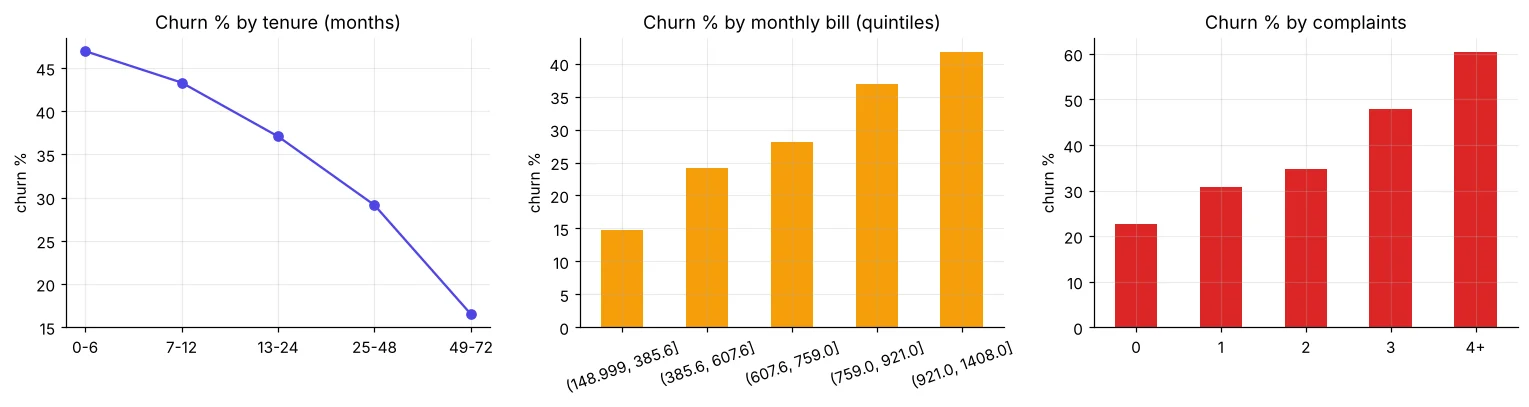
import numpy as np
import pandas as pd

def load_churn(path="telecom_churn.csv"):
    # "None" means no internet plan – stop pandas from turning it into NaN
    df = pd.read_csv(path, keep_default_na=False, na_values=[""])
    df["total_charges"] = df["total_charges"].fillna(df["monthly_charges"] * df["tenure_months"])
    df["churned"] = (df["churn"] == "Yes").astype(int)
    return df

df = load_churn()
num = ["tenure_months", "monthly_charges", "total_charges", "complaints", "data_usage_gb"]
print(df.groupby("churn")[num].median().round(1).T)Churners have lower total charges – not because paying more keeps people, but because total ≈ monthly × tenure, and churners have short tenure. Always ask what a column really measures before reading cause into it.
Interactions: where risk concentrates
import numpy as np
import pandas as pd

def load_churn(path="telecom_churn.csv"):
    # "None" means no internet plan – stop pandas from turning it into NaN
    df = pd.read_csv(path, keep_default_na=False, na_values=[""])
    df["total_charges"] = df["total_charges"].fillna(df["monthly_charges"] * df["tenure_months"])
    df["churned"] = (df["churn"] == "Yes").astype(int)
    return df

import seaborn as sns
import matplotlib.pyplot as plt
df = load_churn()
df["tenure_band"] = pd.cut(df["tenure_months"], [0, 6, 12, 24, 48, 72], labels=["0-6", "7-12", "13-24", "25-48", "49-72"])
fig, ax = plt.subplots(1, 2, figsize=(13, 4))
p1 = df.pivot_table(index="contract", columns="tech_support", values="churned", aggfunc="mean") * 100
sns.heatmap(p1, annot=True, fmt=".0f", cmap="Reds", ax=ax[0], cbar=False); ax[0].set_title("Churn %: contract × tech support")
p2 = df.pivot_table(index="contract", columns="tenure_band", values="churned", aggfunc="mean", observed=True) * 100
sns.heatmap(p2, annot=True, fmt=".0f", cmap="Reds", ax=ax[1], cbar=False); ax[1].set_title("Churn %: contract × tenure")
plt.tight_layout(); plt.show()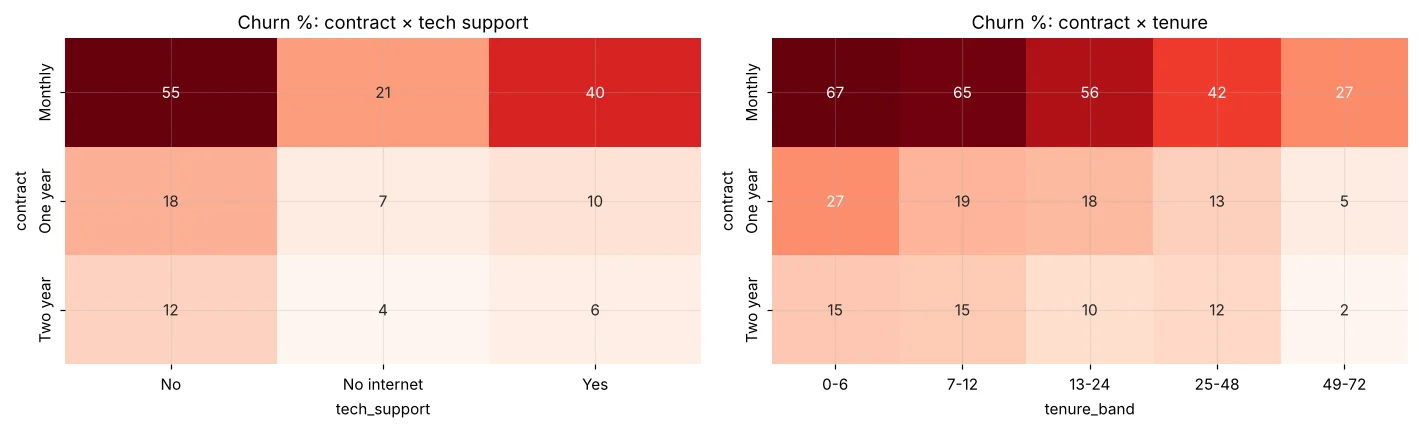
import numpy as np
import pandas as pd

def load_churn(path="telecom_churn.csv"):
    # "None" means no internet plan – stop pandas from turning it into NaN
    df = pd.read_csv(path, keep_default_na=False, na_values=[""])
    df["total_charges"] = df["total_charges"].fillna(df["monthly_charges"] * df["tenure_months"])
    df["churned"] = (df["churn"] == "Yes").astype(int)
    return df

df = load_churn()
seg = df.assign(new=df["tenure_months"] <= 12)
hot = seg[(seg["contract"] == "Monthly") & (seg["tech_support"] == "No") & seg["new"]]
print(f"Hot segment (monthly, no support, ≤12 months): {len(hot)} customers, churn {hot['churned'].mean():.0%}")
print(f"→ {len(hot) / len(df):.0%} of customers but {hot['churned'].sum() / df['churned'].sum():.0%} of all churners")Are the differences real?
import numpy as np
import pandas as pd

def load_churn(path="telecom_churn.csv"):
    # "None" means no internet plan – stop pandas from turning it into NaN
    df = pd.read_csv(path, keep_default_na=False, na_values=[""])
    df["total_charges"] = df["total_charges"].fillna(df["monthly_charges"] * df["tenure_months"])
    df["churned"] = (df["churn"] == "Yes").astype(int)
    return df

from scipy import stats
df = load_churn()
print("Chi-square tests (category vs churn):")
for col in ["contract", "internet_service", "tech_support", "payment_method", "senior_citizen", "gender"]:
    chi2, p, dof, _ = stats.chi2_contingency(pd.crosstab(df[col], df["churn"]))
    n = len(df); k = min(pd.crosstab(df[col], df["churn"]).shape) - 1
    v = (chi2 / (n * k)) ** 0.5                        # Cramér's V = effect size
    print(f"  {col:17s} p={p:.1e}  Cramér's V={v:.2f}  {'significant' if p < 0.05 else 'not significant'}")
print("Welch t-tests (numeric, churners vs stayers):")
for col in ["tenure_months", "monthly_charges", "complaints", "data_usage_gb"]:
    a, b = df.loc[df["churned"] == 1, col], df.loc[df["churned"] == 0, col]
    t, p = stats.ttest_ind(a, b, equal_var=False)
    d = (a.mean() - b.mean()) / ((a.var() + b.var()) / 2) ** 0.5
print(f" {col:17s} p={p:.1e} Cohen's d={d:+.2f}")Gender and payment method are not significant at 5% – good, the business should not target by gender anyway. Contract has the largest effect (Cramér’s V), and tenure the largest numeric effect. Report both p-values and effect sizes.
Ranking the drivers
import numpy as np
import pandas as pd

def load_churn(path="telecom_churn.csv"):
    # "None" means no internet plan – stop pandas from turning it into NaN
    df = pd.read_csv(path, keep_default_na=False, na_values=[""])
    df["total_charges"] = df["total_charges"].fillna(df["monthly_charges"] * df["tenure_months"])
    df["churned"] = (df["churn"] == "Yes").astype(int)
    return df

import matplotlib.pyplot as plt
df = load_churn()
base = df["churned"].mean()
lifts = {"Monthly contract": df.loc[df.contract == "Monthly", "churned"].mean() / base,
         "Tenure ≤ 6 months": df.loc[df.tenure_months <= 6, "churned"].mean() / base,
         "3+ complaints": df.loc[df.complaints >= 3, "churned"].mean() / base,
         "No tech support": df.loc[df.tech_support == "No", "churned"].mean() / base,
         "Fiber internet": df.loc[df.internet_service == "Fiber", "churned"].mean() / base,
         "Bill > ₹900": df.loc[df.monthly_charges > 900, "churned"].mean() / base,
         "Pays by cash": df.loc[df.payment_method == "Cash", "churned"].mean() / base,
         "Senior citizen": df.loc[df.senior_citizen == 1, "churned"].mean() / base,
         "Two-year contract": df.loc[df.contract == "Two year", "churned"].mean() / base}
s = pd.Series(lifts).sort_values()
plt.figure(figsize=(8.5, 4.2))
plt.barh(s.index, s.values, color=["#16a34a" if v < 1 else "#dc2626" for v in s.values]); plt.axvline(1, color="k", lw=1)
plt.title("Churn lift vs average (1.0 = average customer)"); plt.xlabel("× average churn rate")
plt.show()
print(s.round(2).sort_values(ascending=False).to_string())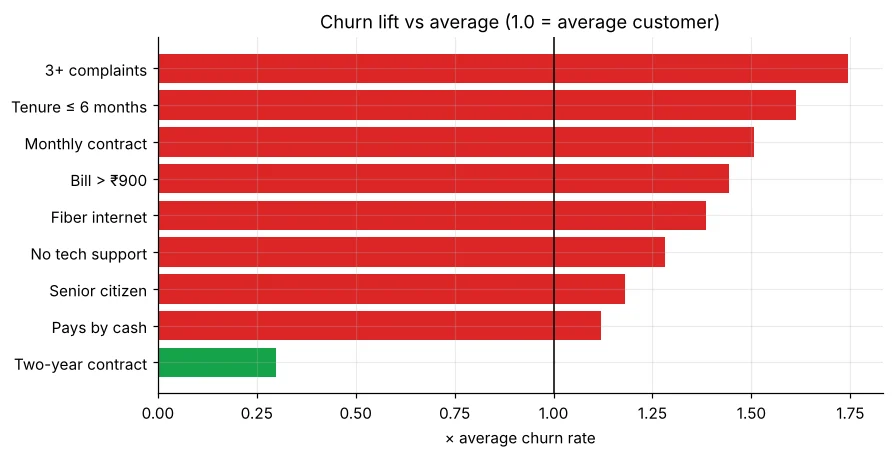
Five insights for the retention team
🏅 Job skills unlocked today
Practice tasks
🏋️ Practice – do it yourself
Show solution
import numpy as np
import pandas as pd

def load_churn(path="telecom_churn.csv"):
    # "None" means no internet plan – stop pandas from turning it into NaN
    df = pd.read_csv(path, keep_default_na=False, na_values=[""])
    df["total_charges"] = df["total_charges"].fillna(df["monthly_charges"] * df["tenure_months"])
    df["churned"] = (df["churn"] == "Yes").astype(int)
    return df

df = load_churn(); d = df[df["internet_service"] != "None"].copy()
d["bill_band"] = pd.cut(d["monthly_charges"], [0, 600, 750, 900, 2000], labels=["≤600", "600-750", "750-900", "900+"])
print((d.pivot_table(index="bill_band", columns="internet_service", values="churned", aggfunc="mean", observed=True) * 100).round(1))Show solution
import numpy as np
import pandas as pd

def load_churn(path="telecom_churn.csv"):
    # "None" means no internet plan – stop pandas from turning it into NaN
    df = pd.read_csv(path, keep_default_na=False, na_values=[""])
    df["total_charges"] = df["total_charges"].fillna(df["monthly_charges"] * df["tenure_months"])
    df["churned"] = (df["churn"] == "Yes").astype(int)
    return df

df = load_churn()
print((df[df["senior_citizen"] == 1].groupby("tech_support")["churned"].mean() * 100).round(1))Quick quiz
🧠 Quick Quiz – test yourself
Interview corner
💼 Interview Corner
What did your EDA reveal about churn?
Contract type is the strongest driver (monthly ~44% vs two-year ~9%), followed by short tenure, complaints, missing tech support and Fiber; payment method looked different but was not statistically significant. The monthly + no-support + new segment holds a disproportionate share of churners – an immediate target for the retention team.
Why test significance in EDA?
With many comparisons some differences appear by chance. Tests plus effect sizes separate real, meaningful drivers from noise and stop the team chasing random patterns.
Summary
- Contract, tenure, complaints, tech support and Fiber drive churn; gender does not, and payment method is not significant.
- Monthly + no support + new customers = the hottest segment.
- Chi-square/t-tests with effect sizes confirm the drivers.
- Five insights give the retention team actions before any model.
Day 58: engineer features, build pipelines and compare models with cross-validation.
