Day 18: Exploratory Data Analysis (EDA)
✅ Today you will learn
- The 6-step EDA framework
- Univariate: histograms, value counts, skew
- Outliers with the IQR rule and box plots
- Bivariate: numeric vs target, category vs target
- Correlation heatmap and turning charts into insights
🏢 In the real world
A property start-up gives you 800 house listings from six cities and asks one question: “What drives price?” Before any machine learning, EDA tells you which features matter, which values are suspicious and what story the data tells.
The EDA framework
- 1Understand: shape, columns, types
- 2Quality: missing, duplicates
- 3Univariate: one column at a time
- 4Outliers
- 5Bivariate: each feature vs target
- 6Summarise insights
Steps 1–2: understand and check quality
import pandas as pd
h = pd.read_csv("house_prices.csv")
print(h.shape)
print(h.head(3))
print("Missing:", h.isna().sum().sum(), "| duplicates:", h.duplicated().sum())
print(h.describe().round(1).T[["mean", "50%", "min", "max"]])Step 3: univariate analysis
import pandas as pd
import matplotlib.pyplot as plt
h = pd.read_csv("house_prices.csv")
fig, ax = plt.subplots(1, 3, figsize=(12, 3.6))
ax[0].hist(h["price_lakh"], bins=30, color="#4f46e5"); ax[0].set_title("Price (₹ lakh)")
ax[1].hist(h["area_sqft"], bins=30, color="#0891b2"); ax[1].set_title("Area (sqft)")
h["city"].value_counts().plot(kind="bar", ax=ax[2], color="#f59e0b"); ax[2].set_title("Listings per city")
ax[2].tick_params(axis="x", rotation=30)
plt.tight_layout(); plt.show()
print("Skew → price:", round(h["price_lakh"].skew(), 2), "| area:", round(h["area_sqft"].skew(), 2))
Skew ≈ 0: symmetric. Skew > 1: long right tail (prices, incomes) – the mean is pulled above the median, so report the median and consider a log transform later.
Step 4: outliers with IQR
import pandas as pd
h = pd.read_csv("house_prices.csv")
q1, q3 = h["price_lakh"].quantile([0.25, 0.75])
iqr = q3 - q1
low, high = q1 - 1.5 * iqr, q3 + 1.5 * iqr
out = h[(h["price_lakh"] < low) | (h["price_lakh"] > high)]
print(f"Q1={q1:.1f} Q3={q3:.1f} IQR={iqr:.1f} → normal range {low:.1f} to {high:.1f} lakh")
print(len(out), "outliers")
print(out.sort_values("price_lakh", ascending=False)[["city", "area_sqft", "bedrooms", "price_lakh"]].head())import pandas as pd
import seaborn as sns
import matplotlib.pyplot as plt
h = pd.read_csv("house_prices.csv")
order = h.groupby("city")["price_lakh"].median().sort_values().index
plt.figure(figsize=(9, 4))
sns.boxplot(data=h, x="city", y="price_lakh", order=order, color="#a5b4fc")
plt.title("Price by city – boxes show the middle 50%, dots are outliers")
plt.ylabel("₹ lakh"); plt.show()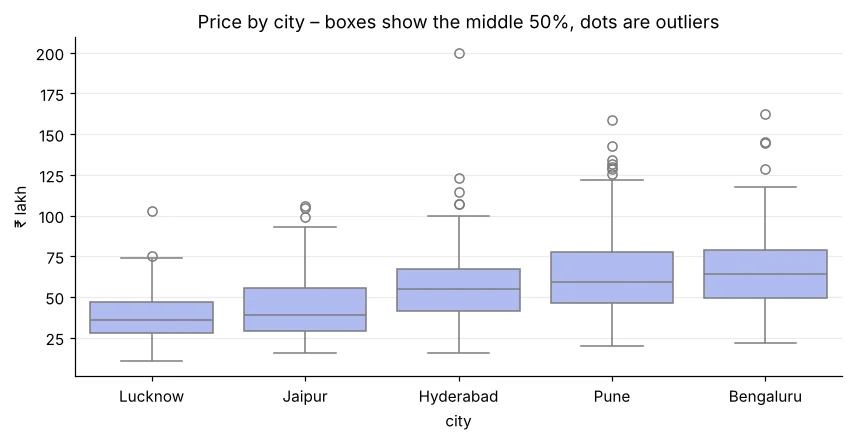
Remove values that are impossible (negative area). Investigate values that are rare but possible (a 3,000 sqft villa). Often you keep them – or cap them – rather than delete.
Step 5: bivariate analysis
import pandas as pd
import matplotlib.pyplot as plt
h = pd.read_csv("house_prices.csv")
fig, ax = plt.subplots(1, 2, figsize=(11, 4))
ax[0].scatter(h["area_sqft"], h["price_lakh"], s=10, alpha=0.5, color="#4f46e5")
ax[0].set_xlabel("Area (sqft)"); ax[0].set_ylabel("Price (₹ lakh)"); ax[0].set_title("Bigger homes cost more")
h["ppsf"] = h["price_lakh"] * 1e5 / h["area_sqft"]               # price per sqft removes the size effect
band = pd.cut(h["metro_km"], [0, 1, 2, 4, 7, 18], labels=["<1", "1-2", "2-4", "4-7", "7+"])
h.groupby(band, observed=True)["ppsf"].median().plot(kind="bar", ax=ax[1], color="#dc2626", rot=0)
ax[1].set_xlabel("Distance to metro (km)"); ax[1].set_ylabel("₹ per sqft"); ax[1].set_title("Farther from metro → cheaper per sqft")
plt.tight_layout(); plt.show()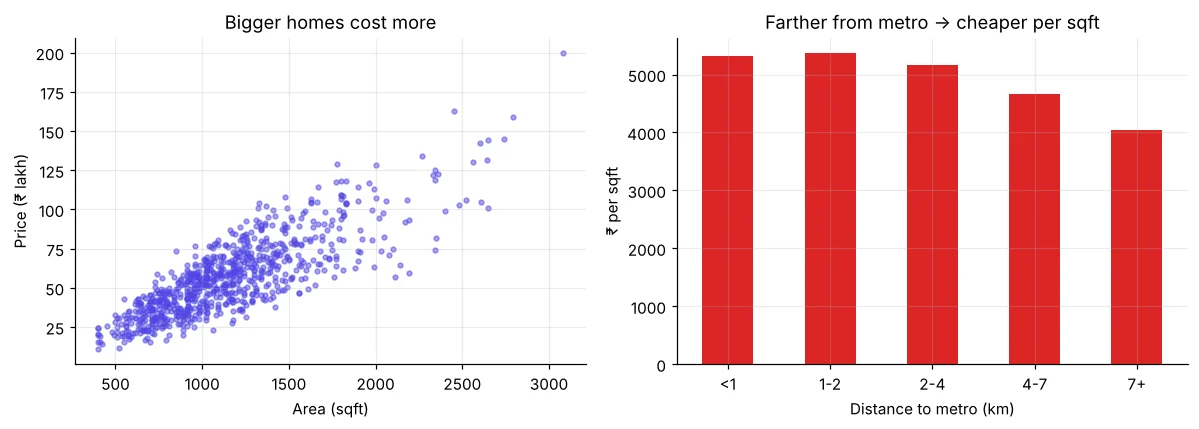
import pandas as pd
h = pd.read_csv("house_prices.csv")
for col in ["furnishing", "parking", "bedrooms"]:
print(h.groupby(col)["price_lakh"].median().round(1).to_dict())import pandas as pd
import seaborn as sns
import matplotlib.pyplot as plt
h = pd.read_csv("house_prices.csv")
corr = h.select_dtypes("number").corr().round(2)
print(corr["price_lakh"].sort_values(ascending=False))
plt.figure(figsize=(6.5, 5))
sns.heatmap(corr, annot=True, cmap="RdBu_r", vmin=-1, vmax=1, fmt=".2f")
plt.title("Correlation matrix"); plt.show()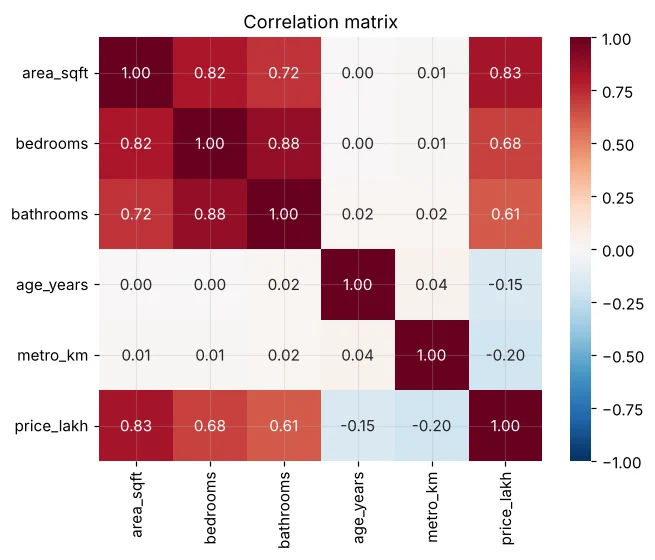
Step 6: write insights, not just charts
import pandas as pd
def quick_eda(df, target):
    print("Shape:", df.shape, "| missing:", int(df.isna().sum().sum()), "| dups:", int(df.duplicated().sum()))
    num = df.select_dtypes("number").drop(columns=[target])
    print("Top numeric drivers:", num.corrwith(df[target]).abs().sort_values(ascending=False).round(2).head(3).to_dict())
    for c in df.select_dtypes("object").columns:
        g = df.groupby(c)[target].median()
        print(f"{c}: best={g.idxmax()} ({g.max():.1f}) worst={g.idxmin()} ({g.min():.1f})")
quick_eda(pd.read_csv("house_prices.csv"), "price_lakh")🏅 Job skills unlocked today
Practice tasks
🏋️ Practice – do it yourself
quick_eda on students_performance.csv with target average.Show solution
import pandas as pd
def quick_eda(df, target):
    num = df.select_dtypes("number").drop(columns=[target, "maths", "science", "english"])
    print(num.corrwith(df[target]).round(2).sort_values(ascending=False).to_dict())
    for c in ["gender", "school_type", "tuition", "internet", "parent_education"]:
        print(c, df.groupby(c)[target].mean().round(1).to_dict())
quick_eda(pd.read_csv("students_performance.csv"), "average")monthly_charges of the telecom data with the IQR rule.Show solution
import pandas as pd
t = pd.read_csv("telecom_churn.csv")
q1, q3 = t["monthly_charges"].quantile([.25, .75]); i = q3 - q1
print(((t["monthly_charges"] < q1 - 1.5 * i) | (t["monthly_charges"] > q3 + 1.5 * i)).sum(), "outliers")spending_score in mall_customers.csv? Is the relationship linear? (Hint: scatter plot.)Show solution
import pandas as pd
m = pd.read_csv("mall_customers.csv")
print(m.select_dtypes("number").corr()["spending_score"].round(2))
print("Age is strongly negative; income looks weak overall, yet a scatter shows clear clusters (Day 46).")Quick quiz
🧠 Quick Quiz – test yourself
Interview corner
💼 Interview Corner
Walk me through your EDA process.
Understand the business question and columns; check shape, types, missing values and duplicates; look at each variable (histograms, value_counts); detect outliers; relate each feature to the target (scatter, box, group medians, correlation); then write 3–5 insights and next steps for modelling.
Two features are highly correlated with each other. Is that a problem?
For prediction with tree models, usually not. For linear models it causes multicollinearity – unstable coefficients – so you may drop one, combine them or use regularisation (Day 39).
Summary
- EDA = understand → quality → univariate → outliers → bivariate → insights.
- Use median for skewed data; IQR to flag outliers.
- Box plots for category vs number; scatter for number vs number; heatmap for correlations.
- Always end with written insights.
Day 19: Mini project – full EDA of BazaarKart’s 2024 sales with a management summary.
