Day 39: Multiple Regression, Ridge & Lasso
✅ Today you will learn
- Use many features at once
- One-hot encode city and furnishing
- Read coefficients “holding others fixed”
- Multicollinearity and log-transformed targets
- Ridge and Lasso: shrink and select features
🏢 In the real world
The area-only model was off by ₹7 lakh per flat. Buyers also care about city, metro distance, age, furnishing and parking. A model that uses all of them – and tells you what each is worth in rupees – becomes a pricing tool sales teams trust.
Step 1: turn categories into numbers
import pandas as pd
h = pd.read_csv("house_prices.csv")
X = pd.get_dummies(h.drop(columns="price_lakh"), columns=["city", "furnishing", "parking"], drop_first=True, dtype=int)
print(X.columns.tolist())
print(X.head(3))With 5 cities we keep 4 columns; the dropped one (Bengaluru) becomes the reference. Each city coefficient then means “difference from Bengaluru”. Keeping all 5 creates perfect collinearity (the dummy-variable trap).
Step 2: fit and evaluate
import pandas as pd
from sklearn.model_selection import train_test_split
from sklearn.linear_model import LinearRegression
from sklearn.metrics import mean_absolute_error, r2_score
h = pd.read_csv("house_prices.csv")
X = pd.get_dummies(h.drop(columns="price_lakh"), columns=["city", "furnishing", "parking"], drop_first=True, dtype=int)
y = h["price_lakh"]
X_tr, X_te, y_tr, y_te = train_test_split(X, y, test_size=0.25, random_state=42)
area_only = LinearRegression().fit(X_tr[["area_sqft"]], y_tr)
full = LinearRegression().fit(X_tr, y_tr)
for name, m, cols in [("area only", area_only, ["area_sqft"]), ("all features", full, X.columns)]:
    p = m.predict(X_te[cols])
print(f"{name:13s} MAE = ₹{mean_absolute_error(y_te, p):.2f} lakh R² = {r2_score(y_te, p):.3f}")Step 3: what is each feature worth?
import pandas as pd
from sklearn.linear_model import LinearRegression
h = pd.read_csv("house_prices.csv")
X = pd.get_dummies(h.drop(columns="price_lakh"), columns=["city", "furnishing", "parking"], drop_first=True, dtype=int)
m = LinearRegression().fit(X, h["price_lakh"])
coef = pd.Series(m.coef_, index=X.columns).round(3)
print(coef.sort_values().to_string())Each number is the change in price (₹ lakh) for +1 unit of that feature holding all others fixed. Example: metro_km ≈ −1.7 means each extra km from the metro lowers the price by about ₹1.7 lakh for the same size, city and age.
Bedrooms and bathrooms are highly correlated with area. Holding area fixed, an extra bedroom means smaller rooms – so its coefficient can be small or even negative. This is multicollinearity: predictions are fine, individual coefficients are unstable.
import pandas as pd
from statsmodels.stats.outliers_influence import variance_inflation_factor
h = pd.read_csv("house_prices.csv")
num = h[["area_sqft", "bedrooms", "bathrooms", "age_years", "metro_km"]].assign(const=1)
vif = pd.Series([variance_inflation_factor(num.values, i) for i in range(num.shape[1] - 1)], index=num.columns[:-1]).round(2)
print(vif.to_string())
print("VIF > 5 → strongly explained by the other features")A better target: log(price)
Prices grow in percentages (a metro station adds a % to every flat), and they are right-skewed. Modelling log(price) often fits better and coefficients become “% change”.
import numpy as np
import pandas as pd
from sklearn.model_selection import train_test_split
from sklearn.linear_model import LinearRegression
from sklearn.metrics import mean_absolute_error
h = pd.read_csv("house_prices.csv")
X = pd.get_dummies(h.drop(columns="price_lakh"), columns=["city", "furnishing", "parking"], drop_first=True, dtype=int)
X["log_area"] = np.log(X["area_sqft"])
y = h["price_lakh"]
X_tr, X_te, y_tr, y_te = train_test_split(X, y, test_size=0.25, random_state=42)
plain = LinearRegression().fit(X_tr.drop(columns="log_area"), y_tr)
logm = LinearRegression().fit(X_tr.drop(columns="area_sqft"), np.log(y_tr))
p1 = plain.predict(X_te.drop(columns="log_area"))
p2 = np.exp(logm.predict(X_te.drop(columns="area_sqft")))
print(f"price model     MAE = ₹{mean_absolute_error(y_te, p1):.2f} lakh")
print(f"log-price model MAE = ₹{mean_absolute_error(y_te, p2):.2f} lakh")
c = pd.Series(logm.coef_, index=X_tr.drop(columns="area_sqft").columns)
print(f"each km from metro → {(np.exp(c['metro_km']) - 1) * 100:.1f}% price | furnished → {(np.exp(c['furnishing_Unfurnished']) - 1) * -100:.1f}% more than unfurnished")Regularisation: Ridge and Lasso
import numpy as np
import pandas as pd
from sklearn.model_selection import train_test_split
from sklearn.linear_model import LinearRegression, Ridge, Lasso
from sklearn.preprocessing import StandardScaler
from sklearn.pipeline import make_pipeline
h = pd.read_csv("house_prices.csv")
X = pd.get_dummies(h.drop(columns="price_lakh"), columns=["city", "furnishing", "parking"], drop_first=True, dtype=int)
rng = np.random.default_rng(0)
for i in range(30):                                   # add 30 useless noise columns
    X[f"noise_{i}"] = rng.normal(size=len(X))
X_tr, X_te, y_tr, y_te = train_test_split(X, h["price_lakh"], test_size=0.5, random_state=1)
for name, est in [("Linear", LinearRegression()), ("Ridge α=10", Ridge(alpha=10)), ("Lasso α=0.3", Lasso(alpha=0.3, max_iter=20000))]:
    m = make_pipeline(StandardScaler(), est).fit(X_tr, y_tr)
    coefs = m[-1].coef_
print(f"{name:12s} test R²={m.score(X_te, y_te):.3f} | non-zero coefs={np.sum(np.abs(coefs) > 1e-6):2d} of {len(coefs)}")import numpy as np
import pandas as pd
import matplotlib.pyplot as plt
from sklearn.linear_model import Lasso
from sklearn.preprocessing import StandardScaler
h = pd.read_csv("house_prices.csv")
X = pd.get_dummies(h.drop(columns="price_lakh"), columns=["city", "furnishing", "parking"], drop_first=True, dtype=int)
Xs = StandardScaler().fit_transform(X)
alphas = np.logspace(-2, 1.3, 40)
paths = np.array([Lasso(alpha=a, max_iter=20000).fit(Xs, h["price_lakh"]).coef_ for a in alphas])
plt.figure(figsize=(9, 4.2))
for j, col in enumerate(X.columns):
plt.plot(alphas, paths[:, j], label=col if j < 9 else None)
plt.xscale("log"); plt.axhline(0, color="black", lw=0.6)
plt.xlabel("alpha (penalty strength)"); plt.ylabel("coefficient (scaled)")
plt.title("Lasso path: weak features drop to zero first; area survives longest")
plt.legend(fontsize=7, ncol=2); plt.show()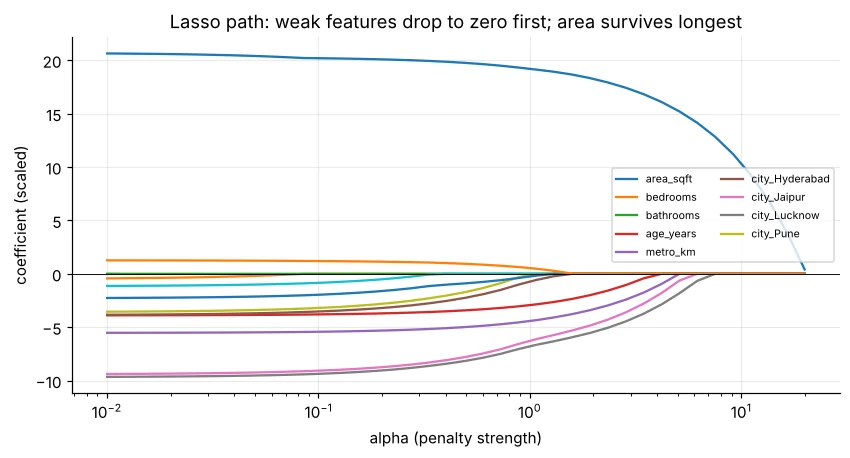
import pandas as pd
from sklearn.linear_model import RidgeCV, LassoCV
from sklearn.preprocessing import StandardScaler
from sklearn.pipeline import make_pipeline
h = pd.read_csv("house_prices.csv")
X = pd.get_dummies(h.drop(columns="price_lakh"), columns=["city", "furnishing", "parking"], drop_first=True, dtype=int)
ridge = make_pipeline(StandardScaler(), RidgeCV(alphas=[0.01, 0.1, 1, 10, 100])).fit(X, h["price_lakh"])
lasso = make_pipeline(StandardScaler(), LassoCV(cv=5, random_state=0, max_iter=20000)).fit(X, h["price_lakh"])
print("best Ridge alpha:", ridge[-1].alpha_, "| best Lasso alpha:", round(lasso[-1].alpha_, 4))🏅 Job skills unlocked today
Practice tasks
🏋️ Practice – do it yourself
average from study_hours, attendance, tuition, internet and parent_education (one-hot). Which features matter most?Show solution
import pandas as pd
from sklearn.linear_model import LinearRegression
st = pd.read_csv("students_performance.csv")
X = pd.get_dummies(st[["study_hours", "attendance", "tuition", "internet", "parent_education"]], drop_first=True, dtype=int)
m = LinearRegression().fit(X, st["average"])
print(pd.Series(m.coef_, index=X.columns).round(2).sort_values()); print("R²", round(m.score(X, st["average"]), 3))Show solution
import pandas as pd
from sklearn.linear_model import LassoCV
from sklearn.preprocessing import StandardScaler
st = pd.read_csv("students_performance.csv")
X = pd.get_dummies(st[["study_hours", "attendance", "tuition", "internet", "parent_education", "gender", "school_type"]], drop_first=True, dtype=int)
m = LassoCV(cv=5, random_state=0).fit(StandardScaler().fit_transform(X), st["average"])
print(pd.Series(m.coef_, index=X.columns).round(2))Quick quiz
🧠 Quick Quiz – test yourself
Interview corner
💼 Interview Corner
Difference between Ridge and Lasso?
Both add a penalty to large coefficients to reduce overfitting. Ridge (L2) shrinks all coefficients but keeps them non-zero – good with correlated features. Lasso (L1) can shrink some to exactly zero, performing feature selection. Elastic Net mixes both.
What is multicollinearity and why does it matter?
When features are strongly correlated with each other. Predictions may stay accurate, but coefficients become unstable and hard to interpret. Detect with correlation/VIF; fix by dropping or combining features or using Ridge.
Summary
- One-hot encode categories (drop_first) and fit all features together.
- Coefficients = effect holding others fixed; watch multicollinearity (VIF).
- log(price) often fits better and gives % effects.
- Ridge shrinks, Lasso selects; tune α with CV and scale features first.
Day 40: logistic regression – from predicting numbers to predicting yes/no with probabilities.
