Day 19: Mini Project: Retail Sales EDA
✅ Today you will learn
- Turn a vague brief into 6 business questions
- Clean and enrich data with a reusable function
- Compute KPIs: revenue, AOV, orders, rating
- Answer each question with a table + chart
- Write a one-page management summary
🏢 In the real world
The CEO of BazaarKart writes: “We are planning 2025. Tell me what happened in 2024 and where we should invest.” That is all you get. This project shows exactly how a data analyst turns such a message into numbers, charts and recommendations – the kind of project that wins interviews.
Step 1: turn the brief into questions
| # | Business question | Analysis |
|---|---|---|
| Q1 | How big was 2024? | KPIs |
| Q2 | How did sales move through the year? | Monthly trend |
| Q3 | Which cities and categories drive revenue? | groupby + pivot |
| Q4 | Do discounts help or hurt? | Discount bands vs revenue and rating |
| Q5 | Who are our customers? | Age groups, gender, payment |
| Q6 | Where are customers unhappy? | Rating analysis |
Step 2: load, clean, enrich
import pandas as pd

def load_sales(path="sales_data.csv"):
    df = pd.read_csv(path, parse_dates=["order_date"]).drop_duplicates()
    df["customer_age"] = df["customer_age"].fillna(df["customer_age"].median())
    df["revenue"] = df["quantity"] * df["unit_price"] * (1 - df["discount"])
    df["month"] = df["order_date"].dt.to_period("M")
    df["age_group"] = pd.cut(df["customer_age"], [17, 24, 34, 44, 60], labels=["18-24", "25-34", "35-44", "45+"])
    df["disc_band"] = pd.cut(df["discount"], [-0.01, 0, 0.1, 0.2, 0.3], labels=["None", "1-10%", "11-20%", "21-30%"])
    return df

df = load_sales()
df.to_pickle("sales_ready.pkl")                 # reuse in the next cells
print(df.shape, "| rating missing:", df["rating"].isna().sum())
print(df[["order_date", "city", "product", "revenue", "age_group", "disc_band"]].head(3))Q1: KPIs
import pandas as pd
df = pd.read_pickle("sales_ready.pkl")
kpi = {"Revenue (₹ lakh)": round(df["revenue"].sum() / 1e5, 2),
       "Orders": len(df),
       "Units sold": int(df["quantity"].sum()),
       "Avg order value (₹)": round(df["revenue"].mean()),
       "Avg rating": round(df["rating"].mean(), 2),
       "Prepaid share %": round((df["payment_mode"] != "Cash on Delivery").mean() * 100, 1)}
for k, v in kpi.items():
print(f"{k:22s} {v}")Q2: monthly trend
import pandas as pd
import matplotlib.pyplot as plt
df = pd.read_pickle("sales_ready.pkl")
m = df.groupby("month").agg(revenue=("revenue", "sum"), orders=("order_id", "count"))
m["revenue_lakh"] = (m["revenue"] / 1e5).round(2)
print(m[["orders", "revenue_lakh"]].to_string())
fig, ax = plt.subplots(figsize=(10, 4))
ax.bar(m.index.strftime("%b"), m["revenue_lakh"], color=["#dc2626" if x in (10, 11) else "#818cf8" for x in m.index.month])
ax.set_title("Monthly revenue 2024 – the festive season (Oct–Nov) is the business"); ax.set_ylabel("₹ lakh")
for i, v in enumerate(m["revenue_lakh"]):
    ax.text(i, v + 0.1, f"{v:.1f}", ha="center", fontsize=8)
plt.show()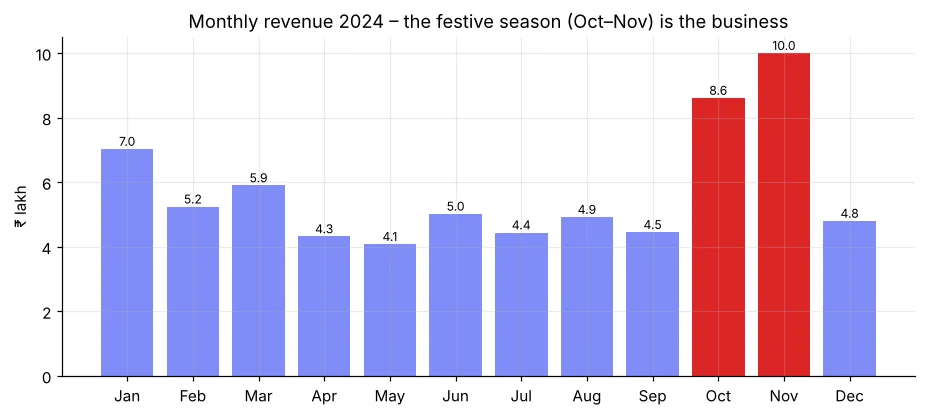
import pandas as pd
df = pd.read_pickle("sales_ready.pkl")
m = df.groupby("month")["revenue"].sum()
festive = m[m.index.month.isin([10, 11])].sum()
print(f"Oct+Nov = {festive / m.sum() * 100:.1f}% of yearly revenue in {2 / 12 * 100:.0f}% of the time")
print("Best month:", m.idxmax(), "| weakest month:", m.idxmin())Q3: cities and categories
import pandas as pd
import matplotlib.pyplot as plt
df = pd.read_pickle("sales_ready.pkl")
city = df.groupby("city").agg(revenue=("revenue", "sum"), orders=("order_id", "count"), aov=("revenue", "mean"))
city["share_%"] = (city["revenue"] / city["revenue"].sum() * 100).round(1)
city = city.sort_values("revenue")
print(city.round(0).sort_values("revenue", ascending=False).head(5))
fig, ax = plt.subplots(1, 2, figsize=(12, 4.2))
(city["revenue"] / 1e5).plot(kind="barh", ax=ax[0], color="#4f46e5"); ax[0].set_title("Revenue by city (₹ lakh)")
cat = df.groupby("category")["revenue"].sum().sort_values()
ax[1].pie(cat, labels=cat.index, autopct="%1.0f%%", startangle=90, wedgeprops=dict(width=0.45))
ax[1].set_title("Revenue share by category")
plt.tight_layout(); plt.show()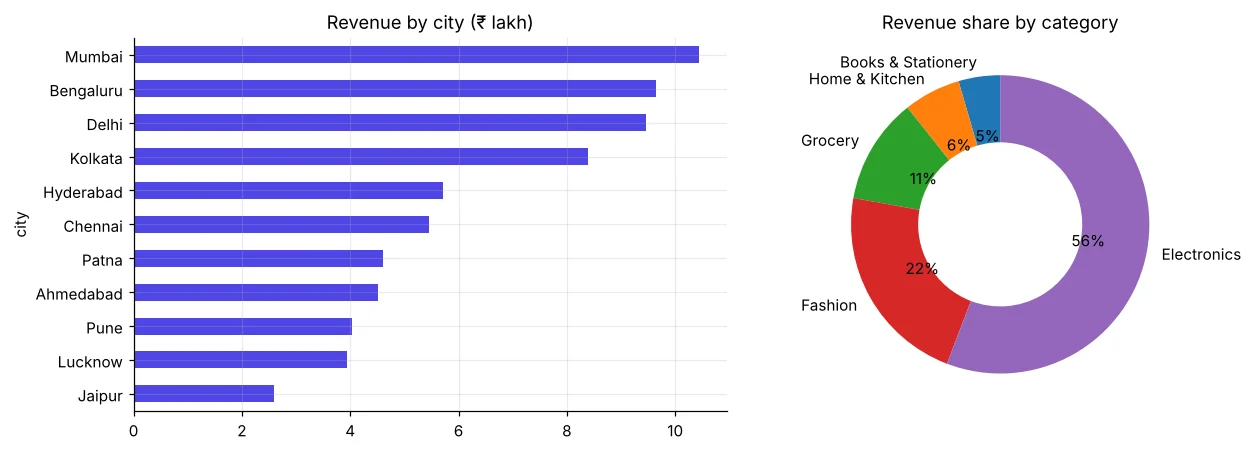
import pandas as pd
df = pd.read_pickle("sales_ready.pkl")
pv = df.pivot_table(index="category", values=["revenue", "quantity"], aggfunc="sum")
pv["orders"] = df.groupby("category").size()
pv["aov"] = (pv["revenue"] / pv["orders"]).round()
pv["rev_share_%"] = (pv["revenue"] / pv["revenue"].sum() * 100).round(1)
pv["order_share_%"] = (pv["orders"] / pv["orders"].sum() * 100).round(1)
print(pv[["orders", "order_share_%", "rev_share_%", "aov"]].sort_values("rev_share_%", ascending=False))Grocery has many orders but a small revenue share (low AOV) – it brings customers back often. Electronics has fewer orders but most of the money. Both matter, for different reasons: frequency vs value.
Q4: do discounts help?
import pandas as pd
df = pd.read_pickle("sales_ready.pkl")
d = df.groupby("disc_band", observed=True).agg(orders=("order_id", "count"), avg_qty=("quantity", "mean"),
                                               aov=("revenue", "mean"), rating=("rating", "mean"))
d["discount_given_₹"] = df.groupby("disc_band", observed=True).apply(
    lambda g: (g["quantity"] * g["unit_price"] * g["discount"]).sum(), include_groups=False).round()
print(d.round(2))Quantity per order and rating barely change with bigger discounts, yet the money given away rises sharply. In this data, deep discounts mostly reduce margin. Recommendation: test smaller, targeted offers (Day 31 – A/B testing).
Q5: who are our customers?
import pandas as pd
import matplotlib.pyplot as plt
df = pd.read_pickle("sales_ready.pkl")
fig, ax = plt.subplots(1, 2, figsize=(11, 3.8))
df.groupby("age_group", observed=True)["revenue"].sum().div(1e5).plot(kind="bar", ax=ax[0], color="#0891b2", rot=0)
ax[0].set_title("Revenue by age group (₹ lakh)")
pm = pd.crosstab(df["age_group"], df["payment_mode"], normalize="index") * 100
pm.plot(kind="bar", stacked=True, ax=ax[1], rot=0, colormap="Set2")
ax[1].set_title("Payment mode by age (%)"); ax[1].legend(fontsize=7, bbox_to_anchor=(1.01, 1), loc="upper left")
plt.tight_layout(); plt.show()
print(df.groupby("customer_gender")["revenue"].agg(["count", "mean"]).round())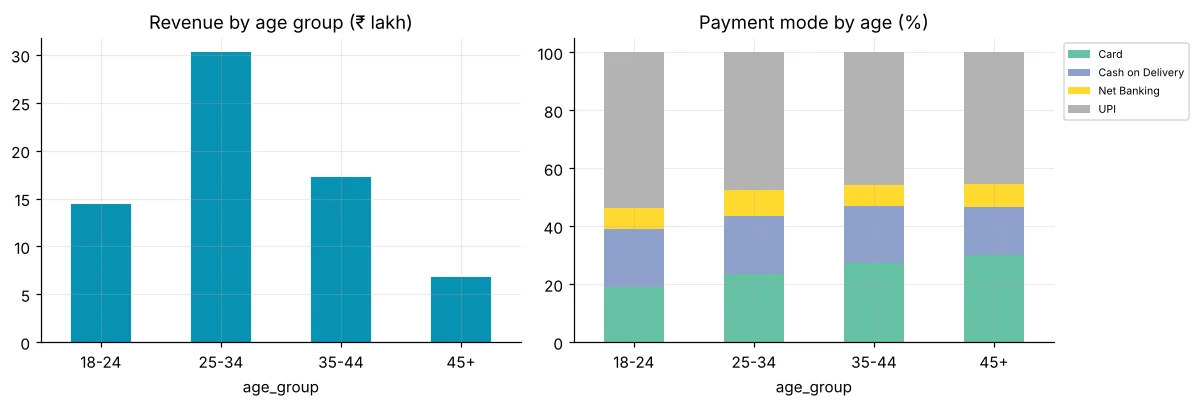
Q6: where are customers unhappy?
import pandas as pd
df = pd.read_pickle("sales_ready.pkl")
r = df.dropna(subset=["rating"])
low = r.assign(low=r["rating"] <= 3).groupby("product")["low"].agg(["mean", "count"])
low = low[low["count"] >= 30].sort_values("mean", ascending=False)
low["mean"] = (low["mean"] * 100).round(1)
print(low.rename(columns={"mean": "low_rating_%", "count": "orders"}).head(5))
print("Overall low-rating %:", round((r["rating"] <= 3).mean() * 100, 1))Step 3: the management summary
Put it on GitHub (Day 53) with: the questions, the notebook, 4–5 charts and the four recommendations at the top of the README. Recruiters read the summary first – make it business-focused, not code-focused.
🏅 Job skills unlocked today
Practice tasks
🏋️ Practice – do it yourself
Show solution
import pandas as pd
df = pd.read_pickle("sales_ready.pkl")
q = df.pivot_table(index="region", columns=df["order_date"].dt.quarter, values="revenue", aggfunc="sum")
print(((q[4] / q[3] - 1) * 100).round(1).sort_values(ascending=False))Show solution
import pandas as pd
df = pd.read_pickle("sales_ready.pkl")
t = df.groupby(["city", "product"])["revenue"].sum().reset_index()
print(t.sort_values(["city", "revenue"], ascending=[True, False]).groupby("city").head(3).head(9).round(0).to_string(index=False))Quick quiz
🧠 Quick Quiz – test yourself
Interview corner
💼 Interview Corner
Tell me about a data analysis project you did.
Use STAR: Situation (CEO wanted a 2024 review), Task (find drivers and opportunities), Action (cleaned 2,000 orders, built KPIs, trend, city/category/discount/customer analysis in pandas), Result (four recommendations, e.g. festive season = X% of revenue, deep discounts did not raise quantity).
Can you say discounts caused no change?
No – this is observational data; discounts were not random. It suggests a hypothesis. A controlled A/B test is needed to prove cause.
Summary
- Start from business questions, not from charts.
- One load/clean function + saved pickle keeps analysis consistent.
- Each question → table → chart → one-line insight.
- Finish with 3–5 actionable, numeric recommendations.
Day 20: Pandas practice test – 15 real tasks to check you are job-ready with pandas.
