Day 37: scikit-learn & Train/Test Split
✅ Today you will learn
- The scikit-learn API: fit → predict → score
- Prepare X and y correctly
- Split data with stratify and random_state
- Always beat a baseline first
- Predict probabilities and new applicants
🏢 In the real world
A fintech start-up wants an instant loan decision in its app. You must build the first version today, prove it is better than guessing, and show the product team how the model decides for a new applicant.
One API for every model
Step 1: prepare X and y
import pandas as pd
loans = pd.read_csv("loan_applications.csv")
loans["is_salaried"] = (loans["employment"] == "Salaried").astype(int)
loans["loan_to_income"] = (loans["loan_amount"] / (loans["monthly_income"] * 12)).round(3)
features = ["monthly_income", "credit_score", "loan_amount", "years_employed", "is_salaried", "loan_to_income"]
X = loans[features]
y = loans["approved"]
print(X.shape, y.shape)
print(X.head(3))
print("Class balance:", y.value_counts(normalize=True).round(3).to_dict())X must be all numbers with no missing values (for most models). Text columns need encoding (Day 44). Never put the target – or anything known only after the decision – inside X.
Step 2: split
import pandas as pd
from sklearn.model_selection import train_test_split
loans = pd.read_csv("loan_applications.csv")
X = loans[["monthly_income", "credit_score", "loan_amount", "years_employed"]]; y = loans["approved"]
X_train, X_test, y_train, y_test = train_test_split(X, y, test_size=0.2, random_state=42, stratify=y)
print("train:", X_train.shape, "test:", X_test.shape)
print("approval rate → train", round(y_train.mean(), 3), "| test", round(y_test.mean(), 3))| Argument | Why |
|---|---|
| test_size=0.2 | 20% held back for the final check |
| random_state=42 | Same split every run – reproducible results |
| stratify=y | Same class balance in train and test |
Step 3: a baseline
import pandas as pd
from sklearn.model_selection import train_test_split
from sklearn.dummy import DummyClassifier
loans = pd.read_csv("loan_applications.csv")
X = loans[["monthly_income", "credit_score", "loan_amount", "years_employed"]]; y = loans["approved"]
X_train, X_test, y_train, y_test = train_test_split(X, y, test_size=0.2, random_state=42, stratify=y)
base = DummyClassifier(strategy="most_frequent").fit(X_train, y_train)
print(f"Baseline (always predict the majority class): {base.score(X_test, y_test):.1%}")If 90% of transactions are not fraud, a model that always says “not fraud” is 90% accurate and catches nothing. Always compare with the baseline – and on Day 41 we learn better metrics.
Step 4: train real models
import pandas as pd
from sklearn.model_selection import train_test_split
from sklearn.linear_model import LogisticRegression
from sklearn.tree import DecisionTreeClassifier
from sklearn.neighbors import KNeighborsClassifier
from sklearn.ensemble import RandomForestClassifier
loans = pd.read_csv("loan_applications.csv")
loans["loan_to_income"] = loans["loan_amount"] / (loans["monthly_income"] * 12)
loans["is_salaried"] = (loans["employment"] == "Salaried").astype(int)
X = loans[["monthly_income", "credit_score", "loan_amount", "years_employed", "is_salaried", "loan_to_income"]]; y = loans["approved"]
X_train, X_test, y_train, y_test = train_test_split(X, y, test_size=0.2, random_state=42, stratify=y)
models = {"Logistic regression": LogisticRegression(max_iter=5000),
          "Decision tree": DecisionTreeClassifier(max_depth=4, random_state=42),
          "KNN (k=15)": KNeighborsClassifier(n_neighbors=15),
          "Random forest": RandomForestClassifier(n_estimators=200, random_state=42)}
for name, m in models.items():
    m.fit(X_train, y_train)
print(f"{name:20s} train={m.score(X_train, y_train):.3f} test={m.score(X_test, y_test):.3f}")The engineered feature loan_to_income (Day 17 skills!) lifted the decision tree from about 81% (Day 36) to 84%. The random forest scores 100% on training data – a sign of memorising. KNN is weak because it needs scaled features (Day 44). Same API, four algorithms, one loop.
Step 5: predict for new applicants
import pandas as pd
from sklearn.model_selection import train_test_split
from sklearn.linear_model import LogisticRegression
loans = pd.read_csv("loan_applications.csv")
def make_X(df):
    return pd.DataFrame({"monthly_income": df["monthly_income"], "credit_score": df["credit_score"],
                         "loan_amount": df["loan_amount"], "years_employed": df["years_employed"],
                         "is_salaried": (df["employment"] == "Salaried").astype(int),
                         "loan_to_income": df["loan_amount"] / (df["monthly_income"] * 12)})
X, y = make_X(loans), loans["approved"]
model = LogisticRegression(max_iter=5000).fit(X, y)
new = pd.DataFrame({"monthly_income": [55000, 30000, 120000], "credit_score": [780, 640, 720],
                    "loan_amount": [500000, 900000, 3000000], "years_employed": [6, 2, 12],
                    "employment": ["Salaried", "Self-Employed", "Business"]}, index=["Riya", "Arjun", "Meera"])
proba = model.predict_proba(make_X(new))[:, 1]
out = new[["monthly_income", "credit_score", "loan_amount"]].assign(approval_prob=proba.round(3), decision=model.predict(make_X(new)))
print(out)predict gives 0/1 using a 0.5 cut-off. predict_proba gives the probability – far more useful: the bank can auto-approve above 0.8, auto-reject below 0.2 and send the middle to a human.
Step 6: look inside
import pandas as pd
import matplotlib.pyplot as plt
from sklearn.tree import DecisionTreeClassifier, plot_tree
loans = pd.read_csv("loan_applications.csv")
loans["loan_to_income"] = loans["loan_amount"] / (loans["monthly_income"] * 12)
X = loans[["credit_score", "loan_to_income", "years_employed"]]; y = loans["approved"]
tree = DecisionTreeClassifier(max_depth=2, random_state=42).fit(X, y)
plt.figure(figsize=(11, 4.6))
plot_tree(tree, feature_names=X.columns, class_names=["reject", "approve"], filled=True, rounded=True, fontsize=9, impurity=False)
plt.title("A depth-2 tree: the rules the model learned"); plt.show()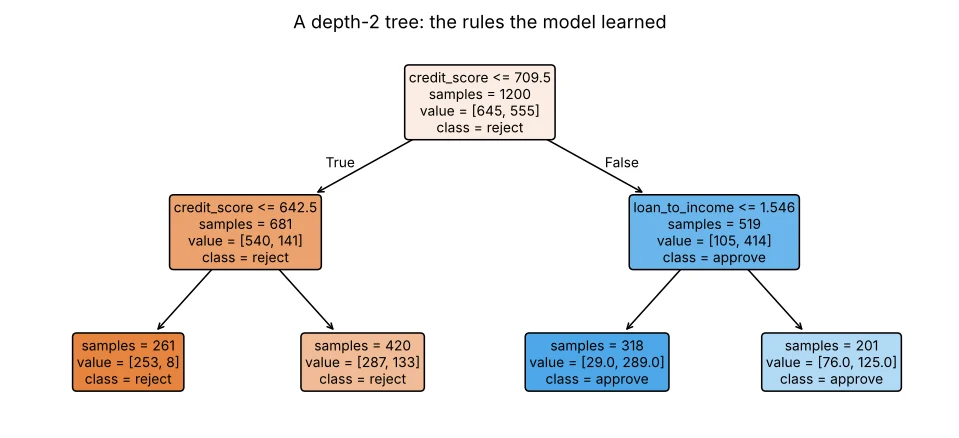
🏅 Job skills unlocked today
Practice tasks
🏋️ Practice – do it yourself
Show solution
import pandas as pd
from sklearn.model_selection import train_test_split
from sklearn.linear_model import LogisticRegression
from sklearn.dummy import DummyClassifier
st = pd.read_csv("students_performance.csv")
X, y = st[["study_hours", "attendance"]], (st["average"] >= 70).astype(int)
a, b, c, d = train_test_split(X, y, test_size=0.2, random_state=1, stratify=y)
print("baseline", DummyClassifier().fit(a, c).score(b, d), "| model", round(LogisticRegression().fit(a, c).score(b, d), 3))random_state of the split to 0, 1, 2, 3, 4. How much does the random-forest test accuracy move?Show solution
import pandas as pd
from sklearn.model_selection import train_test_split
from sklearn.ensemble import RandomForestClassifier
l = pd.read_csv("loan_applications.csv"); l["lti"] = l["loan_amount"] / (l["monthly_income"] * 12)
X, y = l[["monthly_income", "credit_score", "loan_amount", "years_employed", "lti"]], l["approved"]
for s in range(5):
    a, b, c, d = train_test_split(X, y, test_size=0.2, random_state=s, stratify=y)
print(s, round(RandomForestClassifier(n_estimators=100, random_state=0).fit(a, c).score(b, d), 3))new DataFrame and read the approval probability.Quick quiz
🧠 Quick Quiz – test yourself
Interview corner
💼 Interview Corner
Why do we need a train/test split?
To estimate how the model performs on data it has never seen. Evaluating on training data rewards memorisation and hides overfitting.
What is data leakage?
When information not available at prediction time (or from the test set) sneaks into training – e.g. using “loan_disbursed_date” to predict approval, or scaling with statistics from the full data. It gives fake-high scores.
Summary
- Estimator → fit → predict / predict_proba → score.
- train_test_split(test_size, random_state, stratify).
- Beat DummyClassifier/DummyRegressor first.
- Use one function to build X for training and for new data.
Day 38: linear regression – predict house prices and understand every coefficient.
