Day 38: Linear Regression: House Prices
✅ Today you will learn
- The idea: a straight line through the data
- Slope and intercept in business words
- Least squares – what “best fit” means
- Evaluate with MAE, RMSE and R²
- Residual plots and when a line is not enough
🏢 In the real world
A Pune property portal wants a “price estimate” button. Sellers type the flat size and instantly see a fair price. Today you build version 1 with one feature – area – and learn exactly how wrong it can be.
The idea
price = intercept + slope × area. The slope says how many lakh one extra square foot adds; the intercept is where the line crosses zero area.
import pandas as pd
from sklearn.linear_model import LinearRegression
h = pd.read_csv("house_prices.csv")
pune = h[h["city"] == "Pune"]
X, y = pune[["area_sqft"]], pune["price_lakh"]
lr = LinearRegression().fit(X, y)
print(f"price ≈ {lr.intercept_:.2f} + {lr.coef_[0]:.4f} × area")
print(f"→ every extra 100 sqft adds about ₹{lr.coef_[0] * 100:.2f} lakh")
for a in [600, 1000, 1500]:
print(f"{a} sqft → ₹{lr.predict(pd.DataFrame({'area_sqft': [a]}))[0]:.1f} lakh")import pandas as pd
import matplotlib.pyplot as plt
from sklearn.linear_model import LinearRegression
h = pd.read_csv("house_prices.csv"); pune = h[h["city"] == "Pune"]
lr = LinearRegression().fit(pune[["area_sqft"]], pune["price_lakh"])
x = pd.DataFrame({"area_sqft": range(400, 3000, 50)})
fig, ax = plt.subplots(figsize=(9, 4.2))
ax.scatter(pune["area_sqft"], pune["price_lakh"], s=14, alpha=0.5, color="#4f46e5", label="flats in Pune")
ax.plot(x["area_sqft"], lr.predict(x), color="#dc2626", lw=2.5, label="best-fit line")
s = pune.sample(6, random_state=3)
for _, r in s.iterrows():
p = lr.predict(pd.DataFrame({"area_sqft": [r.area_sqft]}))[0]
ax.plot([r.area_sqft, r.area_sqft], [r.price_lakh, p], color="#f59e0b", lw=1.5)
ax.set_xlabel("area (sqft)"); ax.set_ylabel("price (₹ lakh)"); ax.legend()
ax.set_title("Orange lines = errors (residuals). Least squares makes their squares as small as possible")
plt.show()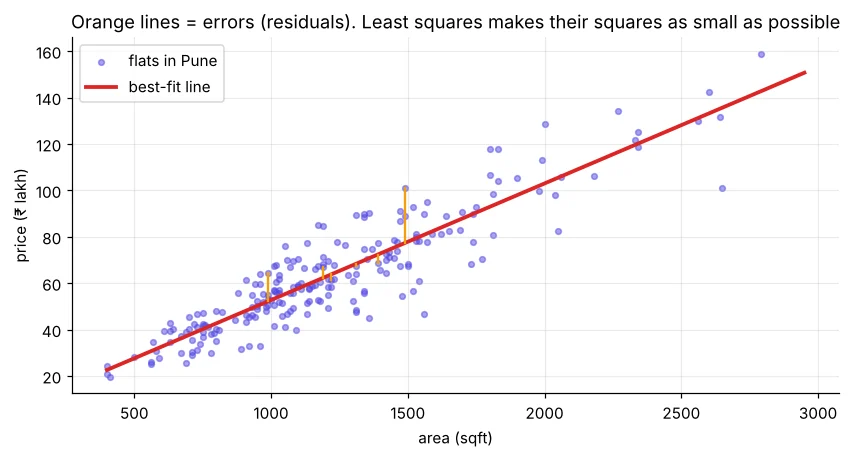
Least squares by hand
import numpy as np
import pandas as pd
h = pd.read_csv("house_prices.csv"); pune = h[h["city"] == "Pune"]
x, y = pune["area_sqft"].to_numpy(), pune["price_lakh"].to_numpy()
slope = ((x - x.mean()) * (y - y.mean())).sum() / ((x - x.mean()) ** 2).sum()
intercept = y.mean() - slope * x.mean()
print(f"by formula : slope={slope:.5f} intercept={intercept:.3f}")
print(f"np.polyfit : {np.polyfit(x, y, 1).round(5)}")How good is the line?
import numpy as np
import pandas as pd
from sklearn.model_selection import train_test_split
from sklearn.linear_model import LinearRegression
from sklearn.dummy import DummyRegressor
from sklearn.metrics import mean_absolute_error, root_mean_squared_error, r2_score
h = pd.read_csv("house_prices.csv"); pune = h[h["city"] == "Pune"]
X_tr, X_te, y_tr, y_te = train_test_split(pune[["area_sqft"]], pune["price_lakh"], test_size=0.25, random_state=7)
for name, m in [("baseline (mean price)", DummyRegressor()), ("linear regression", LinearRegression())]:
    p = m.fit(X_tr, y_tr).predict(X_te)
print(f"{name:22s} MAE={mean_absolute_error(y_te, p):5.2f} RMSE={root_mean_squared_error(y_te, p):5.2f} R²={r2_score(y_te, p):5.3f}")| Metric | Meaning | Good when |
|---|---|---|
| MAE | Average absolute error, in lakh | Small; easy to explain |
| RMSE | Like MAE but punishes big errors more | Small; close to MAE = few huge misses |
| R² | Share of price variation explained (0–1) | Close to 1; 0 = no better than the mean |
“On flats it has never seen, the estimate is off by about ₹7.4 lakh on average, and area alone explains about 86% of the price differences.”
Residuals: what the line misses
import pandas as pd
import matplotlib.pyplot as plt
from sklearn.linear_model import LinearRegression
h = pd.read_csv("house_prices.csv"); pune = h[h["city"] == "Pune"].copy()
lr = LinearRegression().fit(pune[["area_sqft"]], pune["price_lakh"])
pune["pred"] = lr.predict(pune[["area_sqft"]]); pune["resid"] = pune["price_lakh"] - pune["pred"]
fig, ax = plt.subplots(1, 2, figsize=(11, 3.8))
ax[0].scatter(pune["pred"], pune["resid"], s=12, alpha=0.6, color="#0891b2"); ax[0].axhline(0, color="#dc2626")
ax[0].set_xlabel("predicted price"); ax[0].set_ylabel("residual"); ax[0].set_title("Residuals vs prediction")
ax[1].scatter(pune["metro_km"], pune["resid"], s=12, alpha=0.6, color="#f59e0b"); ax[1].axhline(0, color="#dc2626")
ax[1].set_xlabel("metro distance (km)"); ax[1].set_title("Residuals fall with metro distance → missing feature!")
plt.tight_layout(); plt.show()
print("corr(residual, metro_km) =", round(pune["resid"].corr(pune["metro_km"]), 2), "| corr(residual, age) =", round(pune["resid"].corr(pune["age_years"]), 2))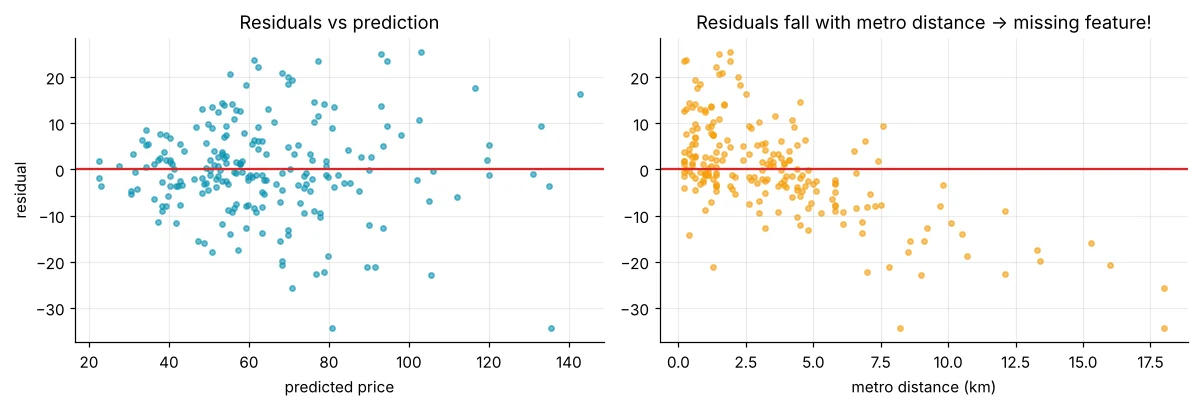
Roughly straight-line relationship, independent errors, similar error spread across the range, and no extreme outliers dominating. Residual plots are how you check them.
When a straight line is not enough
import pandas as pd
from sklearn.linear_model import LinearRegression
from sklearn.preprocessing import PolynomialFeatures
from sklearn.pipeline import make_pipeline
from sklearn.metrics import r2_score
w = pd.read_csv("delhi_weather.csv", parse_dates=["date"])
w["doy"] = w["date"].dt.dayofyear
X, y = w[["doy"]], w["avg_temp_c"]
line = LinearRegression().fit(X, y)
curve = make_pipeline(PolynomialFeatures(4), LinearRegression()).fit(X, y)
print("straight line R² =", round(r2_score(y, line.predict(X)), 3))
print("degree-4 curve R² =", round(r2_score(y, curve.predict(X)), 3), " ← seasons are not a straight line")🏅 Job skills unlocked today
Practice tasks
🏋️ Practice – do it yourself
Show solution
import pandas as pd
from sklearn.linear_model import LinearRegression
h = pd.read_csv("house_prices.csv")
for c in ["Lucknow", "Bengaluru"]:
    d = h[h["city"] == c]; m = LinearRegression().fit(d[["area_sqft"]], d["price_lakh"])
print(c, "₹", round(m.coef_[0] * 100, 2), "lakh per extra 100 sqft")Show solution
import pandas as pd
from sklearn.model_selection import train_test_split
from sklearn.linear_model import LinearRegression
st = pd.read_csv("students_performance.csv")
a, b, c, d = train_test_split(st[["study_hours"]], st["average"], test_size=0.25, random_state=0)
print(round(LinearRegression().fit(a, c).score(b, d), 3))Show solution
import pandas as pd
from sklearn.linear_model import LinearRegression
t = pd.read_csv("telecom_churn.csv").dropna()
m = LinearRegression().fit(t[["tenure_months"]], t["total_charges"])
print("Each extra month ≈ ₹", round(m.coef_[0]), "more total charges")Quick quiz
🧠 Quick Quiz – test yourself
Interview corner
💼 Interview Corner
Explain R² to a non-technical person.
“Our model explains about 80% of why prices differ from flat to flat; the remaining 20% comes from things the model does not know.” Add MAE in rupees to make it concrete.
MAE or RMSE – which would you report?
MAE for stakeholders because it is in plain units and easy to read. RMSE when large errors are especially costly. Often report both.
Summary
- Linear regression fits y = intercept + slope × x by least squares.
- Slope = change in y for one unit of x.
- Evaluate on test data: MAE, RMSE, R² vs a mean baseline.
- Residual patterns reveal missing features.
Day 39: multiple regression with all features, plus Ridge and Lasso to keep the model honest.
