Day 22: Seaborn: Distributions & Heatmaps
✅ Today you will learn
- Why Seaborn on top of Matplotlib
- Distributions: histplot, kdeplot, box, violin
- Categories: countplot, barplot with error bars
- Relationships: scatterplot with hue, regplot, heatmap
- Many charts at once: pairplot and FacetGrid
🏢 In the real world
A school chain wants to know: “Does tuition really help? Do students with internet at home score more? Is study time or attendance more important?” Seaborn answers each question with one line of code – and shows the uncertainty too.
Why Seaborn?
Matplotlib
- Full control, more code
- You group and aggregate yourself
- Best for custom layouts
Seaborn
- Works directly with DataFrames
- hue= splits by category automatically
- Statistics (mean, CI, KDE) built in
Distributions
import pandas as pd
import seaborn as sns
import matplotlib.pyplot as plt
st = pd.read_csv("students_performance.csv")
fig, ax = plt.subplots(1, 2, figsize=(11, 4))
sns.histplot(data=st, x="average", hue="internet", kde=True, ax=ax[0], palette=["#f59e0b", "#4f46e5"])
ax[0].set_title("Students with internet score slightly higher")
sns.kdeplot(data=st, x="study_hours", hue="school_type", fill=True, ax=ax[1], common_norm=False)
ax[1].set_title("Study hours: similar in both school types")
plt.tight_layout(); plt.show()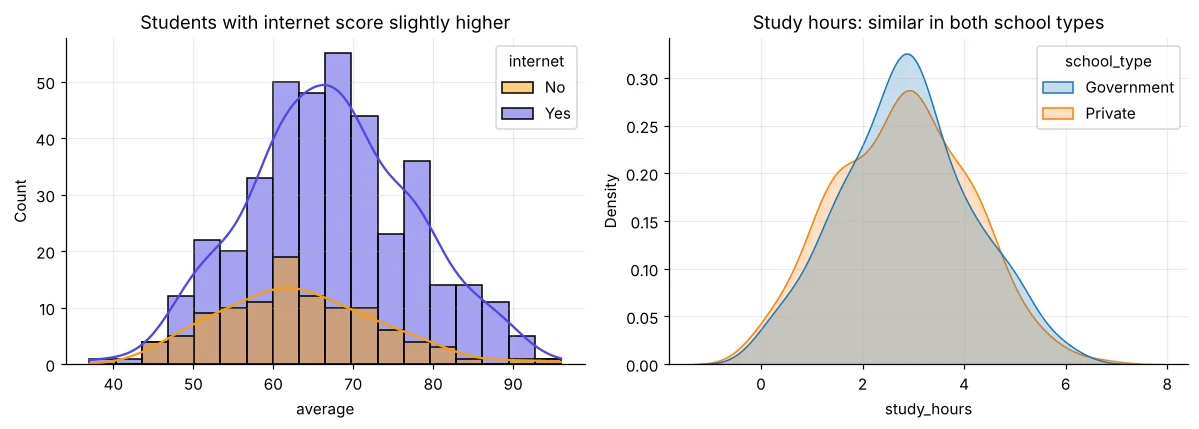
import pandas as pd
import seaborn as sns
import matplotlib.pyplot as plt
st = pd.read_csv("students_performance.csv")
order = ["School", "Graduate", "Post-Graduate"]
fig, ax = plt.subplots(1, 2, figsize=(11, 4))
sns.boxplot(data=st, x="parent_education", y="average", order=order, ax=ax[0], color="#a5b4fc")
ax[0].set_title("Box plot: median and spread")
sns.violinplot(data=st, x="parent_education", y="average", order=order, ax=ax[1], color="#99f6e4", inner="quartile")
ax[1].set_title("Violin: the full shape")
plt.tight_layout(); plt.show()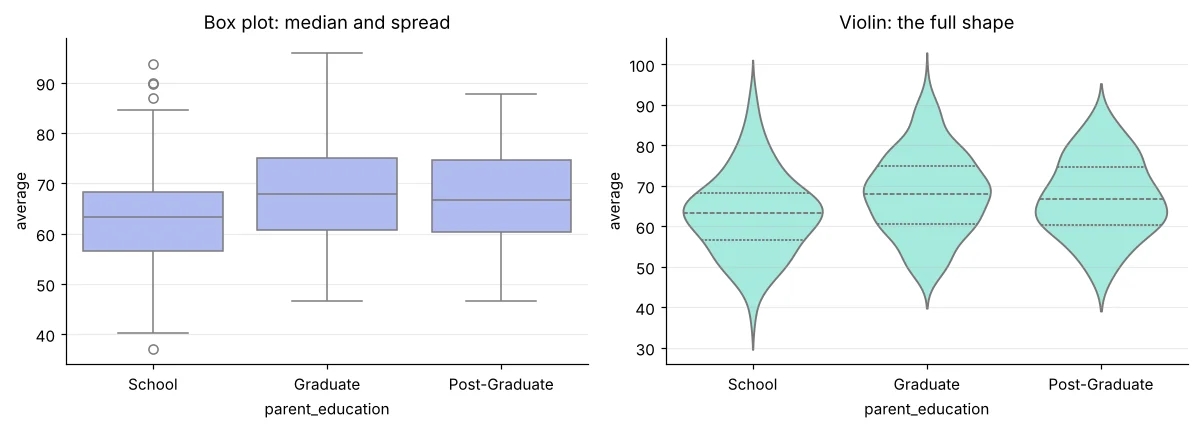
Categories with error bars
import pandas as pd
import seaborn as sns
import matplotlib.pyplot as plt
t = pd.read_csv("telecom_churn.csv")
t["churned"] = (t["churn"] == "Yes").astype(int) * 100
fig, ax = plt.subplots(1, 2, figsize=(11, 4))
sns.countplot(data=t, x="contract", hue="churn", order=["Monthly", "One year", "Two year"], ax=ax[0], palette=["#94a3b8", "#dc2626"])
ax[0].set_title("Customers by contract and churn")
sns.barplot(data=t, x="contract", y="churned", hue="internet_service", order=["Monthly", "One year", "Two year"], ax=ax[1], errorbar=("ci", 95))
ax[1].set_ylabel("Churn %"); ax[1].set_title("Churn % with 95% confidence interval")
plt.tight_layout(); plt.show()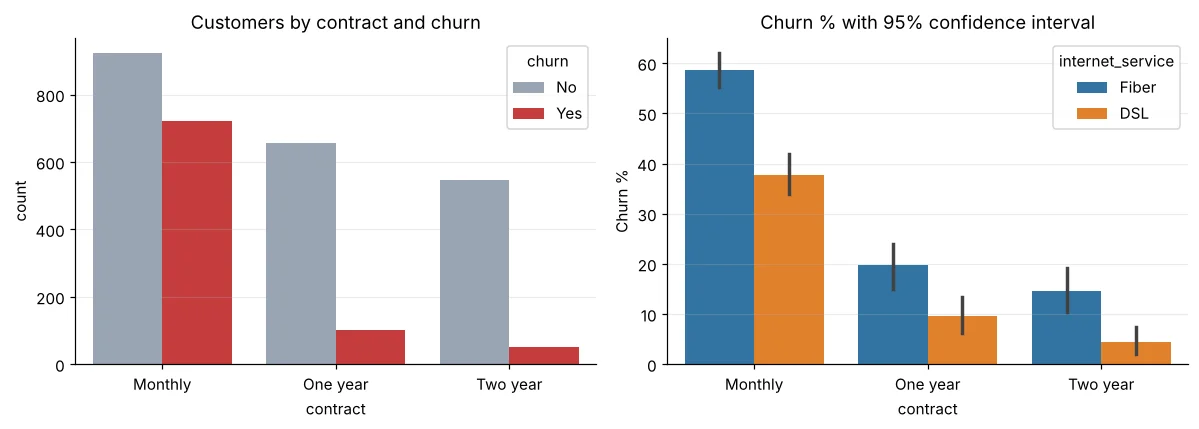
It is the 95% confidence interval: the range where the true average probably lies. If two intervals do not overlap, the difference is likely real. Day 29 explains this properly.
Relationships
import pandas as pd
import seaborn as sns
import matplotlib.pyplot as plt
st = pd.read_csv("students_performance.csv")
fig, ax = plt.subplots(1, 2, figsize=(11, 4))
sns.regplot(data=st, x="study_hours", y="average", ax=ax[0], scatter_kws=dict(s=10, alpha=0.4), line_kws=dict(color="#dc2626"))
ax[0].set_title("Each extra study hour ≈ higher average")
sns.regplot(data=st, x="attendance", y="average", ax=ax[1], scatter_kws=dict(s=10, alpha=0.4, color="#0891b2"), line_kws=dict(color="#dc2626"))
ax[1].set_title("Attendance helps too, but less")
plt.tight_layout(); plt.show()
print(st[["study_hours", "attendance", "average"]].corr().round(2))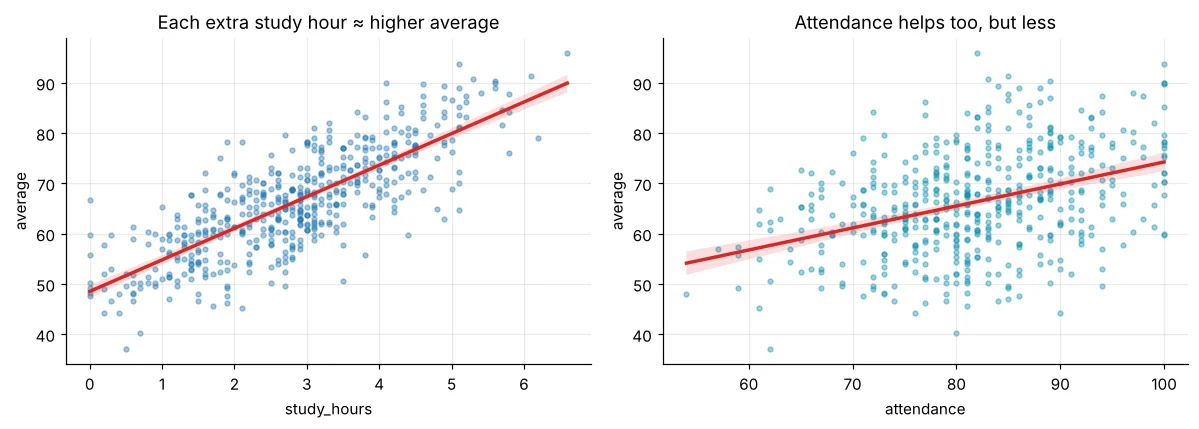
import pandas as pd
import seaborn as sns
import matplotlib.pyplot as plt
st = pd.read_csv("students_performance.csv")
pv = st.pivot_table(index="parent_education", columns="internet", values="average", aggfunc="mean")
plt.figure(figsize=(5.5, 3.4))
sns.heatmap(pv.loc[["School", "Graduate", "Post-Graduate"]], annot=True, fmt=".1f", cmap="YlGnBu", cbar_kws=dict(label="avg score"))
plt.title("Average score: parent education × internet"); plt.show()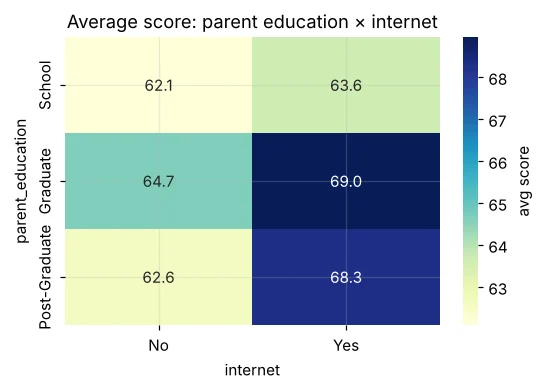
pairplot and FacetGrid
import pandas as pd
import seaborn as sns
import matplotlib.pyplot as plt
m = pd.read_csv("mall_customers.csv")
g = sns.pairplot(m[["age", "annual_income_lakh", "spending_score"]], corner=True, plot_kws=dict(s=14, alpha=0.6), height=2.4)
g.figure.suptitle("Mall customers – look at income vs spending!", y=1.02)
plt.show()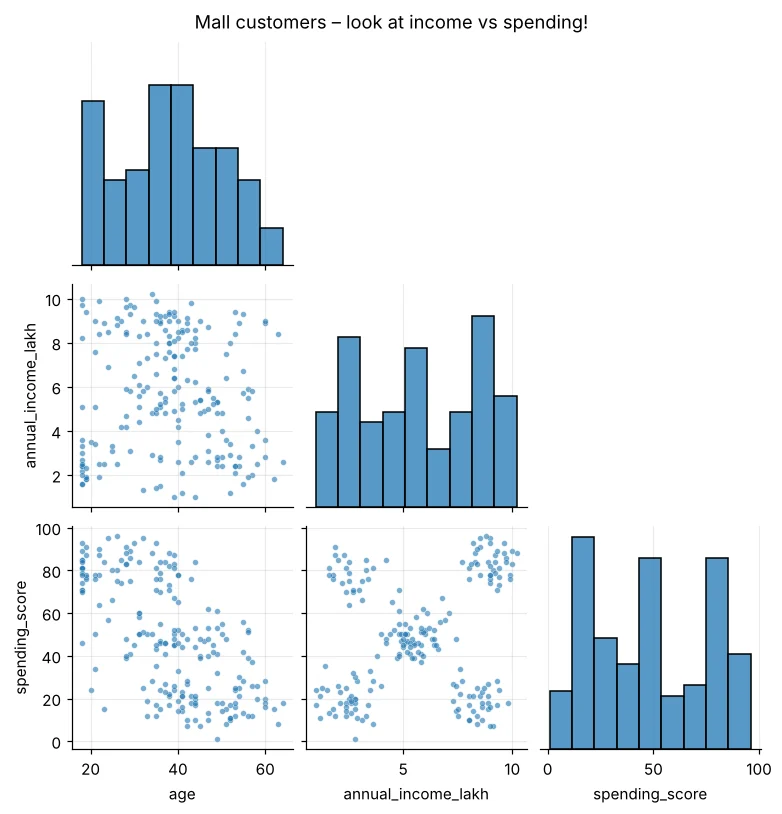
import pandas as pd
import seaborn as sns
import matplotlib.pyplot as plt
h = pd.read_csv("house_prices.csv")
g = sns.FacetGrid(h, col="city", col_wrap=3, height=2.6, aspect=1.3)
g.map_dataframe(sns.scatterplot, x="area_sqft", y="price_lakh", hue="furnishing", s=12, palette="Set2")
g.add_legend(); g.set_titles("{col_name}")
plt.show()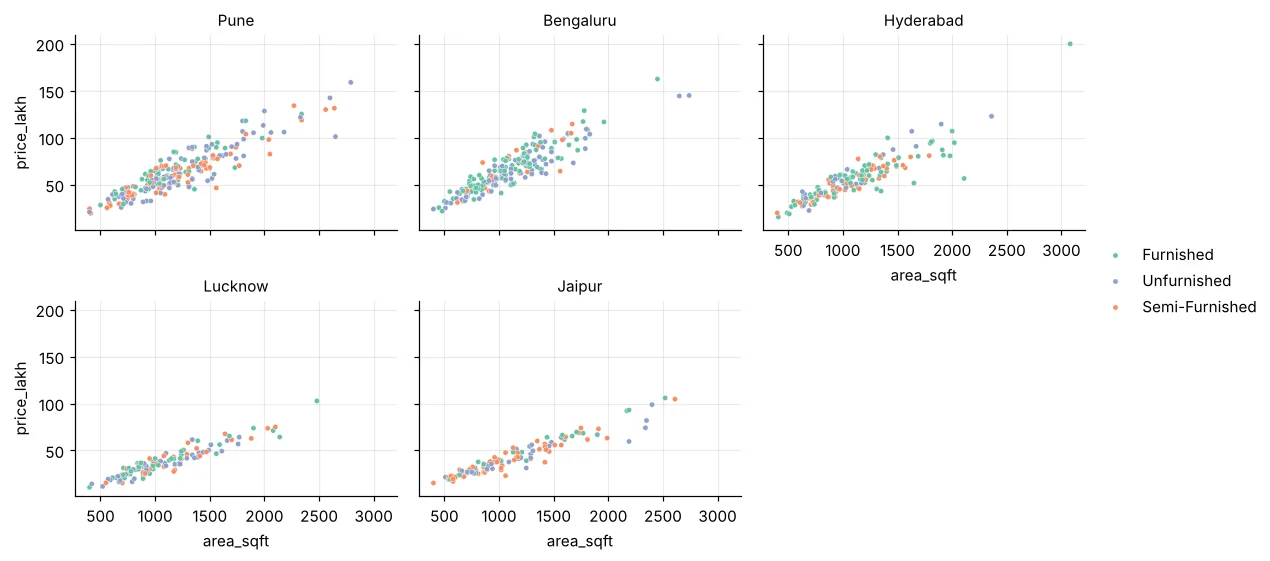
sns.set_theme(style="whitegrid", palette="muted", font_scale=1.1) at the top of a notebook makes every chart consistent.
🏅 Job skills unlocked today
Practice tasks
🏋️ Practice – do it yourself
monthly_charges by churn in the telecom data. Who pays more – churners or stayers?Show solution
import pandas as pd, seaborn as sns, matplotlib.pyplot as plt
t = pd.read_csv("telecom_churn.csv")
plt.figure(figsize=(5, 3.5))
sns.boxplot(data=t, x="churn", y="monthly_charges", palette=["#94a3b8", "#dc2626"], hue="churn", legend=False)
plt.title("Churners pay higher monthly charges"); plt.show()
print(t.groupby("churn")["monthly_charges"].median())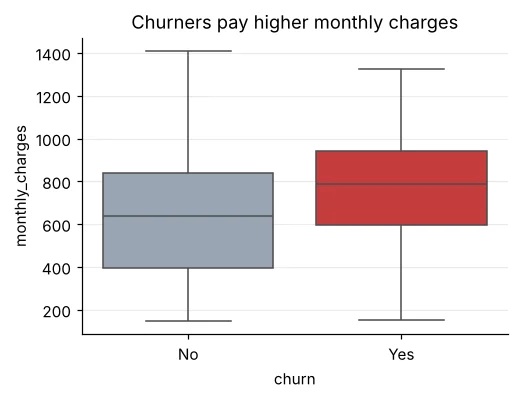
Show solution
import pandas as pd, seaborn as sns, matplotlib.pyplot as plt
l = pd.read_csv("loan_applications.csv")
l["score_band"] = pd.cut(l["credit_score"], [0, 650, 750, 900], labels=["<650", "650-750", ">750"])
pv = l.pivot_table(index="employment", columns="score_band", values="approved", aggfunc="mean", observed=True) * 100
plt.figure(figsize=(5.5, 3)); sns.heatmap(pv, annot=True, fmt=".0f", cmap="Greens"); plt.title("Approval %"); plt.show()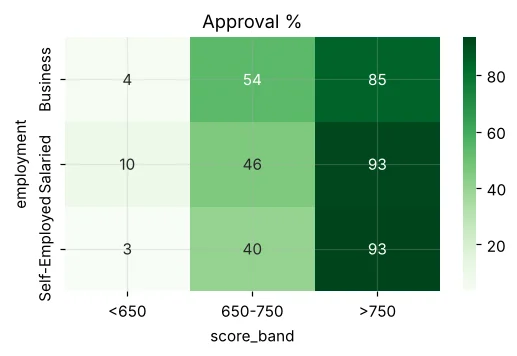
sns.lineplot to show monthly average AQI in Delhi with one line per year (hue="year").Quick quiz
🧠 Quick Quiz – test yourself
Interview corner
💼 Interview Corner
How would you show that two groups differ, visually?
Box or violin plots side by side for the distribution, and a barplot of the mean with confidence intervals. Overlapping intervals warn the difference may be noise – confirm with a t-test (Day 30).
When is a heatmap useful?
For a correlation matrix, or for any two-way table (pivot) where you want to spot high and low cells quickly – e.g. churn by contract × internet type.
Summary
- Seaborn = DataFrame-aware statistical plots on top of Matplotlib.
- histplot/kdeplot/box/violin for distributions; count/barplot for categories.
- regplot and heatmap for relationships; pairplot and FacetGrid for many at once.
- Confidence intervals show how sure we are.
Day 23: Plotly – interactive charts you can hover, zoom and share as a web page.
