दिन 22: Seaborn: Distributions और Heatmaps
✅ आज आप सीखेंगे
- Matplotlib के ऊपर Seaborn क्यों
- Distributions: histplot, kdeplot, box, violin
- Categories: countplot, error bars के साथ barplot
- Relationships: hue वाला scatterplot, regplot, heatmap
- एक साथ कई charts: pairplot और FacetGrid
🏢 असली दुनिया में
एक school chain जानना चाहती है: “क्या tuition सच में मदद करती है? घर पर internet वाले students ज़्यादा score करते हैं? Study time ज़्यादा ज़रूरी है या attendance?” Seaborn हर सवाल का जवाब एक line के code से देता है – और अनिश्चितता भी दिखाता है।
Seaborn क्यों?
Matplotlib
- पूरा control, ज़्यादा code
- Grouping और aggregation ख़ुद
- Custom layouts के लिए बढ़िया
Seaborn
- सीधे DataFrames के साथ
- hue= अपने आप category से बाँटता है
- Statistics (mean, CI, KDE) अंदर ही
Distributions
import pandas as pd
import seaborn as sns
import matplotlib.pyplot as plt
st = pd.read_csv("students_performance.csv")
fig, ax = plt.subplots(1, 2, figsize=(11, 4))
sns.histplot(data=st, x="average", hue="internet", kde=True, ax=ax[0], palette=["#f59e0b", "#4f46e5"])
ax[0].set_title("Students with internet score slightly higher")
sns.kdeplot(data=st, x="study_hours", hue="school_type", fill=True, ax=ax[1], common_norm=False)
ax[1].set_title("Study hours: similar in both school types")
plt.tight_layout(); plt.show()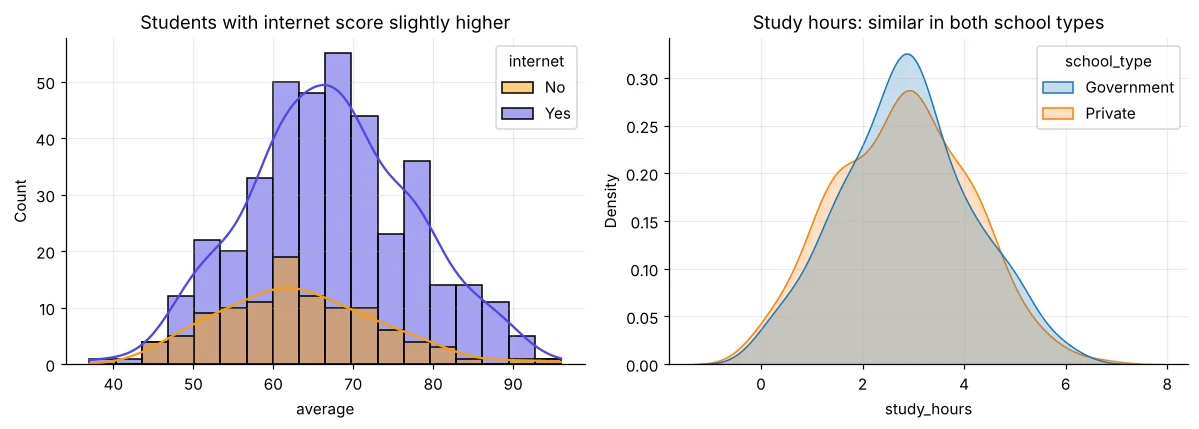
import pandas as pd
import seaborn as sns
import matplotlib.pyplot as plt
st = pd.read_csv("students_performance.csv")
order = ["School", "Graduate", "Post-Graduate"]
fig, ax = plt.subplots(1, 2, figsize=(11, 4))
sns.boxplot(data=st, x="parent_education", y="average", order=order, ax=ax[0], color="#a5b4fc")
ax[0].set_title("Box plot: median and spread")
sns.violinplot(data=st, x="parent_education", y="average", order=order, ax=ax[1], color="#99f6e4", inner="quartile")
ax[1].set_title("Violin: the full shape")
plt.tight_layout(); plt.show()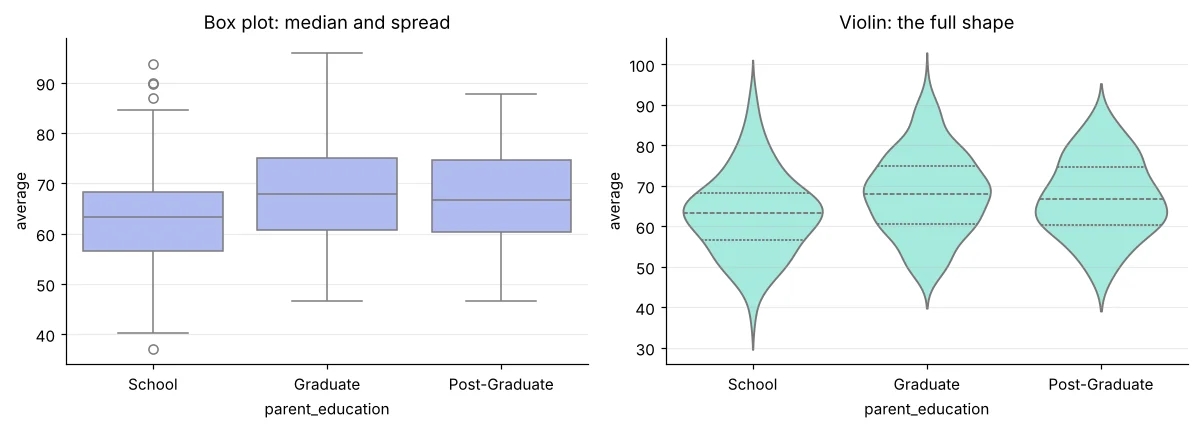
Error bars के साथ categories
import pandas as pd
import seaborn as sns
import matplotlib.pyplot as plt
t = pd.read_csv("telecom_churn.csv")
t["churned"] = (t["churn"] == "Yes").astype(int) * 100
fig, ax = plt.subplots(1, 2, figsize=(11, 4))
sns.countplot(data=t, x="contract", hue="churn", order=["Monthly", "One year", "Two year"], ax=ax[0], palette=["#94a3b8", "#dc2626"])
ax[0].set_title("Customers by contract and churn")
sns.barplot(data=t, x="contract", y="churned", hue="internet_service", order=["Monthly", "One year", "Two year"], ax=ax[1], errorbar=("ci", 95))
ax[1].set_ylabel("Churn %"); ax[1].set_title("Churn % with 95% confidence interval")
plt.tight_layout(); plt.show()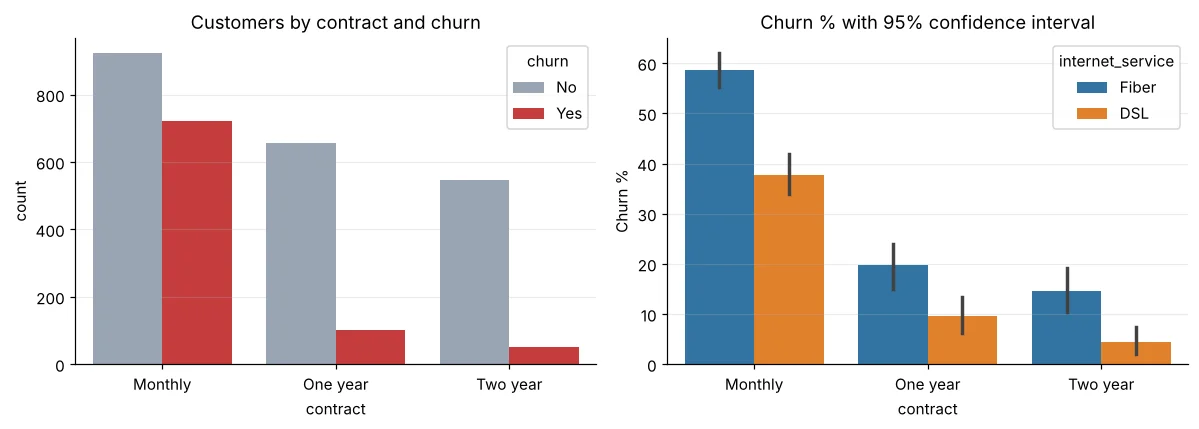
यह 95% confidence interval है: वह range जिसमें असली औसत शायद है। दो intervals overlap न करें तो अंतर शायद असली है। Day 29 में यह विस्तार से।
Relationships
import pandas as pd
import seaborn as sns
import matplotlib.pyplot as plt
st = pd.read_csv("students_performance.csv")
fig, ax = plt.subplots(1, 2, figsize=(11, 4))
sns.regplot(data=st, x="study_hours", y="average", ax=ax[0], scatter_kws=dict(s=10, alpha=0.4), line_kws=dict(color="#dc2626"))
ax[0].set_title("Each extra study hour ≈ higher average")
sns.regplot(data=st, x="attendance", y="average", ax=ax[1], scatter_kws=dict(s=10, alpha=0.4, color="#0891b2"), line_kws=dict(color="#dc2626"))
ax[1].set_title("Attendance helps too, but less")
plt.tight_layout(); plt.show()
print(st[["study_hours", "attendance", "average"]].corr().round(2))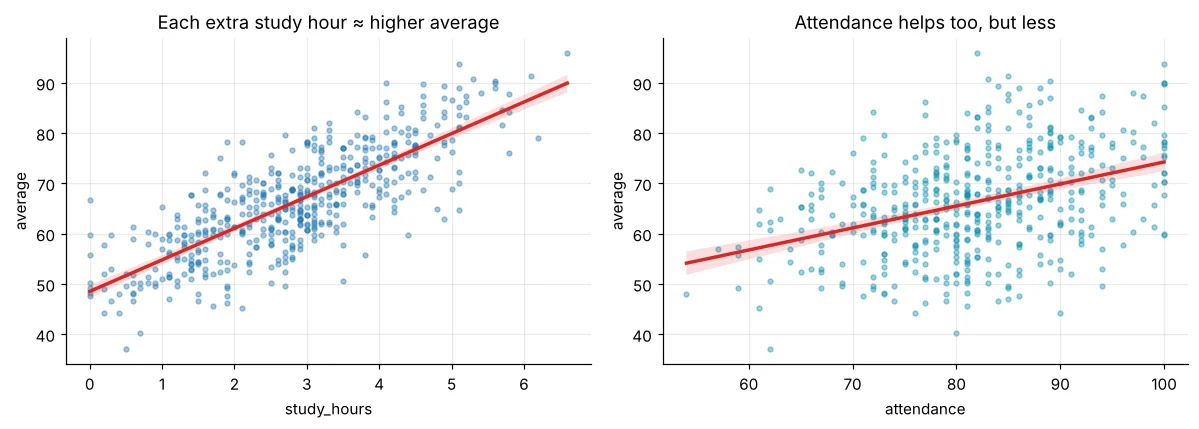
import pandas as pd
import seaborn as sns
import matplotlib.pyplot as plt
st = pd.read_csv("students_performance.csv")
pv = st.pivot_table(index="parent_education", columns="internet", values="average", aggfunc="mean")
plt.figure(figsize=(5.5, 3.4))
sns.heatmap(pv.loc[["School", "Graduate", "Post-Graduate"]], annot=True, fmt=".1f", cmap="YlGnBu", cbar_kws=dict(label="avg score"))
plt.title("Average score: parent education × internet"); plt.show()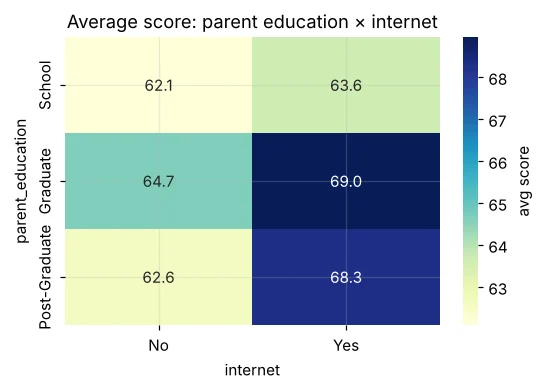
pairplot और FacetGrid
import pandas as pd
import seaborn as sns
import matplotlib.pyplot as plt
m = pd.read_csv("mall_customers.csv")
g = sns.pairplot(m[["age", "annual_income_lakh", "spending_score"]], corner=True, plot_kws=dict(s=14, alpha=0.6), height=2.4)
g.figure.suptitle("Mall customers – look at income vs spending!", y=1.02)
plt.show()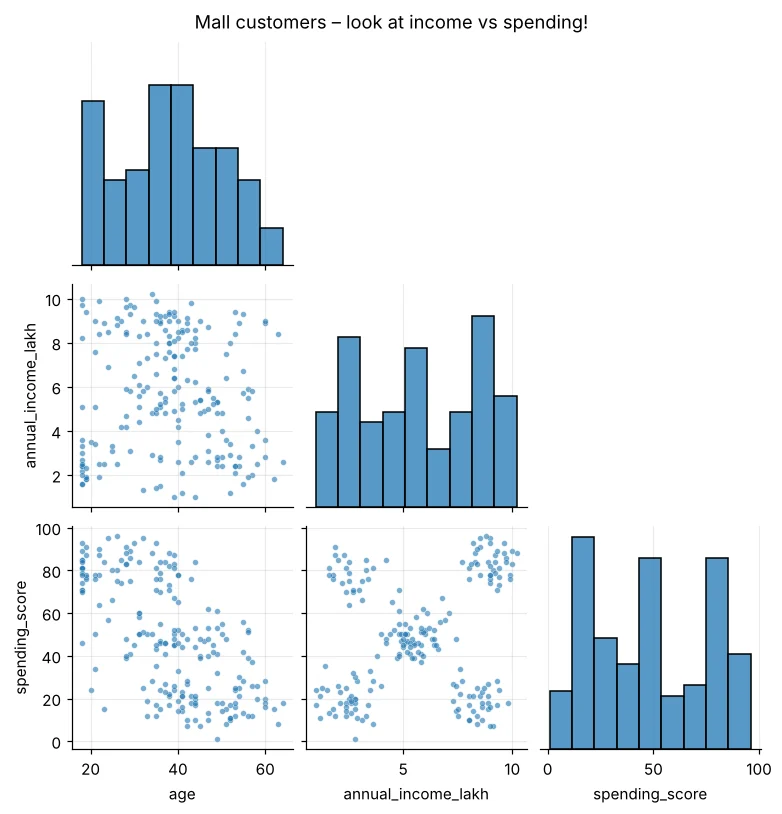
import pandas as pd
import seaborn as sns
import matplotlib.pyplot as plt
h = pd.read_csv("house_prices.csv")
g = sns.FacetGrid(h, col="city", col_wrap=3, height=2.6, aspect=1.3)
g.map_dataframe(sns.scatterplot, x="area_sqft", y="price_lakh", hue="furnishing", s=12, palette="Set2")
g.add_legend(); g.set_titles("{col_name}")
plt.show()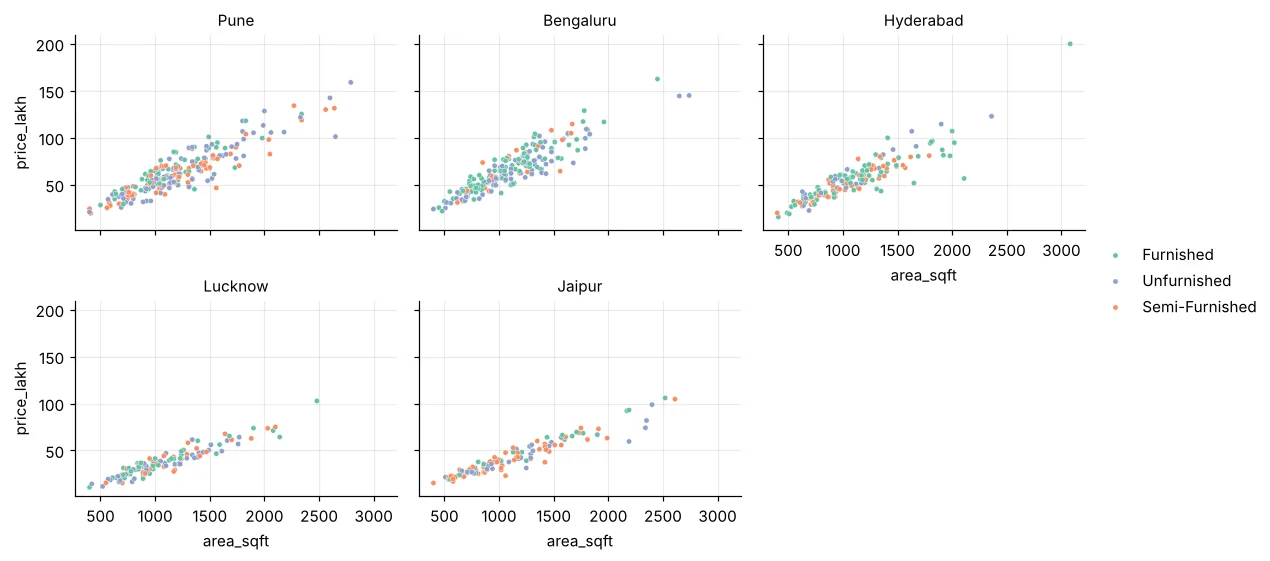
Notebook के ऊपर sns.set_theme(style="whitegrid", palette="muted", font_scale=1.1) हर chart को एक जैसा बना देता है।
🏅 आज के Job Skills
Practice tasks
🏋️ Practice – ख़ुद करें
churn के हिसाब से monthly_charges का box plot। ज़्यादा कौन देता है – जाने वाले या रुकने वाले?Solution देखें
import pandas as pd, seaborn as sns, matplotlib.pyplot as plt
t = pd.read_csv("telecom_churn.csv")
plt.figure(figsize=(5, 3.5))
sns.boxplot(data=t, x="churn", y="monthly_charges", palette=["#94a3b8", "#dc2626"], hue="churn", legend=False)
plt.title("Churners pay higher monthly charges"); plt.show()
print(t.groupby("churn")["monthly_charges"].median())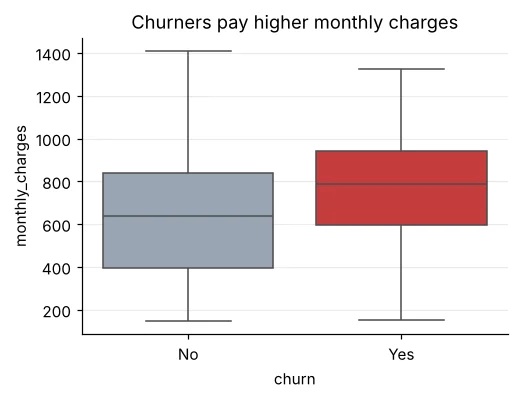
Solution देखें
import pandas as pd, seaborn as sns, matplotlib.pyplot as plt
l = pd.read_csv("loan_applications.csv")
l["score_band"] = pd.cut(l["credit_score"], [0, 650, 750, 900], labels=["<650", "650-750", ">750"])
pv = l.pivot_table(index="employment", columns="score_band", values="approved", aggfunc="mean", observed=True) * 100
plt.figure(figsize=(5.5, 3)); sns.heatmap(pv, annot=True, fmt=".0f", cmap="Greens"); plt.title("Approval %"); plt.show()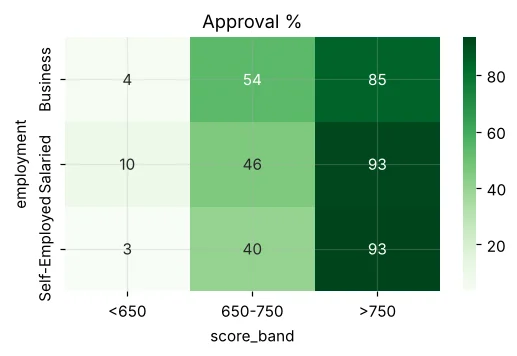
sns.lineplot से Delhi का monthly average AQI दिखाएँ, हर साल की अलग line (hue="year")।Quick quiz
🧠 Quick Quiz – ख़ुद को जाँचें
Interview corner
💼 Interview Corner
दो groups अलग हैं, यह visually कैसे दिखाएँगे?
Distribution के लिए साथ-साथ box या violin plots, और confidence intervals के साथ mean का barplot। Overlap करते intervals बताते हैं कि अंतर शोर हो सकता है – t-test (Day 30) से पक्का करें।
Heatmap कब काम आता है?
Correlation matrix के लिए, या किसी भी two-way table (pivot) के लिए जहाँ ऊँचे-नीचे cells जल्दी पहचानने हों – जैसे contract × internet type के हिसाब से churn।
सारांश
- Seaborn = Matplotlib के ऊपर DataFrame समझने वाले statistical plots।
- Distributions के लिए histplot/kdeplot/box/violin; categories के लिए count/barplot।
- Relationships के लिए regplot और heatmap; कई के लिए pairplot और FacetGrid।
- Confidence intervals बताते हैं हम कितने निश्चित हैं।
Day 23: Plotly – interactive charts जिन पर hover, zoom करके web page की तरह share कर सकते हैं।
