दिन 18: Exploratory Data Analysis (EDA)
✅ आज आप सीखेंगे
- 6-step EDA framework
- Univariate: histograms, value counts, skew
- IQR rule और box plots से outliers
- Bivariate: numeric vs target, category vs target
- Correlation heatmap और charts को insights में बदलना
🏢 असली दुनिया में
एक property start-up आपको छह शहरों की 800 house listings देकर एक सवाल पूछता है: “Price किस चीज़ से तय होता है?” किसी भी machine learning से पहले, EDA बताता है कौन से features मायने रखते हैं, कौन सी values संदिग्ध हैं और data क्या कहानी कहता है।
EDA framework
- 1समझें: shape, columns, types
- 2Quality: missing, duplicates
- 3Univariate: एक बार में एक column
- 4Outliers
- 5Bivariate: हर feature vs target
- 6Insights लिखें
Steps 1–2: समझना और quality जाँचना
import pandas as pd
h = pd.read_csv("house_prices.csv")
print(h.shape)
print(h.head(3))
print("Missing:", h.isna().sum().sum(), "| duplicates:", h.duplicated().sum())
print(h.describe().round(1).T[["mean", "50%", "min", "max"]])Step 3: univariate analysis
import pandas as pd
import matplotlib.pyplot as plt
h = pd.read_csv("house_prices.csv")
fig, ax = plt.subplots(1, 3, figsize=(12, 3.6))
ax[0].hist(h["price_lakh"], bins=30, color="#4f46e5"); ax[0].set_title("Price (₹ lakh)")
ax[1].hist(h["area_sqft"], bins=30, color="#0891b2"); ax[1].set_title("Area (sqft)")
h["city"].value_counts().plot(kind="bar", ax=ax[2], color="#f59e0b"); ax[2].set_title("Listings per city")
ax[2].tick_params(axis="x", rotation=30)
plt.tight_layout(); plt.show()
print("Skew → price:", round(h["price_lakh"].skew(), 2), "| area:", round(h["area_sqft"].skew(), 2))
Skew ≈ 0: symmetric। Skew > 1: लंबी right tail (prices, incomes) – mean median से ऊपर खिंच जाता है, इसलिए median बताएँ और बाद में log transform पर विचार करें।
Step 4: IQR से outliers
import pandas as pd
h = pd.read_csv("house_prices.csv")
q1, q3 = h["price_lakh"].quantile([0.25, 0.75])
iqr = q3 - q1
low, high = q1 - 1.5 * iqr, q3 + 1.5 * iqr
out = h[(h["price_lakh"] < low) | (h["price_lakh"] > high)]
print(f"Q1={q1:.1f} Q3={q3:.1f} IQR={iqr:.1f} → normal range {low:.1f} to {high:.1f} lakh")
print(len(out), "outliers")
print(out.sort_values("price_lakh", ascending=False)[["city", "area_sqft", "bedrooms", "price_lakh"]].head())import pandas as pd
import seaborn as sns
import matplotlib.pyplot as plt
h = pd.read_csv("house_prices.csv")
order = h.groupby("city")["price_lakh"].median().sort_values().index
plt.figure(figsize=(9, 4))
sns.boxplot(data=h, x="city", y="price_lakh", order=order, color="#a5b4fc")
plt.title("Price by city – boxes show the middle 50%, dots are outliers")
plt.ylabel("₹ lakh"); plt.show()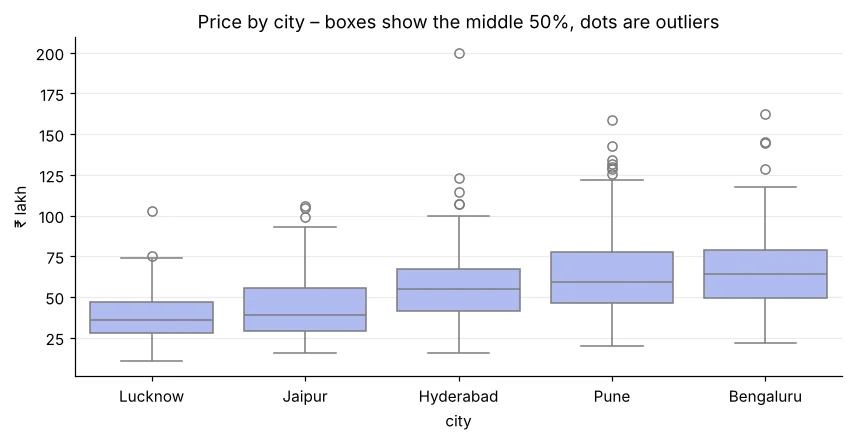
असंभव values हटाएँ (negative area)। दुर्लभ पर संभव values (3,000 sqft villa) की जाँच करें। अक्सर उन्हें हटाने की जगह रखते हैं – या cap करते हैं।
Step 5: bivariate analysis
import pandas as pd
import matplotlib.pyplot as plt
h = pd.read_csv("house_prices.csv")
fig, ax = plt.subplots(1, 2, figsize=(11, 4))
ax[0].scatter(h["area_sqft"], h["price_lakh"], s=10, alpha=0.5, color="#4f46e5")
ax[0].set_xlabel("Area (sqft)"); ax[0].set_ylabel("Price (₹ lakh)"); ax[0].set_title("Bigger homes cost more")
h["ppsf"] = h["price_lakh"] * 1e5 / h["area_sqft"]               # price per sqft removes the size effect
band = pd.cut(h["metro_km"], [0, 1, 2, 4, 7, 18], labels=["<1", "1-2", "2-4", "4-7", "7+"])
h.groupby(band, observed=True)["ppsf"].median().plot(kind="bar", ax=ax[1], color="#dc2626", rot=0)
ax[1].set_xlabel("Distance to metro (km)"); ax[1].set_ylabel("₹ per sqft"); ax[1].set_title("Farther from metro → cheaper per sqft")
plt.tight_layout(); plt.show()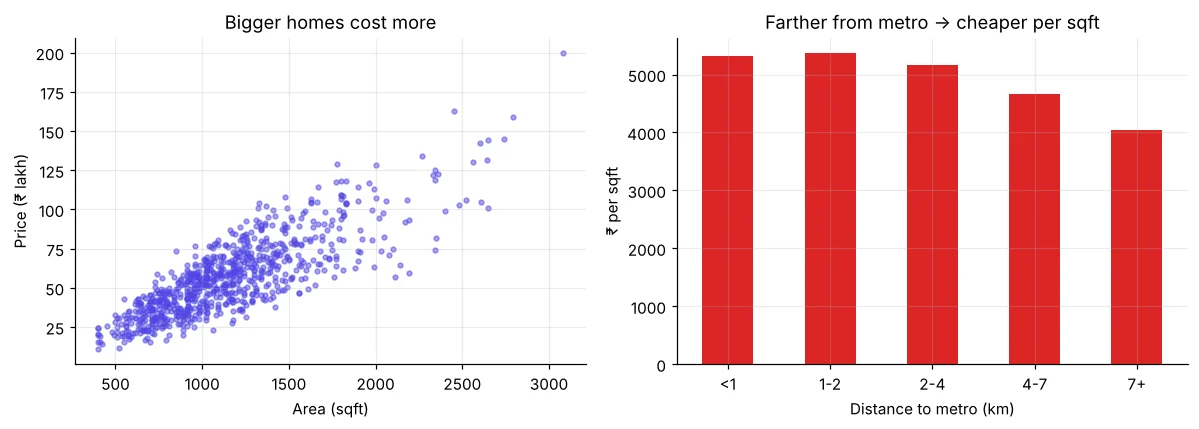
import pandas as pd
h = pd.read_csv("house_prices.csv")
for col in ["furnishing", "parking", "bedrooms"]:
print(h.groupby(col)["price_lakh"].median().round(1).to_dict())import pandas as pd
import seaborn as sns
import matplotlib.pyplot as plt
h = pd.read_csv("house_prices.csv")
corr = h.select_dtypes("number").corr().round(2)
print(corr["price_lakh"].sort_values(ascending=False))
plt.figure(figsize=(6.5, 5))
sns.heatmap(corr, annot=True, cmap="RdBu_r", vmin=-1, vmax=1, fmt=".2f")
plt.title("Correlation matrix"); plt.show()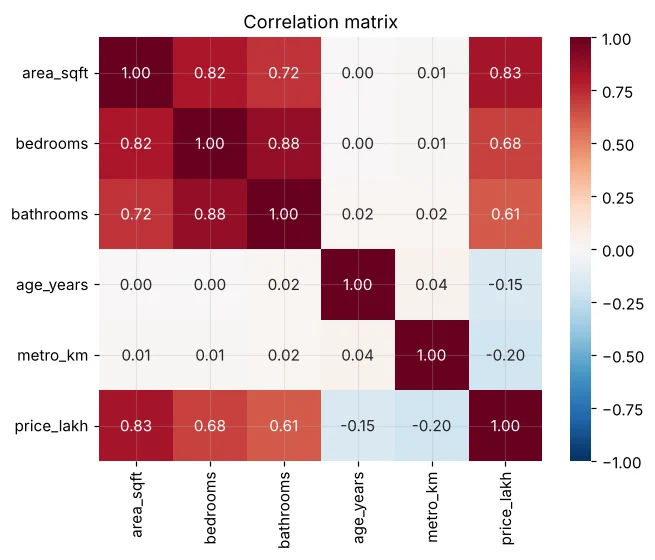
Step 6: सिर्फ़ charts नहीं, insights लिखें
import pandas as pd
def quick_eda(df, target):
    print("Shape:", df.shape, "| missing:", int(df.isna().sum().sum()), "| dups:", int(df.duplicated().sum()))
    num = df.select_dtypes("number").drop(columns=[target])
    print("Top numeric drivers:", num.corrwith(df[target]).abs().sort_values(ascending=False).round(2).head(3).to_dict())
    for c in df.select_dtypes("object").columns:
        g = df.groupby(c)[target].median()
        print(f"{c}: best={g.idxmax()} ({g.max():.1f}) worst={g.idxmin()} ({g.min():.1f})")
quick_eda(pd.read_csv("house_prices.csv"), "price_lakh")🏅 आज के Job Skills
Practice tasks
🏋️ Practice – ख़ुद करें
students_performance.csv पर target average के साथ quick_eda चलाएँ।Solution देखें
import pandas as pd
def quick_eda(df, target):
    num = df.select_dtypes("number").drop(columns=[target, "maths", "science", "english"])
    print(num.corrwith(df[target]).round(2).sort_values(ascending=False).to_dict())
    for c in ["gender", "school_type", "tuition", "internet", "parent_education"]:
        print(c, df.groupby(c)[target].mean().round(1).to_dict())
quick_eda(pd.read_csv("students_performance.csv"), "average")monthly_charges में outliers ढूँढें।Solution देखें
import pandas as pd
t = pd.read_csv("telecom_churn.csv")
q1, q3 = t["monthly_charges"].quantile([.25, .75]); i = q3 - q1
print(((t["monthly_charges"] < q1 - 1.5 * i) | (t["monthly_charges"] > q3 + 1.5 * i)).sum(), "outliers")mall_customers.csv में spending_score से कौन सा numeric column सबसे ज़्यादा correlated है? क्या रिश्ता linear है? (Hint: scatter plot)Solution देखें
import pandas as pd
m = pd.read_csv("mall_customers.csv")
print(m.select_dtypes("number").corr()["spending_score"].round(2))
print("Age is strongly negative; income looks weak overall, yet a scatter shows clear clusters (Day 46).")Quick quiz
🧠 Quick Quiz – ख़ुद को जाँचें
Interview corner
💼 Interview Corner
अपना EDA process बताइए।
Business सवाल और columns समझें; shape, types, missing values और duplicates जाँचें; हर variable देखें (histograms, value_counts); outliers पकड़ें; हर feature को target से जोड़ें (scatter, box, group medians, correlation); फिर 3–5 insights और modelling के अगले कदम लिखें।
दो features आपस में बहुत correlated हैं। क्या यह समस्या है?
Tree models से prediction में आमतौर पर नहीं। Linear models में multicollinearity होती है – अस्थिर coefficients – इसलिए एक हटाएँ, दोनों को जोड़ें या regularisation (Day 39) लें।
सारांश
- EDA = समझना → quality → univariate → outliers → bivariate → insights।
- Skewed data के लिए median; outliers के लिए IQR।
- Category vs number के लिए box; number vs number के लिए scatter; correlations के लिए heatmap।
- हमेशा लिखी हुई insights से ख़त्म करें।
Day 19: Mini project – BazaarKart की 2024 sales का पूरा EDA, management summary के साथ।
