दिन 46: K-Means Clustering: Customer Segments
✅ आज आप सीखेंगे
- Clustering: labels के बिना groups
- K-Means step by step
- पहले scale, फिर k चुनें (elbow, silhouette)
- Clusters को marketing personas में बदलना
- DBSCAN या hierarchical clustering कब
🏢 असली दुनिया में
Pune के एक mall के 200 loyalty-card members का age, income और spending score है। Marketing सबको एक ही SMS भेजना बंद करना चाहती है। किसी ने customers के “प्रकार” label नहीं किए – clustering उन्हें ढूँढती है, और हर group को अपना offer मिलता है।
पहले data देखें
import pandas as pd
import matplotlib.pyplot as plt
m = pd.read_csv("mall_customers.csv")
print(m.head()); print(m.describe().round(1).loc[["mean", "min", "max"]])
plt.figure(figsize=(7.5, 4.5))
plt.scatter(m["annual_income_lakh"], m["spending_score"], s=22, color="#64748b")
plt.xlabel("annual income (₹ lakh)"); plt.ylabel("spending score (1–100)")
plt.title("Can you see the groups?"); plt.show()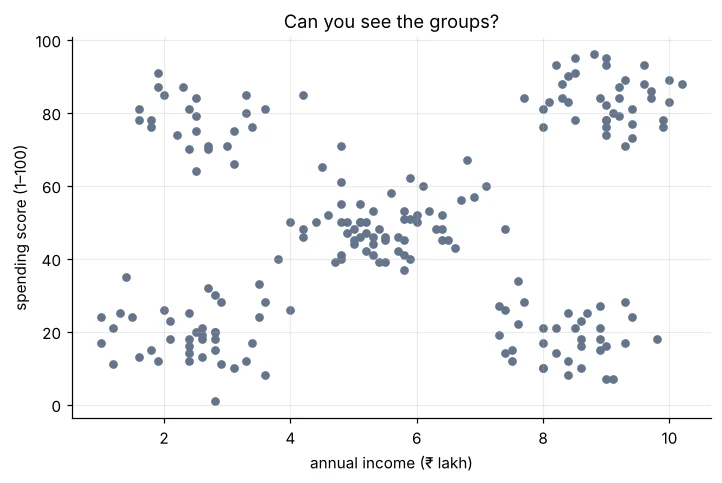
K-Means कैसे काम करता है
- 1k random centres चुनें
- 2हर customer को सबसे क़रीबी centre में डालें
- 3हर centre को उसके customers के औसत पर ले जाएँ
- 4Centres रुकने तक दोहराएँ
import numpy as np
import pandas as pd
import matplotlib.pyplot as plt
m = pd.read_csv("mall_customers.csv")
X = m[["annual_income_lakh", "spending_score"]].to_numpy()
Xs = (X - X.mean(0)) / X.std(0)
rng = np.random.default_rng(3)
centres = Xs[rng.choice(len(Xs), 5, replace=False)]
fig, ax = plt.subplots(1, 4, figsize=(14, 3.4), sharey=True)
for it in range(4):
    lab = np.argmin(((Xs[:, None, :] - centres[None]) ** 2).sum(-1), axis=1)
    ax[it].scatter(Xs[:, 0], Xs[:, 1], c=lab, cmap="tab10", s=10)
    ax[it].scatter(centres[:, 0], centres[:, 1], c="black", marker="X", s=120)
    ax[it].set_title(f"iteration {it + 1}")
    centres = np.array([Xs[lab == k].mean(0) for k in range(5)])
plt.tight_layout(); plt.show()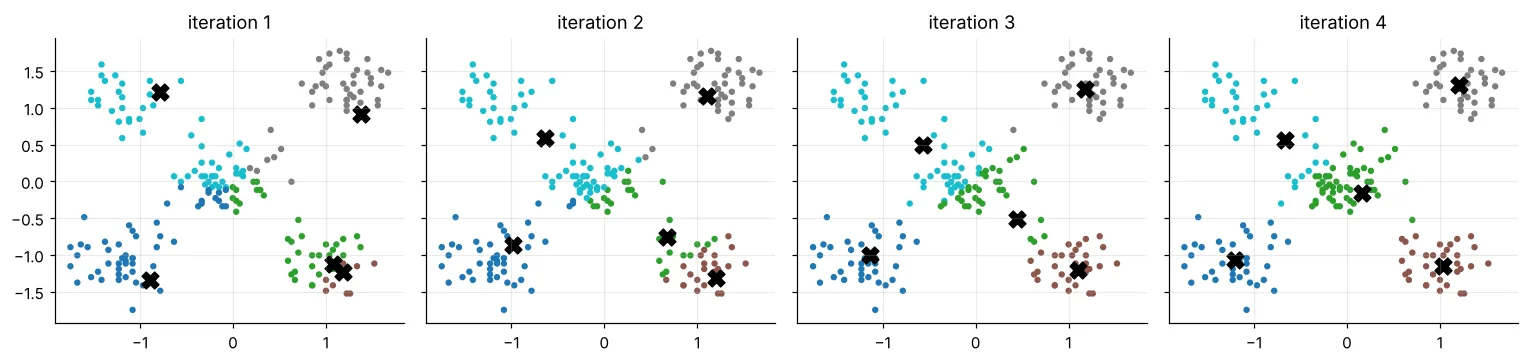
scikit-learn से K-Means
import pandas as pd
from sklearn.preprocessing import StandardScaler
from sklearn.cluster import KMeans
m = pd.read_csv("mall_customers.csv")
X = StandardScaler().fit_transform(m[["annual_income_lakh", "spending_score"]])
km = KMeans(n_clusters=5, n_init=10, random_state=0).fit(X)
m["cluster"] = km.labels_
print(m["cluster"].value_counts().sort_index().to_dict())
print("inertia (within-cluster spread):", round(km.inertia_, 1))K-Means दूरियाँ इस्तेमाल करता है। Income (2–10 lakh) और score (1–100) अलग scales पर हैं – scaling के बिना अकेला spending score clusters तय कर देगा।
k चुनना
import pandas as pd
import matplotlib.pyplot as plt
from sklearn.preprocessing import StandardScaler
from sklearn.cluster import KMeans
from sklearn.metrics import silhouette_score
m = pd.read_csv("mall_customers.csv")
X = StandardScaler().fit_transform(m[["annual_income_lakh", "spending_score"]])
ks = range(2, 11); inertia, sil = [], []
for k in ks:
    km = KMeans(n_clusters=k, n_init=10, random_state=0).fit(X)
    inertia.append(km.inertia_); sil.append(silhouette_score(X, km.labels_))
fig, ax = plt.subplots(1, 2, figsize=(11, 3.6))
ax[0].plot(ks, inertia, marker="o", color="#4f46e5"); ax[0].set_title("Elbow: inertia drops slowly after the bend"); ax[0].set_xlabel("k")
ax[1].plot(ks, sil, marker="o", color="#16a34a"); ax[1].set_title("Silhouette: higher is better"); ax[1].set_xlabel("k")
best = list(ks)[sil.index(max(sil))]; ax[1].axvline(best, color="#dc2626", ls="--")
plt.tight_layout(); plt.show()
print("best k by silhouette:", best, "| scores:", [round(s, 3) for s in sil])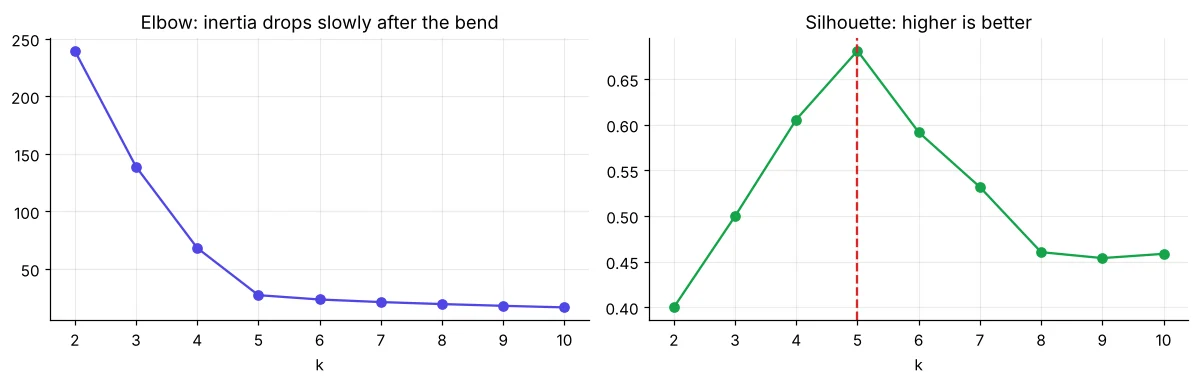
हर customer के लिए: अपने cluster के कितने क़रीब vs अगले सबसे क़रीबी cluster के, −1 (ग़लत group) से +1 (perfect) तक। औसत बताता है clusters कितने अलग हैं।
Clusters से personas तक
import pandas as pd
import matplotlib.pyplot as plt
from sklearn.preprocessing import StandardScaler
from sklearn.cluster import KMeans
m = pd.read_csv("mall_customers.csv")
X = StandardScaler().fit_transform(m[["annual_income_lakh", "spending_score"]])
m["cluster"] = KMeans(n_clusters=5, n_init=10, random_state=0).fit_predict(X)
prof = m.groupby("cluster")[["age", "annual_income_lakh", "spending_score"]].mean().round(1)
prof["customers"] = m["cluster"].value_counts().sort_index()
def name(r):
    hi_inc, hi_sp = r.annual_income_lakh > 6.5, r.spending_score > 60
    lo_inc, lo_sp = r.annual_income_lakh < 4, r.spending_score < 40
    if hi_inc and hi_sp: return "Premium spenders"
    if hi_inc and lo_sp: return "Careful earners"
    if lo_inc and hi_sp: return "Young trend-seekers"
    if lo_inc and lo_sp: return "Budget shoppers"
    return "Average regulars"
prof["persona"] = prof.apply(name, axis=1)
print(prof.to_string())
m["persona"] = m["cluster"].map(prof["persona"])
plt.figure(figsize=(8, 4.8))
for p, g in m.groupby("persona"):
    plt.scatter(g["annual_income_lakh"], g["spending_score"], s=22, label=p)
plt.xlabel("annual income (₹ lakh)"); plt.ylabel("spending score"); plt.legend(fontsize=8)
plt.title("Five customer personas"); plt.show()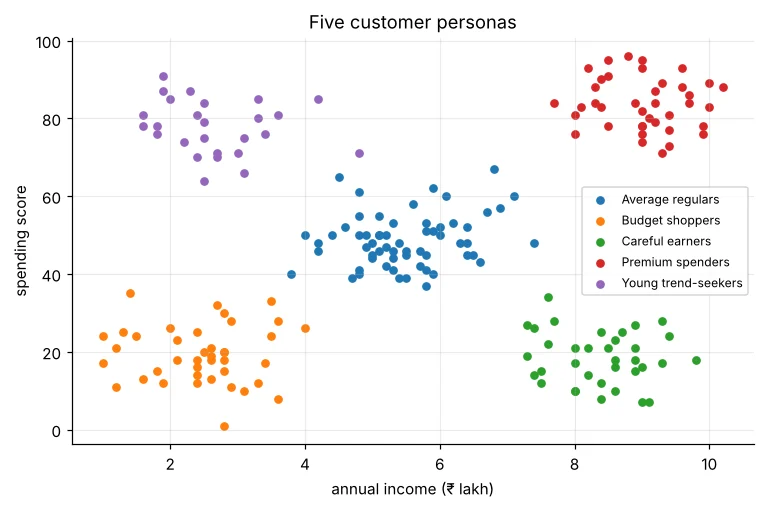
दूसरे clustering तरीके
import pandas as pd
from sklearn.preprocessing import StandardScaler
from sklearn.cluster import DBSCAN, AgglomerativeClustering
from sklearn.metrics import silhouette_score
m = pd.read_csv("mall_customers.csv")
X = StandardScaler().fit_transform(m[["annual_income_lakh", "spending_score"]])
db = DBSCAN(eps=0.35, min_samples=5).fit(X)
print("DBSCAN clusters:", len(set(db.labels_)) - (1 if -1 in db.labels_ else 0), "| noise points:", (db.labels_ == -1).sum())
ag = AgglomerativeClustering(n_clusters=5, linkage="ward").fit(X)
print("Hierarchical (ward) silhouette:", round(silhouette_score(X, ag.labels_), 3))| Method | ताक़त | कमज़ोरी |
|---|---|---|
| K-Means | तेज़, सरल, लाखों तक | k चाहिए; गोल, बराबर size के clusters मानता है |
| DBSCAN | कोई भी आकार, outliers (noise) पकड़ता है | eps पर निर्भर; अलग density में मुश्किल |
| Hierarchical | Dendrogram nested groups दिखाता है | बड़े data पर धीमा |
🏅 आज के Job Skills
Practice tasks
🏋️ Practice – ख़ुद करें
Solution देखें
import pandas as pd
from sklearn.preprocessing import StandardScaler
from sklearn.cluster import KMeans
from sklearn.metrics import silhouette_score
m = pd.read_csv("mall_customers.csv")
X = StandardScaler().fit_transform(m[["age", "annual_income_lakh", "spending_score"]])
print({k: round(silhouette_score(X, KMeans(k, n_init=10, random_state=0).fit_predict(X)), 3) for k in range(2, 9)})Solution देखें
import pandas as pd
from sklearn.preprocessing import StandardScaler
from sklearn.cluster import KMeans
s = pd.read_csv("sales_data.csv"); s["rev"] = s["quantity"] * s["unit_price"] * (1 - s["discount"])
c = s.groupby("city").agg(revenue=("rev", "sum"), aov=("rev", "mean"), prepaid=("payment_mode", lambda p: (p != "Cash on Delivery").mean()))
c["cluster"] = KMeans(3, n_init=10, random_state=0).fit_predict(StandardScaler().fit_transform(c))
print(c.round(2).sort_values("cluster"))Quick quiz
🧠 Quick Quiz – ख़ुद को जाँचें
Interview corner
💼 Interview Corner
Clusters की संख्या कैसे चुनते हैं?
Inertia curve का elbow, silhouette scores, और – सबसे ज़रूरी – business उपयोगिता: segments अलग, काफ़ी बड़े और actionable हों। अलग seeds से स्थिरता जाँचें।
K-Means की सीमाएँ?
k पहले से चाहिए, scaling और outliers से प्रभावित, गोल बराबर size के clusters मानता है, और local minima में फँस सकता है (n_init > 1 लें)। Categorical data के लिए दूसरे तरीके (k-modes) या encoding चाहिए।
सारांश
- K-Means: सबसे क़रीबी centre में डालें, centres खिसकाएँ, दोहराएँ।
- Features scale करें; elbow + silhouette + business समझ से k चुनें।
- Clusters को personas और actions में बदलें।
- अजीब आकार/outliers के लिए DBSCAN, nested groups के लिए hierarchical।
Day 47: PCA – कई columns को कुछ ताक़तवर components में समेटें और high-dimensional data देखें।
