दिन 31: Correlation और A/B Testing
✅ आज आप सीखेंगे
- Pearson vs Spearman correlation
- Correlation, causation क्यों नहीं
- A/B test और उसका sample size design करना
- Analysis: z-test, lift का CI, segments
- Launch का फ़ैसला करना और समझाना
🏢 असली दुनिया में
BazaarKart की design team ने पुराने तीन-step checkout (A) की जगह नया one-page checkout (B) बनाया। 4,000 visitors को random बाँटा गया। B ने 13.6%, A ने 10.7% convert किया। क्या company को सभी 50 lakh monthly visitors के लिए बदलना चाहिए? Flipkart, Swiggy और हर गंभीर product team A/B testing से ही तय करती है।
Correlation
import pandas as pd
h = pd.read_csv("house_prices.csv")
cols = ["area_sqft", "bedrooms", "age_years", "metro_km", "price_lakh"]
print(h[cols].corr(method="pearson").round(2)["price_lakh"])
print(h[cols].corr(method="spearman").round(2)["price_lakh"])Pearson r
- सीधी-line वाला रिश्ता मापता है
- Outliers से प्रभावित
- लगभग linear numeric data के लिए
Spearman ρ
- Ranks लेता है – कोई भी लगातार बढ़त/घटत
- Outliers से कम प्रभावित
- Skewed data या ranks/ratings के लिए
import numpy as np
import matplotlib.pyplot as plt
rng = np.random.default_rng(1)
x = rng.uniform(-3, 3, 200)
cases = [("r ≈ 0.9", x, 2 * x + rng.normal(0, 1.4, 200)), ("r ≈ −0.6", x, -x + rng.normal(0, 2, 200)),
         ("r ≈ 0 but strong pattern!", x, x ** 2 + rng.normal(0, 0.6, 200))]
fig, ax = plt.subplots(1, 3, figsize=(12, 3.3))
for a, (t, xx, yy) in zip(ax, cases):
    a.scatter(xx, yy, s=8, color="#4f46e5", alpha=0.6); a.set_title(f"{t}  (r={np.corrcoef(xx, yy)[0, 1]:.2f})")
plt.tight_layout(); plt.show()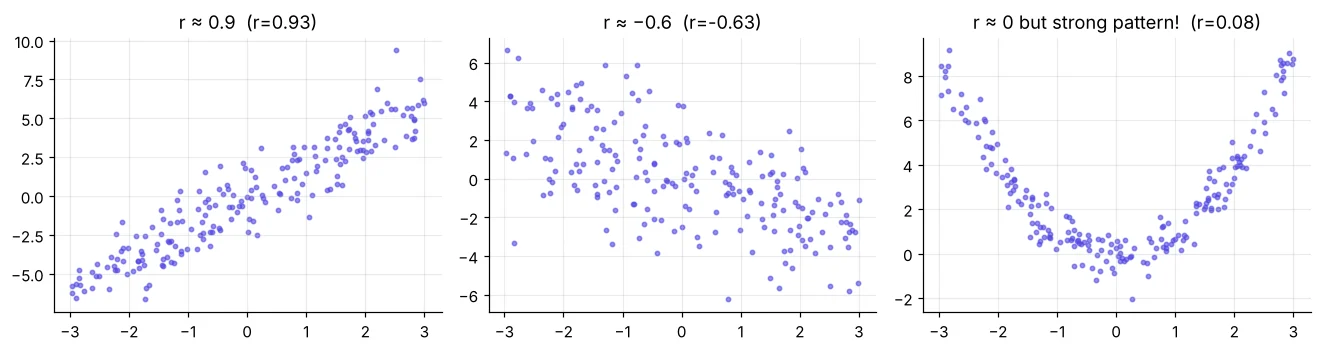
Correlation, causation नहीं है
import pandas as pd
w = pd.read_csv("delhi_weather.csv")
r = w["avg_temp_c"].corr(w["aqi"])
print(f"Temperature vs AQI: r = {r:.2f}")
print("Cold does not create pollution directly: winter brings stubble burning, low wind and")
print("temperature inversion. Temperature is a marker of the season, not the cause.")A/B test: पहले design
- 1एक metric: checkout conversion
- 2H₀: pB = pA, H₁: pB ≠ pA
- 3फ़ायदेमंद न्यूनतम lift: +2 points
- 4हर group का sample size
- 5Random 50/50 split, पूरे हफ़्ते चलाएँ
- 6आख़िर में एक बार analyse
from statsmodels.stats.power import NormalIndPower
from statsmodels.stats.proportion import proportion_effectsize
effect = proportion_effectsize(0.13, 0.11)                 # detect 11% → 13%
n = NormalIndPower().solve_power(effect_size=effect, alpha=0.05, power=0.8, ratio=1)
print(f"Need about {n:,.0f} visitors per group ({2 * n:,.0f} total) for 80% power")हमारे पास हर group में ~2,000 हैं – +2 points पर 80% power के लिए ज़रूरी ~4,100 का लगभग आधा। असली पर छोटा असर चूक सकता है, इसलिए result significant न हो तो “कोई असर नहीं” कहने की जगह test आगे बढ़ाएँगे।
Experiment का analysis
import pandas as pd
ab = pd.read_csv("ab_test.csv")
print(ab.head(3))
summary = ab.groupby("group")["converted"].agg(visitors="count", conversions="sum", rate="mean")
summary["rate_%"] = (summary["rate"] * 100).round(2)
print(summary.drop(columns="rate"))
print("Device mix by group (randomisation check):")
print((pd.crosstab(ab["group"], ab["device"], normalize="index") * 100).round(1))import numpy as np
import pandas as pd
from statsmodels.stats.proportion import proportions_ztest, confint_proportions_2indep
ab = pd.read_csv("ab_test.csv")
g = ab.groupby("group")["converted"].agg(["sum", "count"])
z, p = proportions_ztest(count=[g.loc["B", "sum"], g.loc["A", "sum"]], nobs=[g.loc["B", "count"], g.loc["A", "count"]])
pA, pB = g["sum"] / g["count"]
lo, hi = confint_proportions_2indep(g.loc["B", "sum"], g.loc["B", "count"], g.loc["A", "sum"], g.loc["A", "count"])
print(f"A {pA:.2%} → B {pB:.2%} | absolute lift {pB - pA:+.2%} | relative lift {(pB / pA - 1):+.1%}")
print(f"z = {z:.2f}, p = {p:.4f}")
print(f"95% CI for the lift: {lo:+.2%} to {hi:+.2%}")import pandas as pd
import matplotlib.pyplot as plt
import numpy as np
ab = pd.read_csv("ab_test.csv")
r = ab.groupby(["device", "group"])["converted"].agg(["mean", "count"]).reset_index()
r["se"] = np.sqrt(r["mean"] * (1 - r["mean"]) / r["count"])
fig, ax = plt.subplots(figsize=(8, 3.8))
for i, (grp, c) in enumerate([("A", "#94a3b8"), ("B", "#4f46e5")]):
d = r[r["group"] == grp]
ax.bar(np.arange(len(d)) + (i - 0.5) * 0.38, d["mean"] * 100, 0.38, yerr=1.96 * d["se"] * 100, capsize=4, color=c, label=grp)
ax.set_xticks(range(2), r["device"].unique()); ax.set_ylabel("conversion %"); ax.legend(title="checkout")
ax.set_title("New checkout B wins on both devices (95% CI bars)"); plt.show()
print(r.assign(rate_pct=(r["mean"] * 100).round(2))[["device", "group", "count", "rate_pct"]].to_string(index=False))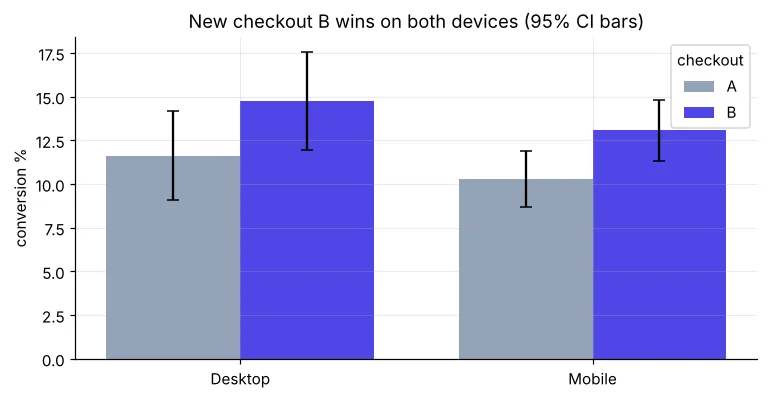
फ़ैसला और business impact
import pandas as pd
ab = pd.read_csv("ab_test.csv")
rate = ab.groupby("group")["converted"].mean()
visitors, aov = 5_000_000, 1200                      # monthly visitors, average order value ₹
extra_orders = visitors * (rate["B"] - rate["A"])
print(f"Extra orders per month ≈ {extra_orders:,.0f}")
print(f"Extra revenue per month ≈ ₹{extra_orders * aov / 1e7:.1f} crore (point estimate)")“नए checkout ने conversion 10.7% से 13.6% किया (p ≈ 0.006; 95% CI लगभग +0.9 से +4.9 points), mobile और desktop दोनों पर। 100% पर launch करें। अनुमानित असर: महीने में लगभग 1.4 lakh ज़्यादा orders। 2 हफ़्ते monitoring जारी रखें।”
Peeking: p < 0.05 होते ही test रोकना झूठी जीत बढ़ाता है। बहुत metrics: कोई एक संयोग से जीतेगा। Novelty effect: users शुरू में नई चीज़ पर ज़्यादा click करते हैं। असमान split: randomisation जाँचें।
🏅 आज के Job Skills
Practice tasks
🏋️ Practice – ख़ुद करें
tenure_months और total_charges का Pearson और Spearman correlation निकालें। ये क़रीब क्यों हैं?Solution देखें
import pandas as pd
t = pd.read_csv("telecom_churn.csv").dropna()
print(round(t["tenure_months"].corr(t["total_charges"]), 3), round(t["tenure_months"].corr(t["total_charges"], method="spearman"), 3))Solution देखें
import pandas as pd
from statsmodels.stats.proportion import proportions_ztest
ab = pd.read_csv("ab_test.csv"); m = ab[ab["device"] == "Mobile"]
g = m.groupby("group")["converted"].agg(["sum", "count"])
z, p = proportions_ztest(g["sum"].values[::-1], g["count"].values[::-1])
print(g); print(f"z = {z:.2f}, p = {p:.4f}")Solution देखें
from statsmodels.stats.power import NormalIndPower
from statsmodels.stats.proportion import proportion_effectsize
print(round(NormalIndPower().solve_power(proportion_effectsize(0.12, 0.11), alpha=0.05, power=0.8)))
Quick quiz
🧠 Quick Quiz – ख़ुद को जाँचें
Interview corner
💼 Interview Corner
A/B test कैसे चलाएँगे, बताइए।
एक मुख्य metric और hypothesis तय करें, minimum detectable effect तय करें, power analysis से sample size निकालें, users को random 50/50 बाँटें, peeking के बिना पूरे हफ़्ते चलाएँ, randomisation जाँचें, z-test और lift का CI निकालें, ज़रूरी segments और guardrail metrics देखें, फिर अनुमानित असर के साथ launch सुझाएँ।
आपका test p = 0.08 दिखाता है। क्या करेंगे?
इसे न जीत कहें न हार। Estimate और CI बताएँ, देखें कि test planned sample size तक पहुँचा या नहीं; कम power हो तो आगे बढ़ाएँ; फ़ैसले से पहले ग़लत होने की कीमत सोचें।
सारांश
- Linear के लिए Pearson, ranks/skewed के लिए Spearman; हमेशा plot करें।
- Correlation ≠ causation; random experiments कारण साबित करते हैं।
- A/B: पहले metric, MDE और sample size तय करें; कभी peek न करें।
- Lift, CI, p-value, segments और rupee impact बताएँ।
- Week 5 पूरा – अब आप statistician की तरह सोचते हैं!
Week 6: SQL। Day 32: SQLite के साथ SQL basics – SELECT, WHERE, ORDER BY सीधे Python के अंदर।
