दिन 9: NumPy Maths, Broadcasting और Random
✅ आज आप सीखेंगे
- पूरे arrays पर vectorised गणित
- Broadcasting: अलग shapes के बीच गणित
- Aggregations: sum, mean, std, percentile, cumsum
- np.where, clip, unique और sorting
- Random numbers और Monte Carlo simulation
🏢 असली दुनिया में
एक e-commerce company जानना चाहती है: “हर शहर में 10% और metro शहरों में 20% छूट दें तो 50,000 products की नई कीमतें क्या होंगी?” Broadcasting इसका जवाब एक line में देता है, और random simulation risk का अनुमान लगाता है।
Vectorised गणित
import numpy as np
prices = np.array([499, 1299, 2499, 89, 15999])
qty = np.array([3, 1, 2, 10, 1])
print("Revenue per item:", prices * qty)
print("With 18% GST    :", (prices * 1.18).round(2))
print("Log prices      :", np.log10(prices).round(2))
print("Total revenue :", (prices * qty).sum())Broadcasting
Broadcasting से NumPy छोटे array को खींचकर अलग shapes के arrays जोड़ता है – बिना copies, बिना loops। नियम: shapes दाएँ से मिलाएँ; sizes बराबर हों या 1।
| A shape | B shape | Result | चलेगा? |
|---|---|---|---|
| (5,) | () scalar | (5,) | ✅ |
| (4, 3) | (3,) | (4, 3) | ✅ row repeated |
| (4, 3) | (4, 1) | (4, 3) | ✅ column repeated |
| (4, 3) | (4,) | — | ❌ 3 ≠ 4 |
import numpy as np
# 3 cities × 4 products base prices
base = np.array([[100, 250, 400, 1200],
                 [110, 260, 420, 1250],
                 [ 95, 240, 390, 1180]])
city_discount = np.array([[0.20], [0.20], [0.10]])     # shape (3, 1): metro, metro, small city
product_gst = np.array([0.05, 0.12, 0.18, 0.18])       # shape (4,)
final = base * (1 - city_discount) * (1 + product_gst)
print(final.round(1))import numpy as np
scores = np.array([[78, 82, 69], [92, 88, 95], [65, 70, 58], [88, 79, 84]])
col_mean = scores.mean(axis=0)
print("Centred (score - subject mean):")
print((scores - col_mean).round(1))
z = (scores - scores.mean(axis=0)) / scores.std(axis=0)
print("Z-scores:")
print(z.round(2))Aggregations
import numpy as np
daily_sales = np.array([42, 55, 38, 61, 70, 95, 88, 47, 52, 49, 66, 91, 99, 58])   # in thousands ₹
print("sum", daily_sales.sum(), "| mean", daily_sales.mean().round(2), "| median", np.median(daily_sales))
print("std", daily_sales.std().round(2), "| min", daily_sales.min(), "| max", daily_sales.max())
print("25th/75th percentile:", np.percentile(daily_sales, [25, 75]))
print("Running total:", daily_sales.cumsum()[:7])
print("Day-on-day change:", np.diff(daily_sales)[:6])np.where, clip, unique, sort
import numpy as np
marks = np.array([35, 82, 47, 91, 28, 66, 73])
print(np.where(marks >= 40, "Pass", "Fail"))
print(np.select([marks >= 75, marks >= 40], ["Distinction", "Pass"], default="Fail"))
print(np.clip(marks + 15, 0, 100))                 # grace marks, max 100
cities = np.array(["Pune", "Delhi", "Pune", "Agra", "Delhi", "Pune"])
vals, counts = np.unique(cities, return_counts=True)
print({str(v): int(c) for v, c in zip(vals, counts)})
print(np.sort(marks)[::-1], np.argsort(marks)[::-1][:3])Random numbers
import numpy as np
rng = np.random.default_rng(42)           # modern, reproducible generator
print(rng.integers(1, 7, size=10))        # 10 dice rolls
print(rng.random(3).round(3))             # 0–1 uniform
heights = rng.normal(loc=165, scale=8, size=1000)   # mean 165 cm, sd 8
print("mean", heights.mean().round(1), "| sd", heights.std().round(1))
print(rng.choice(["UPI", "Card", "Cash"], size=8, p=[0.6, 0.25, 0.15]))import numpy as np
import matplotlib.pyplot as plt
rng = np.random.default_rng(42)
heights = rng.normal(165, 8, 5000)
plt.hist(heights, bins=40, color="#0ea5e9", edgecolor="white")
plt.axvline(heights.mean(), color="red", linestyle="--", label=f"mean {heights.mean():.1f} cm")
plt.title("5,000 simulated student heights")
plt.xlabel("Height (cm)"); plt.ylabel("Students"); plt.legend()
plt.show()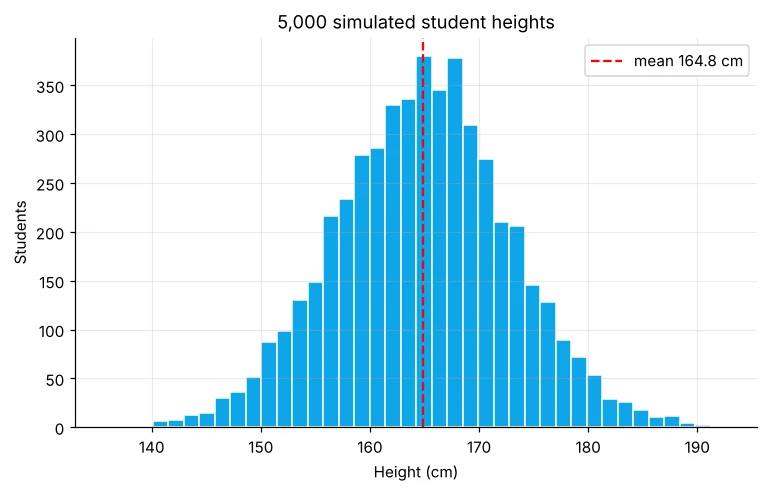
असली example: Monte Carlo risk simulation
एक छोटा café रोज़ 80 से 160 cups बेचता है (औसत 120)। हर cup ₹35 profit देता है और fixed cost (किराया, staff, बिजली) ₹4,100 रोज़ है। एक महीने में loss की संभावना क्या है? हम 10,000 महीने simulate करते हैं।
import numpy as np
rng = np.random.default_rng(7)
months, days = 10_000, 30
cups = rng.normal(120, 22, size=(months, days)).clip(80, 160)    # broadcasting-friendly 2-D array
profit = (cups * 35 - 4100).sum(axis=1)                          # one value per month
print("Average monthly profit: ₹", round(profit.mean()))
print("Worst 5% month       : ₹", round(np.percentile(profit, 5)))
print("Chance of a loss     :", f"{(profit < 0).mean():.2%}")
print("Chance profit > ₹10,000:", f"{(profit > 10000).mean():.1%}")जब formulas कठिन हो जाएँ, हज़ारों random “what-if” दुनिया बनाकर भरोसेमंद जवाब मिलता है। Banks, insurers और supply-chain teams रोज़ Monte Carlo इस्तेमाल करती हैं।
🏅 आज के Job Skills
Practice tasks
🏋️ Practice – ख़ुद करें
[30, 35, 41, 28] °C को एक line में °F (F = C × 9/5 + 32) में बदलें।Solution देखें
import numpy as np
c = np.array([30, 35, 41, 28])
print(c * 9 / 5 + 32)
Solution देखें
import numpy as np
s = np.array([[120, 150, 130], [80, 95, 125], [200, 180, 220]])
print((s / s.sum(axis=1, keepdims=True) * 100).round(1))
Solution देखें
import numpy as np
rng = np.random.default_rng(1)
rolls = rng.integers(1, 7, size=(100000, 2)).sum(axis=1)
print(round((rolls == 7).mean(), 4), "(exact = 1/6 = 0.1667)")
Quick quiz
🧠 Quick Quiz – ख़ुद को जाँचें
Interview corner
💼 Interview Corner
Example के साथ broadcasting समझाइए।
(100, 3) matrix से column means का (3,) array घटाना: NumPy mean वाली row को बिना loops या extra memory के 100 बार दोहराकर element-wise घटाता है। Shapes दाएँ से मिलाए जाते हैं और बराबर या 1 होने चाहिए।
Monte Carlo simulation क्या है?
Random inputs के साथ process को कई बार चलाकर और नतीजों को summarise करके अनिश्चित मात्रा का अनुमान लगाना – जैसे मासिक loss की probability या project cost की range।
सारांश
- Arrays पर गणित element-wise होता है – कोई loop नहीं।
- Broadcasting (4,3) को (3,) या (4,1) से जोड़ता है।
- sum, mean, std, percentile, cumsum तेज़ summary देते हैं।
- default_rng(seed) reproducible simulations देता है।
Day 10: pandas – Series और DataFrames, वे tables जिन पर data scientist दिन भर काम करता है।
