दिन 19: Mini Project: Retail Sales EDA
✅ आज आप सीखेंगे
- अस्पष्ट brief को 6 business सवालों में बदलना
- Reusable function से data साफ़ और समृद्ध करना
- KPIs: revenue, AOV, orders, rating
- हर सवाल का जवाब table + chart से
- एक पेज की management summary लिखना
🏢 असली दुनिया में
BazaarKart के CEO लिखते हैं: “हम 2025 की planning कर रहे हैं। बताइए 2024 में क्या हुआ और हमें कहाँ invest करना चाहिए।” बस इतना ही। यह project दिखाता है कि data analyst ऐसे message को numbers, charts और सुझावों में कैसे बदलता है – ऐसा project जो interviews जिताता है।
Step 1: brief को सवालों में बदलें
| # | Business सवाल | Analysis |
|---|---|---|
| Q1 | 2024 कितना बड़ा रहा? | KPIs |
| Q2 | साल भर sales कैसे बदली? | Monthly trend |
| Q3 | कौन से शहर और categories revenue लाते हैं? | groupby + pivot |
| Q4 | Discounts फ़ायदा देते हैं या नुकसान? | Discount bands vs revenue और rating |
| Q5 | हमारे customers कौन हैं? | Age groups, gender, payment |
| Q6 | Customers कहाँ नाराज़ हैं? | Rating analysis |
Step 2: load, clean, enrich
import pandas as pd

def load_sales(path="sales_data.csv"):
    df = pd.read_csv(path, parse_dates=["order_date"]).drop_duplicates()
    df["customer_age"] = df["customer_age"].fillna(df["customer_age"].median())
    df["revenue"] = df["quantity"] * df["unit_price"] * (1 - df["discount"])
    df["month"] = df["order_date"].dt.to_period("M")
    df["age_group"] = pd.cut(df["customer_age"], [17, 24, 34, 44, 60], labels=["18-24", "25-34", "35-44", "45+"])
    df["disc_band"] = pd.cut(df["discount"], [-0.01, 0, 0.1, 0.2, 0.3], labels=["None", "1-10%", "11-20%", "21-30%"])
    return df

df = load_sales()
df.to_pickle("sales_ready.pkl")                 # reuse in the next cells
print(df.shape, "| rating missing:", df["rating"].isna().sum())
print(df[["order_date", "city", "product", "revenue", "age_group", "disc_band"]].head(3))Q1: KPIs
import pandas as pd
df = pd.read_pickle("sales_ready.pkl")
kpi = {"Revenue (₹ lakh)": round(df["revenue"].sum() / 1e5, 2),
       "Orders": len(df),
       "Units sold": int(df["quantity"].sum()),
       "Avg order value (₹)": round(df["revenue"].mean()),
       "Avg rating": round(df["rating"].mean(), 2),
       "Prepaid share %": round((df["payment_mode"] != "Cash on Delivery").mean() * 100, 1)}
for k, v in kpi.items():
print(f"{k:22s} {v}")Q2: monthly trend
import pandas as pd
import matplotlib.pyplot as plt
df = pd.read_pickle("sales_ready.pkl")
m = df.groupby("month").agg(revenue=("revenue", "sum"), orders=("order_id", "count"))
m["revenue_lakh"] = (m["revenue"] / 1e5).round(2)
print(m[["orders", "revenue_lakh"]].to_string())
fig, ax = plt.subplots(figsize=(10, 4))
ax.bar(m.index.strftime("%b"), m["revenue_lakh"], color=["#dc2626" if x in (10, 11) else "#818cf8" for x in m.index.month])
ax.set_title("Monthly revenue 2024 – the festive season (Oct–Nov) is the business"); ax.set_ylabel("₹ lakh")
for i, v in enumerate(m["revenue_lakh"]):
    ax.text(i, v + 0.1, f"{v:.1f}", ha="center", fontsize=8)
plt.show()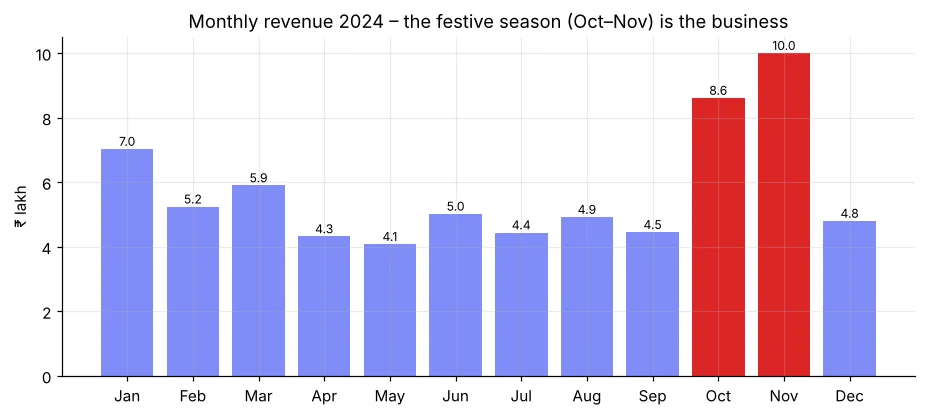
import pandas as pd
df = pd.read_pickle("sales_ready.pkl")
m = df.groupby("month")["revenue"].sum()
festive = m[m.index.month.isin([10, 11])].sum()
print(f"Oct+Nov = {festive / m.sum() * 100:.1f}% of yearly revenue in {2 / 12 * 100:.0f}% of the time")
print("Best month:", m.idxmax(), "| weakest month:", m.idxmin())Q3: शहर और categories
import pandas as pd
import matplotlib.pyplot as plt
df = pd.read_pickle("sales_ready.pkl")
city = df.groupby("city").agg(revenue=("revenue", "sum"), orders=("order_id", "count"), aov=("revenue", "mean"))
city["share_%"] = (city["revenue"] / city["revenue"].sum() * 100).round(1)
city = city.sort_values("revenue")
print(city.round(0).sort_values("revenue", ascending=False).head(5))
fig, ax = plt.subplots(1, 2, figsize=(12, 4.2))
(city["revenue"] / 1e5).plot(kind="barh", ax=ax[0], color="#4f46e5"); ax[0].set_title("Revenue by city (₹ lakh)")
cat = df.groupby("category")["revenue"].sum().sort_values()
ax[1].pie(cat, labels=cat.index, autopct="%1.0f%%", startangle=90, wedgeprops=dict(width=0.45))
ax[1].set_title("Revenue share by category")
plt.tight_layout(); plt.show()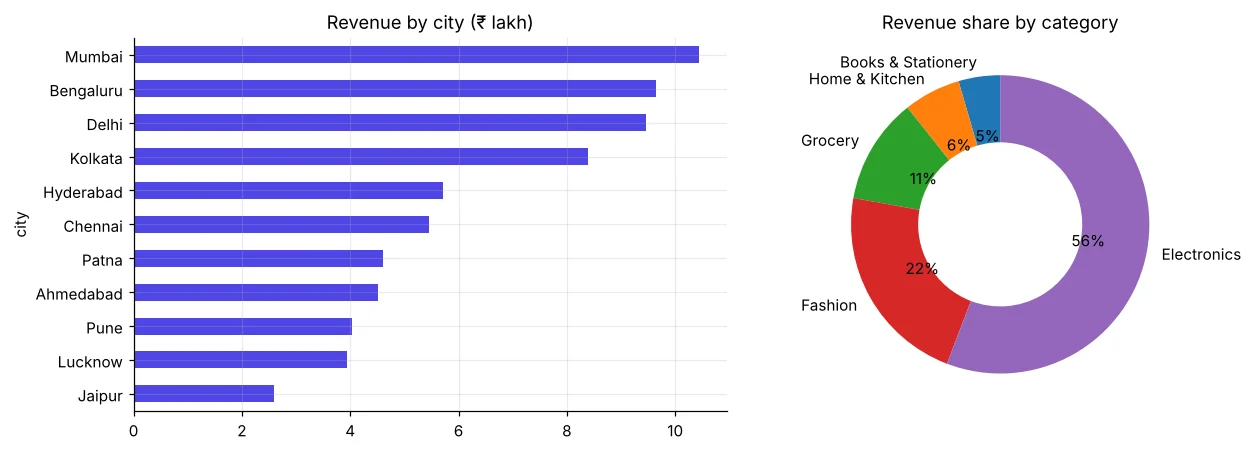
import pandas as pd
df = pd.read_pickle("sales_ready.pkl")
pv = df.pivot_table(index="category", values=["revenue", "quantity"], aggfunc="sum")
pv["orders"] = df.groupby("category").size()
pv["aov"] = (pv["revenue"] / pv["orders"]).round()
pv["rev_share_%"] = (pv["revenue"] / pv["revenue"].sum() * 100).round(1)
pv["order_share_%"] = (pv["orders"] / pv["orders"].sum() * 100).round(1)
print(pv[["orders", "order_share_%", "rev_share_%", "aov"]].sort_values("rev_share_%", ascending=False))Grocery के orders बहुत हैं पर revenue share कम (कम AOV) – यह customers को बार-बार वापस लाता है। Electronics के orders कम पर पैसा सबसे ज़्यादा। दोनों ज़रूरी हैं, अलग वजहों से: frequency vs value।
Q4: क्या discounts काम करते हैं?
import pandas as pd
df = pd.read_pickle("sales_ready.pkl")
d = df.groupby("disc_band", observed=True).agg(orders=("order_id", "count"), avg_qty=("quantity", "mean"),
                                               aov=("revenue", "mean"), rating=("rating", "mean"))
d["discount_given_₹"] = df.groupby("disc_band", observed=True).apply(
    lambda g: (g["quantity"] * g["unit_price"] * g["discount"]).sum(), include_groups=False).round()
print(d.round(2))बड़े discounts से quantity per order और rating लगभग नहीं बदलते, पर दिया गया पैसा तेज़ी से बढ़ता है। इस data में भारी discounts ज़्यादातर margin घटाते हैं। सुझाव: छोटे, targeted offers test करें (Day 31 – A/B testing)।
Q5: हमारे customers कौन हैं?
import pandas as pd
import matplotlib.pyplot as plt
df = pd.read_pickle("sales_ready.pkl")
fig, ax = plt.subplots(1, 2, figsize=(11, 3.8))
df.groupby("age_group", observed=True)["revenue"].sum().div(1e5).plot(kind="bar", ax=ax[0], color="#0891b2", rot=0)
ax[0].set_title("Revenue by age group (₹ lakh)")
pm = pd.crosstab(df["age_group"], df["payment_mode"], normalize="index") * 100
pm.plot(kind="bar", stacked=True, ax=ax[1], rot=0, colormap="Set2")
ax[1].set_title("Payment mode by age (%)"); ax[1].legend(fontsize=7, bbox_to_anchor=(1.01, 1), loc="upper left")
plt.tight_layout(); plt.show()
print(df.groupby("customer_gender")["revenue"].agg(["count", "mean"]).round())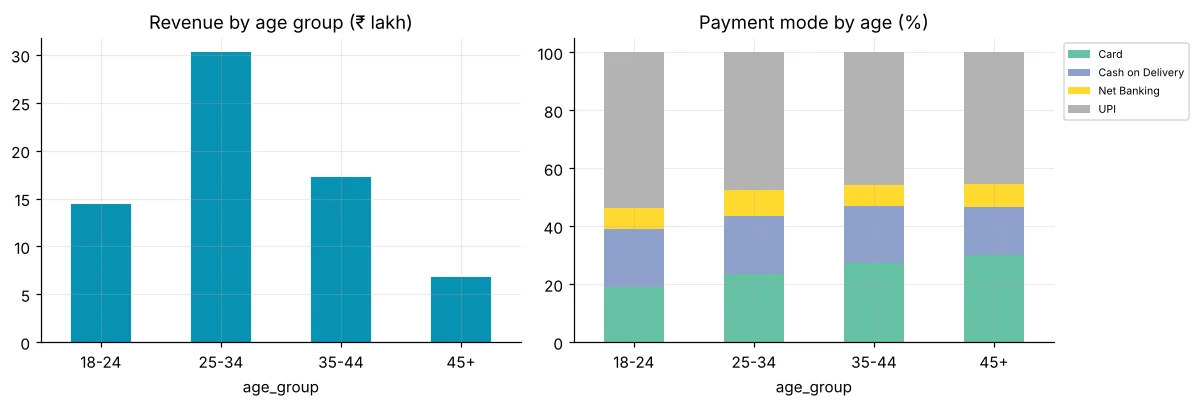
Q6: Customers कहाँ नाराज़ हैं?
import pandas as pd
df = pd.read_pickle("sales_ready.pkl")
r = df.dropna(subset=["rating"])
low = r.assign(low=r["rating"] <= 3).groupby("product")["low"].agg(["mean", "count"])
low = low[low["count"] >= 30].sort_values("mean", ascending=False)
low["mean"] = (low["mean"] * 100).round(1)
print(low.rename(columns={"mean": "low_rating_%", "count": "orders"}).head(5))
print("Overall low-rating %:", round((r["rating"] <= 3).mean() * 100, 1))Step 3: management summary
इसे GitHub (Day 53) पर डालें: सवाल, notebook, 4–5 charts और README के ऊपर चार सुझाव। Recruiters पहले summary पढ़ते हैं – इसे code नहीं, business पर केंद्रित रखें।
🏅 आज के Job Skills
Practice tasks
🏋️ Practice – ख़ुद करें
Solution देखें
import pandas as pd
df = pd.read_pickle("sales_ready.pkl")
q = df.pivot_table(index="region", columns=df["order_date"].dt.quarter, values="revenue", aggfunc="sum")
print(((q[4] / q[3] - 1) * 100).round(1).sort_values(ascending=False))Solution देखें
import pandas as pd
df = pd.read_pickle("sales_ready.pkl")
t = df.groupby(["city", "product"])["revenue"].sum().reset_index()
print(t.sort_values(["city", "revenue"], ascending=[True, False]).groupby("city").head(3).head(9).round(0).to_string(index=False))Quick quiz
🧠 Quick Quiz – ख़ुद को जाँचें
Interview corner
💼 Interview Corner
अपने किसी data analysis project के बारे में बताइए।
STAR लें: Situation (CEO को 2024 review चाहिए था), Task (drivers और मौके ढूँढना), Action (2,000 orders साफ़ किए, pandas में KPIs, trend, city/category/discount/customer analysis), Result (चार सुझाव, जैसे festive season = revenue का X%, भारी discounts से quantity नहीं बढ़ी)।
क्या आप कह सकते हैं कि discounts से कोई बदलाव नहीं हुआ?
नहीं – यह observational data है; discounts random नहीं थे। यह सिर्फ़ hypothesis देता है। कारण साबित करने के लिए controlled A/B test चाहिए।
सारांश
- Charts से नहीं, business सवालों से शुरू करें।
- एक load/clean function + saved pickle analysis को एक जैसा रखता है।
- हर सवाल → table → chart → एक line की insight।
- 3–5 actionable, numbers वाले सुझावों से ख़त्म करें।
Day 20: Pandas practice test – 15 असली tasks यह जाँचने के लिए कि आप pandas में job-ready हैं।
