useState & Events
What is state?
State is data that a component remembers and that can change while the user is on the page — a counter, the text in a search box, whether a menu is open. When state changes, React re-renders the component so the screen shows the new value.
Props
- Come from the parent
- Read-only inside the child
- Like function arguments
State
- Owned by the component
- Changed with a setter function
- Like the component’s own memory
Why 'use client'?
In the Next.js App Router every component is a Server Component by default — it runs on the server and sends HTML. Server Components cannot use useState or onClick, because those need the browser. Add 'use client' at the very top of a file to make it a Client Component.
'use client' files small (a button, a form, a menu) and let pages stay Server Components. That keeps your site fast.Example 1: Counter
'use client' // this file runs in the browser too

import { useState } from 'react'

export default function Counter() {
  const [count, setCount] = useState(0) // [current value, function to change it]

  return (
    <div>
      <p>You clicked {count} times</p>
      <button onClick={() => setCount(count + 1)}>+1</button>
      <button onClick={() => setCount(0)}>Reset</button>
    </div>
  )
}// app/page.jsx — a Server Component can render a Client Component
import Counter from '@/components/Counter'
export default function Page() {
return (
<main>
<h1>State demo</h1>
<Counter />
</main>
)
}How a re-render works
useState(0) returns an array of two things: the current value and a setter function. Calling the setter does not change the variable immediately; it asks React to run the component again with the new value.
Example 2: Controlled input
A controlled input keeps its text in state. React is the single source of truth, so you can validate or show live counts easily.
'use client'
import { useState } from 'react'

export default function NameBox() {
  const [name, setName] = useState('')

  return (
    <div>
      <input
        value={name}                              // value comes FROM state
        onChange={(e) => setName(e.target.value)} // typing updates state
        placeholder="Type your name"
      />
      <p>{name ? `Hello, ${name}!` : 'Start typing…'}</p>
      <p>{name.length} / 20 characters</p>
    </div>
  )
}
Example 3: Show / hide a mobile menu
'use client'
import { useState } from 'react'

export default function MobileMenu() {
  const [open, setOpen] = useState(false)
  return (
    <nav>
      <button aria-expanded={open} onClick={() => setOpen(!open)}>
        {open ? '✕ Close' : '☰ Menu'}
      </button>
      {open && (
        <ul>
          <li>Home</li><li>Courses</li><li>Contact</li>
        </ul>
      )}
    </nav>
  )
}
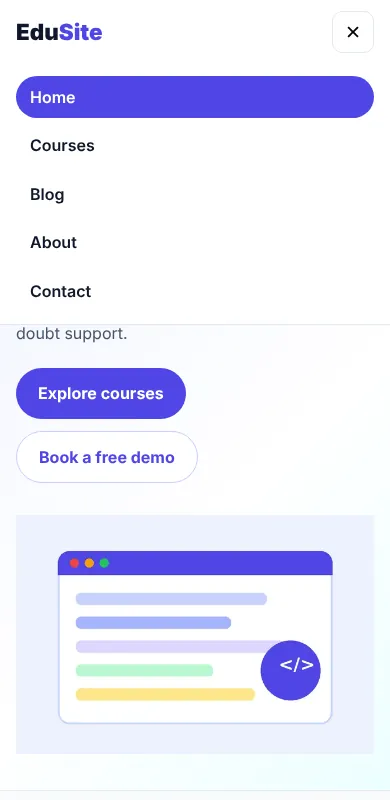
This is exactly how the EduSite header opens its menu on phones:
Updating objects and arrays
Never change state directly. Always create a new object or array with the spread operator ..., filter or map:
const [student, setStudent] = useState({ name: 'Riya', cls: 10 })
// ✅ copy the old object, change one field
setStudent({ ...student, cls: 11 })

const [todos, setTodos] = useState(['Revise loops'])
// ✅ add item (new array)
setTodos([...todos, 'Practise arrays'])
// ✅ remove item
setTodos(todos.filter((t) => t !== 'Revise loops'))

// ❌ wrong — mutating does NOT re-render
student.cls = 11
todos.push('x')
Example 4: Mini enquiry form
'use client'
import { useState } from 'react'

export default function EnquiryForm() {
  const [form, setForm] = useState({ name: '', course: 'python' })
  const [sent, setSent] = useState(false)

  function handleChange(e) {
    setForm({ ...form, [e.target.name]: e.target.value }) // one handler for all fields
  }

  function handleSubmit(e) {
    e.preventDefault() // stop the full page reload
    if (form.name.trim().length < 2) return alert('Please enter your name')
    setSent(true)
  }

  if (sent) return <p>✅ Thanks {form.name}, we will call you about {form.course}.</p>

  return (
    <form onSubmit={handleSubmit}>
      <input name="name" value={form.name} onChange={handleChange} placeholder="Name" />
      <select name="course" value={form.course} onChange={handleChange}>
        <option value="python">Python</option>
        <option value="nextjs">Next.js</option>
      </select>
      <button type="submit">Send</button>
    </form>
  )
}
Later you will replace this browser-only form with a Server Action that saves the enquiry on the server.
Common mistakes
- Forgetting
'use client'→ build error about hooks in Server Components. onClick={setCount(count + 1)}(no arrow) → runs during render and causes an infinite loop. WriteonClick={() => setCount(count + 1)}.- Mutating arrays with
push→ screen does not update. - Calling
useStateinside anifor loop → hooks must be called at the top level of the component.
Summary
const [value, setValue] = useState(initial)stores changing data.- Calling the setter re-renders the component.
- Events:
onClick,onChange,onSubmittake functions. - State and events need
'use client'in Next.js.
Build a "Like" button that shows ♡ 0 and turns into ❤️ with the count increasing on each click, plus an "Undo" button.
