🔵 App Router – Pages, Layouts & Navigation · Lesson 12
Dynamic Routes ([slug])
The problem: 100 courses, 100 files?
Your site has many courses, blog posts or products. Creating app/courses/c-programming/page.jsx, app/courses/python-ai/page.jsx… by hand is impossible. A dynamic route uses square brackets in the folder name so one file handles every URL.
📁 app/
  📁 courses/
    page.jsx            # /courses           (list)
    📁 [slug]/
      page.jsx          # /courses/c-programming
                        # /courses/python-ai
                        # /courses/nextjs      ... any slug
Creating app/courses/[slug]/page.jsx
JS – lib/courses.js
// lib/courses.js  (short version of the EduSite data file)
export const courses = [
  { slug: 'c-programming', title: 'C Programming', level: 'Beginner', fee: 2499 },
  { slug: 'python-ai',     title: 'Python + AI',   level: 'Beginner', fee: 3499 },
  { slug: 'nextjs',        title: 'Next.js',       level: 'Intermediate', fee: 4499 },
]

export function getCourse(slug) {
  return courses.find((c) => c.slug === slug)
}
JSX – app/courses/[slug]/page.jsx
// app/courses/[slug]/page.jsx
import { notFound } from 'next/navigation'
import { getCourse } from '@/lib/courses'

export default async function CoursePage({ params }) {
  const { slug } = await params          // "nextjs" for /courses/nextjs
  const course = getCourse(slug)
  if (!course) notFound()                // real 404 for /courses/abc

  return (
    <main>
      <span className="badge">{course.level}</span>
      <h1>{course.title}</h1>
      <p>Fee: ₹{course.fee}</p>
    </main>
  )
}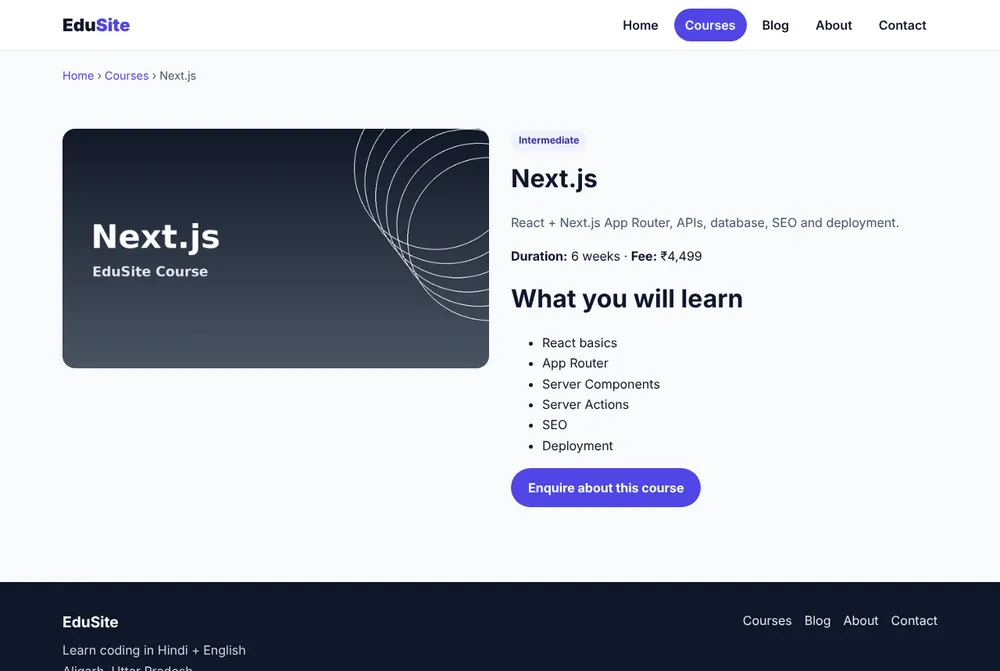
How a URL becomes params
Unknown slug → notFound()
Visiting /courses/abc should not show an empty page — Google would treat it as a "soft 404". notFound() renders app/not-found.jsx with a real 404 status code.
generateStaticParams — pre-build the pages
JSX – generateStaticParams
// app/courses/[slug]/page.jsx  (add above the component)
import { courses } from '@/lib/courses'

export function generateStaticParams() {
  return courses.map((c) => ({ slug: c.slug }))
  // → [{ slug: 'c-programming' }, { slug: 'python-ai' }, { slug: 'nextjs' }]
}

// Optional: return 404 for any slug NOT in the list (no on-demand render)
export const dynamicParams = false
Output of npm run build
Route (app)
┌ ○ /
├ ○ /courses
├ /courses/[slug]
│ ├ ● /courses/c-programming
│ ├ ● /courses/python-ai
│ └ ● /courses/nextjs
○ (Static) prerendered as static content
● (SSG) prerendered as static HTML (uses generateStaticParams)
Without generateStaticParams
- Page rendered on first request
- Works for any new slug
- Slightly slower first visit
With generateStaticParams
- HTML built during npm run build
- Served instantly from cache/CDN
- Best for SEO pages
Catch-all routes [...slug]
JSX – catch-all routes
// app/docs/[...slug]/page.jsx
export default async function Docs({ params }) {
  const { slug } = await params
  // /docs/react          → slug = ['react']
  // /docs/react/hooks    → slug = ['react', 'hooks']
  return <h1>Docs: {slug.join(' / ')}</h1>
}

// app/shop/[[...filters]]/page.jsx  (optional catch-all)
// /shop             → filters = undefined
// /shop/men/shoes → filters = ['men', 'shoes']| Folder | URL | params |
|---|---|---|
[slug] | /blog/hello | { slug: 'hello' } |
[...slug] | /docs/a/b | { slug: ['a','b'] } |
[[...slug]] | /shop | { slug: undefined } |
[cat]/[id] | /mobile/42 | { cat: 'mobile', id: '42' } |
searchParams: ?q=python
The part after ? is not a route — it arrives in the page as searchParams (also a Promise).
JSX – app/courses/page.jsx
// app/courses/page.jsx  →  /courses?q=python&level=beginner
import Link from 'next/link'
import { searchCourses } from '@/lib/courses'

export default async function Courses({ searchParams }) {
  const { q = '' } = await searchParams
  const list = searchCourses(q)
  return (
    <main>
      <h1>{q ? `Results for "${q}"` : 'All courses'}</h1>
      <p>{list.length} course(s) found</p>
      {list.map((c) => (
        <p key={c.slug}><Link href={`/courses/${c.slug}`}>{c.title}</Link></p>
      ))}
    </main>
  )
}
Common mistakes
params.slugwithoutawait→ in Next.js 16 it is undefined/error. Useconst { slug } = await params.- Folder named
(slug)or{slug}→ must be square brackets[slug]. - Returning numbers in generateStaticParams (
{ id: 5 }) → values must be strings ('5'). - Rendering "Not found" text with status 200 → use
notFound().
Summary
[slug]folder → one file for many URLs; read withawait params.notFound()gives a real 404;generateStaticParamspre-builds pages.[...slug]for nested paths,searchParamsfor?queryvalues.
✅ Practice
Create app/blog/[slug]/page.jsx with 3 posts in an array. Add generateStaticParams and check the build output shows ● for the 3 posts.
Frequently Asked Questions
Why do I need await params in Next.js 16?
Since Next.js 15, params and searchParams are Promises so that Next.js can start rendering before they are ready. In Next.js 16 synchronous access is removed, so always write const { slug } = await params.
What is the difference between [slug] and [...slug]?
[slug] matches exactly one segment (/blog/hello). [...slug] matches one or more segments (/docs/a/b/c) and gives an array. [[...slug]] also matches the folder root with no segment.
Is generateStaticParams required?
No. Without it pages are rendered on demand. With it, the listed pages are built as static HTML at build time, which is faster and great for SEO.
How do I show a 404 for a wrong slug?
Call notFound() from next/navigation when your data lookup returns nothing. Next.js renders not-found.jsx with a real 404 status.
