🏆 Project – Build a Complete Website · Lesson 34
Project: Blog with Markdown
Why a Markdown blog?
Database CMS
- Needs MySQL + admin panel
- Every page queries the DB
- More things to secure
Markdown files
- Write posts in any editor
- Pages built once (SSG) – very fast
- Version history in Git
Step 1: Write a post
Each file in content/posts/ is one post. The part between --- lines is front matter (metadata).
Markdown – content/posts/how-to-start-coding.md
---
title: How to Start Coding in 2026 – A Simple Roadmap
date: '2026-09-02'
excerpt: Confused where to begin? Follow this 4-step roadmap that our students use.
tags: [roadmap, beginners]
---

Starting to code feels hard only because there are too many choices. Here is the path our students follow.

## 1. Pick one language

Choose **C** if you are in school or B.Tech, or **Python** if you want AI and data science. Do not learn both at the same time.

## 2. Practise every day

Write at least **one small program daily** — even 20 minutes is enough. Typing code yourself is what builds memory.

## 3. Build a tiny project

After 4 weeks, build something small: a calculator, a marks report or a to-do list.

## 4. Learn the web

Once basics are clear, learn HTML, CSS and JavaScript, then a framework like **Next.js**.

> Consistency beats talent. Code a little every day.
Step 2: lib/posts.js
JS – lib/posts.js
import fs from 'node:fs'
import path from 'node:path'
import matter from 'gray-matter'
import { marked } from 'marked'

// Every .md file inside content/posts becomes a blog post.
const POSTS_DIR = path.join(process.cwd(), 'content', 'posts')

export function getAllPosts() {
  return fs
    .readdirSync(POSTS_DIR)
    .filter((f) => f.endsWith('.md'))
    .map((file) => {
      const slug = file.replace(/\.md$/, '')
      const { data } = matter(fs.readFileSync(path.join(POSTS_DIR, file), 'utf8'))
      return { slug, title: data.title, date: data.date, excerpt: data.excerpt, tags: data.tags || [] }
    })
    .sort((a, b) => (a.date < b.date ? 1 : -1)) // newest first
}

export function getPost(slug) {
  const file = path.join(POSTS_DIR, slug + '.md')
  if (!/^[a-z0-9-]+$/.test(slug) || !fs.existsSync(file)) return null
  const { data, content } = matter(fs.readFileSync(file, 'utf8'))
  return { slug, ...data, html: marked.parse(content) }
}
The regex /^[a-z0-9-]+$/ stops paths like ../../etc/passwd — always validate anything used to build a file path.
Step 3: Blog list page
JSX – app/blog/page.jsx
import PostCard from '@/components/PostCard'
import { getAllPosts } from '@/lib/posts'

export const metadata = {
  title: 'Blog – Coding Tips & Roadmaps',
  description: 'Simple articles on learning to code: roadmaps, language comparisons and project ideas.',
  alternates: { canonical: '/blog' },
}

export default function BlogPage() {
  const posts = getAllPosts()
  return (
    <div className="container section">
      <h1>Blog</h1>
      <p className="lead">{posts.length} articles to help you learn faster.</p>
      <div className="grid" style={{ marginTop: 24 }}>
        {posts.map((p) => (
          <PostCard key={p.slug} post={p} />
        ))}
      </div>
    </div>
  )
}
Step 4: Post page
JSX – app/blog/[slug]/page.jsx
import Link from 'next/link'
import { notFound } from 'next/navigation'
import JsonLd from '@/components/JsonLd'
import { getAllPosts, getPost } from '@/lib/posts'
import { site } from '@/lib/site'

export function generateStaticParams() {
  return getAllPosts().map((p) => ({ slug: p.slug }))
}

// Only the posts above exist. Any other slug gets a 404 without rendering.
export const dynamicParams = false

export async function generateMetadata({ params }) {
  const { slug } = await params
  const post = getPost(slug)
  if (!post) return { title: 'Post not found' }
  return {
    title: post.title,
    description: post.excerpt,
    alternates: { canonical: `/blog/${slug}` },
    openGraph: { type: 'article', publishedTime: post.date },
  }
}

export default async function PostPage({ params }) {
  const { slug } = await params
  const post = getPost(slug)
  if (!post) notFound()

  return (
    <div className="container" style={{ maxWidth: 820 }}>
      <p className="breadcrumb"><Link href="/">Home</Link> › <Link href="/blog">Blog</Link></p>
      <article className="section">
        <h1 style={{ marginTop: 0 }}>{post.title}</h1>
        <p style={{ color: 'var(--muted)' }}>
          {new Date(post.date).toLocaleDateString('en-IN', { day: 'numeric', month: 'long', year: 'numeric' })}
        </p>
        {/* HTML comes from our own Markdown files, so it is safe to render. */}
        <div className="prose" dangerouslySetInnerHTML={{ __html: post.html }} />
      </article>
      <JsonLd
        data={{
          '@context': 'https://schema.org',
          '@type': 'BlogPosting',
          headline: post.title,
          description: post.excerpt,
          datePublished: post.date,
          author: { '@type': 'Organization', name: site.name },
          mainEntityOfPage: `${site.url}/blog/${slug}`,
        }}
      />
    </div>
  )
}
⚠️ Real 404 for wrong slugs
dynamicParams = false makes Next.js reply 404 for any slug not returned by generateStaticParams. Also note: we did not add a loading.jsx in app/blog/. A loading file above [slug] starts streaming the response with status 200, so a later notFound() can no longer change the status code — bad for SEO.
From .md file to web page
Result
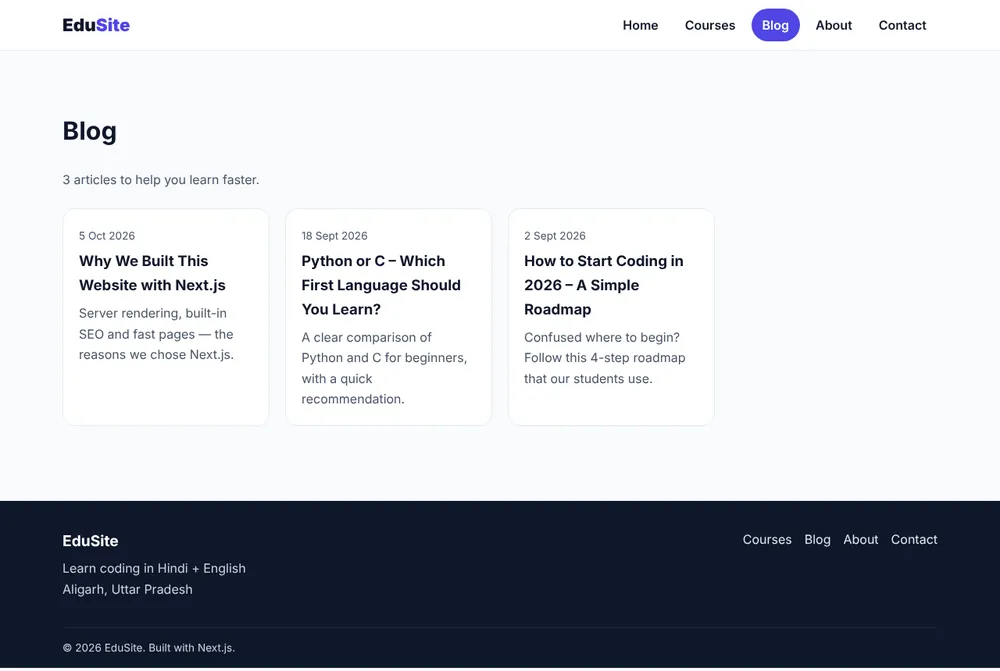
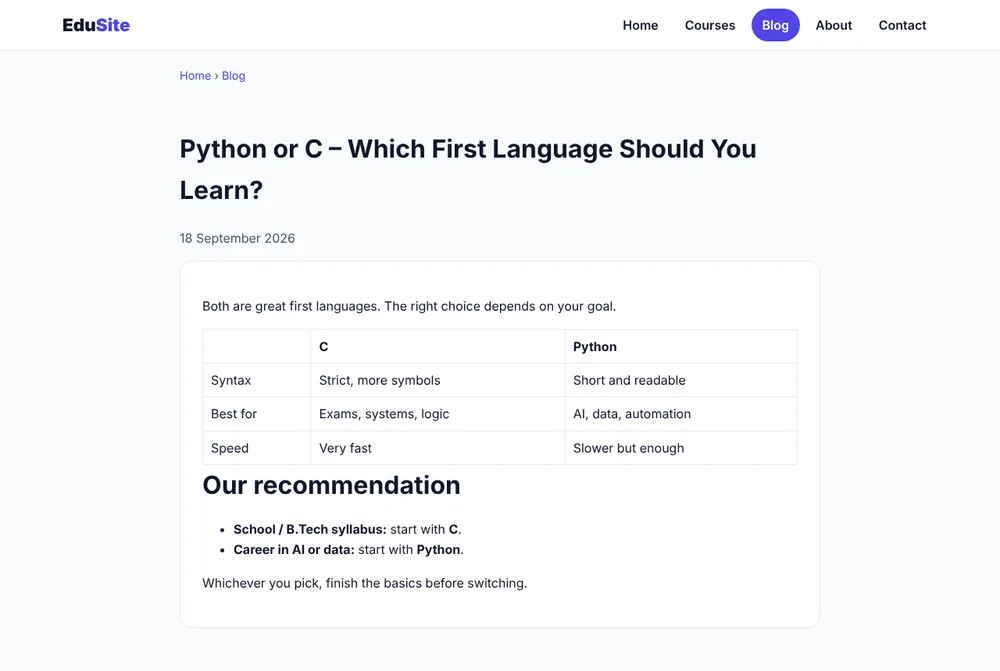
Checklist
- ✅ Posts are sorted newest first.
- ✅
/blog/does-not-existand/blog/..%2F..return 404. - ✅ View source shows a BlogPosting JSON-LD block and
og:type = article.
✅ Practice
Show the post's tags as badges on the post page, and add a "Related posts" section that lists two other posts.
Frequently Asked Questions
Is dangerouslySetInnerHTML safe here?
Yes, because the HTML comes from Markdown files that you write yourself. Never render HTML from user input this way without sanitizing it.
How do I add a new post?
Create a new .md file in content/posts with title, date and excerpt in the front matter, then rebuild. It appears in the list, gets its own page and is added to the sitemap.
