🟣 Data, Server & APIs · Lesson 22
Server Actions & Forms
What is a Server Action?
A Server Action is an async function marked with 'use server'. You pass it to a form's action prop and Next.js wires everything: the browser posts the form, the function runs on the server, and the result comes back. No API route, no fetch, no JSON parsing.
Old way (API + fetch)
- Create /api/contact route
- onSubmit → preventDefault
- fetch POST JSON
- Parse response, set state
Server Action
- Write one 'use server' function
- Done — works even without JS
- useActionState for errors
The simplest form
JSX – app/newsletter/page.jsx
// app/newsletter/page.jsx
import { redirect } from 'next/navigation'

async function subscribe(formData) {
  'use server'                              // this function runs on the server
  const email = formData.get('email')
  console.log('New subscriber:', email)     // appears in the TERMINAL, not browser
  // await db.insert(...)
  redirect('/newsletter/thanks')
}

export default function Newsletter() {
  return (
    <form action={subscribe}>
      <input name="email" type="email" required placeholder="you@example.com" />
      <button>Subscribe</button>
    </form>
  )
}
What happens on submit
Server-side validation
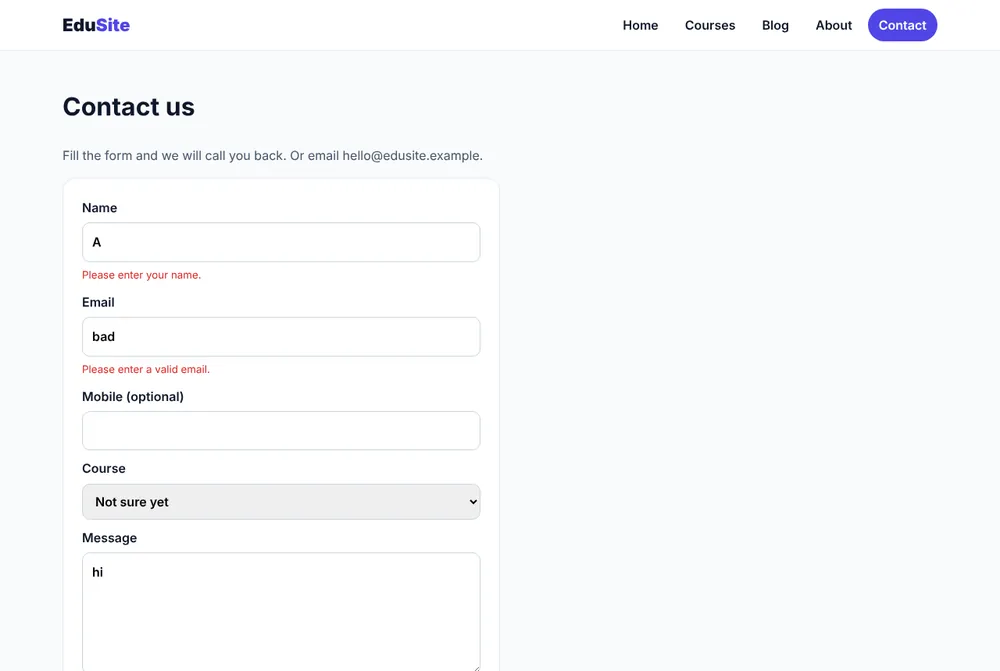
The EduSite contact form validates name, email, Indian mobile number and message length on the server. Browser checks (like required) are only for convenience — anyone can bypass them.
JS – app/contact/actions.js
// app/contact/actions.js  (EduSite – complete file)
'use server'

import fs from 'node:fs/promises'
import path from 'node:path'

export async function sendMessage(prevState, formData) {
  const name = String(formData.get('name') || '').trim()
  const email = String(formData.get('email') || '').trim()
  const phone = String(formData.get('phone') || '').trim()
  const course = String(formData.get('course') || '').trim()
  const message = String(formData.get('message') || '').trim()

  // 1. Validate on the server (never trust the browser).
  const errors = {}
  if (name.length < 2) errors.name = 'Please enter your name.'
  if (!/^[^\s@]+@[^\s@]+\.[^\s@]+$/.test(email)) errors.email = 'Please enter a valid email.'
  if (phone && !/^[6-9]\d{9}$/.test(phone)) errors.phone = 'Enter a 10-digit Indian mobile number.'
  if (message.length < 10) errors.message = 'Message should be at least 10 characters.'
  if (Object.keys(errors).length) {
    return { ok: false, errors, values: { name, email, phone, course, message } }
  }

  // 2. Save the enquiry (could be MySQL or an email instead).
  const file = path.join(process.cwd(), 'data', 'messages.json')
  let list = []
  try { list = JSON.parse(await fs.readFile(file, 'utf8')) } catch { list = [] }
  list.push({ name, email, phone, course, message, at: new Date().toISOString() })
  await fs.mkdir(path.dirname(file), { recursive: true })
  await fs.writeFile(file, JSON.stringify(list, null, 2))

  return { ok: true, message: `Thank you ${name}! We will call you within 24 hours.` }
}
useActionState: errors + pending
JSX – app/contact/ContactForm.jsx
// app/contact/ContactForm.jsx  (EduSite – complete file)
'use client'

import { useActionState } from 'react'
import { sendMessage } from './actions'
import styles from './contact.module.css'

const initialState = { ok: false, errors: {}, values: {} }

export default function ContactForm({ courses, selected }) {
  // state = what the action returned last time; pending = true while sending
  const [state, formAction, pending] = useActionState(sendMessage, initialState)
  const v = state.values || {}
  const e = state.errors || {}

  if (state.ok) return <p className={styles.success} role="status">✅ {state.message}</p>

  return (
    <form action={formAction} className={styles.form} noValidate>
      <label>Name<input name="name" defaultValue={v.name} required /></label>
      {e.name && <small className={styles.err}>{e.name}</small>}

      <label>Email<input name="email" type="email" defaultValue={v.email} required /></label>
      {e.email && <small className={styles.err}>{e.email}</small>}

      <label>Mobile (optional)<input name="phone" inputMode="numeric" defaultValue={v.phone} /></label>
      {e.phone && <small className={styles.err}>{e.phone}</small>}

      <label>Course
        <select name="course" defaultValue={v.course || selected}>
          <option value="">Not sure yet</option>
          {courses.map((c) => <option key={c.slug} value={c.slug}>{c.title}</option>)}
        </select>
      </label>

      <label>Message<textarea name="message" rows={5} defaultValue={v.message} required /></label>
      {e.message && <small className={styles.err}>{e.message}</small>}

      <button className="btn" disabled={pending}>{pending ? 'Sending…' : 'Send message'}</button>
    </form>
  )
}
JSX – app/contact/page.jsx
// app/contact/page.jsx — server page passes data to the client form
import { courses } from '@/lib/courses'
import ContactForm from './ContactForm'

export default async function ContactPage({ searchParams }) {
  const { course = '' } = await searchParams     // /contact?course=nextjs pre-selects
  return (
    <div className="container section">
      <h1>Contact us</h1>
      <ContactForm courses={courses} selected={course} />
    </div>
  )
}The three states of the form


After saving: redirect & revalidate
JS – revalidatePath + redirect
'use server'
import { revalidatePath } from 'next/cache'
import { redirect } from 'next/navigation'

export async function addCourse(prevState, formData) {
  // ...validate + INSERT INTO courses
  revalidatePath('/courses')          // the list page shows the new course
  redirect('/admin/courses?added=1')  // send the admin back to the list
}
Security checklist
- ✅ Validate every field on the server.
- ✅ Check login/role inside the action (an action is callable like an API).
- ✅ Use parameterised SQL (
?placeholders) — never string concatenation. - ✅ Return only safe data (no stack traces, no passwords).
Common mistakes
- Inputs without a
nameattribute →formData.get()returns null. - Using
value=instead ofdefaultValue=without onChange → the input becomes read-only. - Importing
useActionStatefromreact-dom→ it is inreact. - Forgetting the first parameter
prevStatewhen using useActionState →formDatabecomes the wrong argument.
Summary
'use server'functions +<form action>= forms without APIs.- Validate on the server, return
{ ok, errors, values }. useActionStategives state + pending;revalidatePath/redirectafter saving.
✅ Practice
Add a "Book a free demo" form with name, mobile and preferred time. Validate the mobile number on the server and show a pending "Booking…" button.
Frequently Asked Questions
Does a Server Action form work without JavaScript?
Yes. A
Where does useActionState come from?
From react (import { useActionState } from 'react'). It replaced the older useFormState from react-dom.
Are Server Actions secure by default?
They run only on the server and Next.js protects them against cross-site requests, but each action is still a public endpoint. Always validate input and check the user's permission inside the action.
