Props in React
What are props?
Props (short for properties) are how you pass data into a component — just like attributes on an HTML tag. The same component can show different content depending on the props it receives.
Passing and reading props
function Greeting(props) {
  return <p>Hello, {props.name}! You are in class {props.cls}.</p>
}

export default function Page() {
  return (
    <>
      <Greeting name="Riya" cls={10} />
      <Greeting name="Aman" cls={12} />
    </>
  )
}React collects all attributes into one object called props and gives it to the function as the first argument.
Destructuring and default values
Writing props.something everywhere gets long. Most developers destructure props and give default values for optional ones:
// Destructure props directly in the function brackets
function Price({ amount, currency = '₹', discount = 0 }) {
  const final = amount - (amount * discount) / 100
  return (
    <p>
      {currency}{final.toLocaleString('en-IN')}
      {discount > 0 && <small> ({discount}% off)</small>}
    </p>
  )
}

<Price amount={4999} />               // ₹4,999
<Price amount={4999} discount={20} /> // ₹3,999.2 (20% off)
Any value can be a prop
function Course({ title, fee, topics, isNew, onEnquire, teacher }) {
  return (
    <div>
      <h3>{title} {isNew && '🆕'}</h3>
      <p>Fee: ₹{fee} · Teacher: {teacher.name}</p>
      <ul>{topics.map((t) => <li key={t}>{t}</li>)}</ul>
      <button onClick={onEnquire}>Enquire</button>
    </div>
  )
}

<Course
  title="Python + AI"              // string
  fee={3499}                       // number
  isNew                            // boolean true
  topics={['Basics', 'Pandas']}    // array
  teacher={{ name: 'Gagan Sir' }}  // object
  onEnquire={() => alert('Thanks!')} // function (Client Component only)
/>{ }. Notice the double braces for an object: outer = JavaScript, inner = the object.The children prop
Whatever you put between a component's opening and closing tags arrives as children. This is how layouts and wrappers work — even Next.js layout.jsx receives the page as children.
// components/Box.jsx — a wrapper that accepts any content
export default function Box({ title, children }) {
  return (
    <section style={{ border: '1px solid #e2e8f0', borderRadius: 12, padding: 16 }}>
      <h2>{title}</h2>
      {children}
    </section>
  )
}

// usage — everything between <Box> and </Box> is "children"
<Box title="Admissions open">
  <p>New batch starts on 1 November.</p>
  <a href="/contact">Book a demo</a>
</Box>
One-way data flow
Props only go down. A child cannot edit a parent's data. If a child needs to tell the parent something (for example "button clicked"), the parent passes a function as a prop and the child calls it.
Real example: CourseCard in EduSite
// components/CourseCard.jsx (from the EduSite project)
import Image from 'next/image'
import Link from 'next/link'
import { rupees } from '@/lib/courses'

export default function CourseCard({ course }) {
  return (
    <article className="card">
      <Link href={`/courses/${course.slug}`}>
        <Image src={course.image} alt={course.title} width={600} height={338} />
      </Link>
      <div style={{ padding: 18 }}>
        <span className="badge">{course.level}</span>
        <h3>{course.title}</h3>
        <p>{course.summary}</p>
        <p><b>{rupees(course.fee)}</b> · {course.duration}</p>
      </div>
    </article>
  )
}

// app/page.jsx
{courses.slice(0, 3).map((c) => <CourseCard key={c.slug} course={c} />)}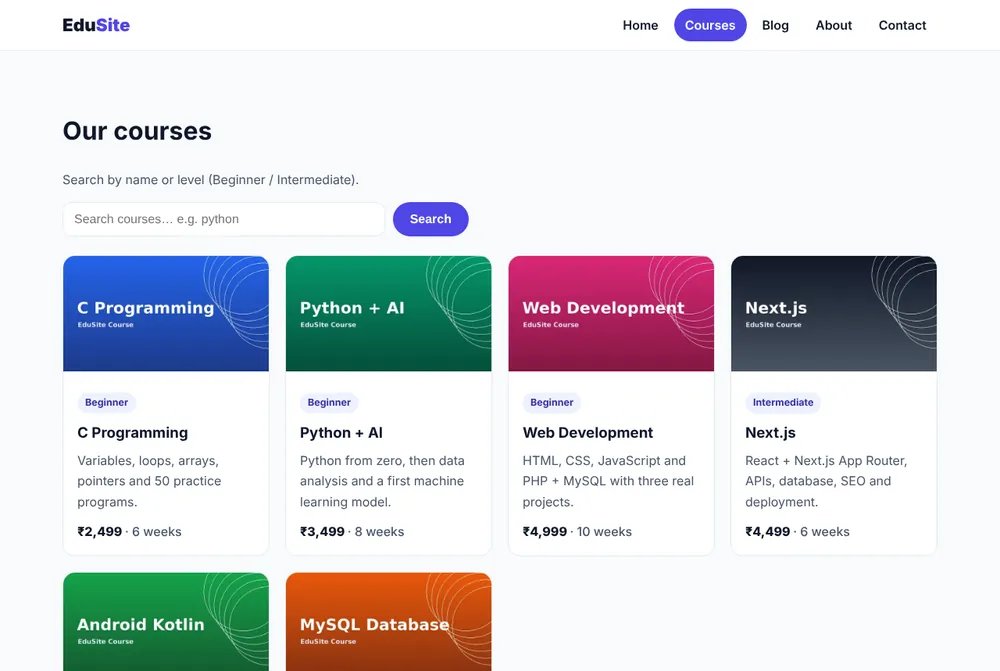
Common mistakes
fee="2499"passes a string; maths likefee * 2may still work but comparisons break. Usefee={2499}.- Changing a prop inside the child (
props.name = 'x') — not allowed; use state instead. - Forgetting curly braces around an object:
style={color:'red'}→ must bestyle={{ color: 'red' }}. - Passing an
onClickfunction from a Server Component to a Client Component — move the handler into the Client Component.
Summary
- Props pass data from parent to child like HTML attributes.
- Destructure them and give defaults:
function X({ a, b = 1 }). childrenis the content between tags.- Props are read-only and flow one way: down.
Make a StudentCard component with props name, roll, marks (array). Show the total and "Topper ⭐" when total is above 270.
