🏆 Project – Build a Complete Website · Lesson 33
Project: Courses with Dynamic Pages
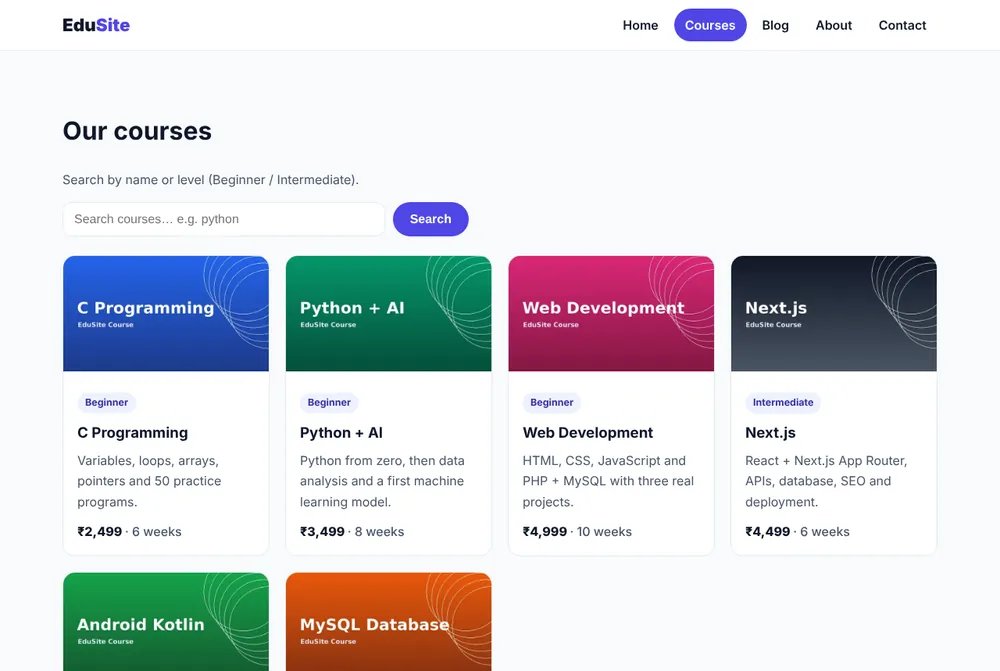
What this part adds
📁 app/courses/
  page.jsx           # list + ?q= search (dynamic ƒ)
  CourseSearch.jsx   # 'use client' search box
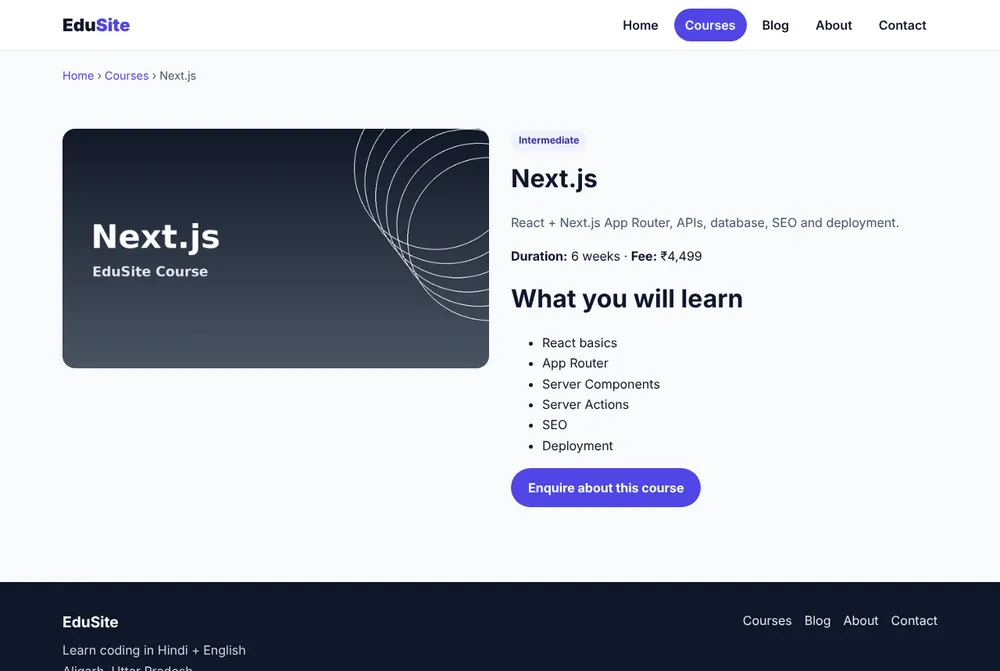
  [slug]/page.jsx    # detail page (SSG ●, 6 pages)
Step 1: Courses list page
JSX – app/courses/page.jsx
import CourseCard from '@/components/CourseCard'
import { searchCourses } from '@/lib/courses'
import CourseSearch from './CourseSearch'

export const metadata = {
  title: 'All Courses',
  description: 'Coding courses in C, Python, Web Development, Next.js, Android and MySQL with fees and duration.',
  alternates: { canonical: '/courses' },
}

// searchParams is a Promise in Next.js 16 — always await it.
export default async function CoursesPage({ searchParams }) {
  const { q = '' } = await searchParams
  const list = searchCourses(q)

  return (
    <div className="container section">
      <h1>Our courses</h1>
      <p className="lead">Search by name or level (Beginner / Intermediate).</p>
      <CourseSearch initial={q} />
      {list.length === 0 ? (
        <p>No course found for “{q}”.</p>
      ) : (
        <div className="grid" style={{ marginTop: 24 }}>
          {list.map((c) => (
            <CourseCard key={c.slug} course={c} />
          ))}
        </div>
      )}
    </div>
  )
}
Step 2: Search box (Client Component)
JSX – app/courses/CourseSearch.jsx
'use client'

import { useRouter } from 'next/navigation'
import { useState } from 'react'

// Client Component: keeps the typed text in state and updates the URL (?q=...).
export default function CourseSearch({ initial }) {
  const router = useRouter()
  const [text, setText] = useState(initial)

  function onSubmit(e) {
    e.preventDefault()
    router.push(text ? `/courses?q=${encodeURIComponent(text)}` : '/courses')
  }

  return (
    <form onSubmit={onSubmit} style={{ display: 'flex', gap: 10, marginTop: 16, maxWidth: 520 }}>
      <input
        value={text}
        onChange={(e) => setText(e.target.value)}
        placeholder="Search courses… e.g. python"
        aria-label="Search courses"
        style={{ flex: 1, padding: '12px 14px', borderRadius: 12, border: '1px solid var(--line)', fontSize: '1rem' }}
      />
      <button className="btn" type="submit">Search</button>
    </form>
  )
}
Step 3: Course detail page
JSX – app/courses/[slug]/page.jsx
import Image from 'next/image'
import Link from 'next/link'
import { notFound } from 'next/navigation'
import JsonLd from '@/components/JsonLd'
import { courses, getCourse, rupees } from '@/lib/courses'
import { site } from '@/lib/site'

// Build one static HTML page per course at build time (SSG).
export function generateStaticParams() {
  return courses.map((c) => ({ slug: c.slug }))
}

// Unique title + description per course (very important for SEO).
export async function generateMetadata({ params }) {
  const { slug } = await params
  const course = getCourse(slug)
  if (!course) return { title: 'Course not found' }
  return {
    title: `${course.title} Course (${course.duration})`,
    description: `${course.summary} Fee ${rupees(course.fee)}. Level: ${course.level}.`,
    alternates: { canonical: `/courses/${course.slug}` },
    openGraph: { images: [course.image] },
  }
}

export default async function CoursePage({ params }) {
  const { slug } = await params
  const course = getCourse(slug)
  if (!course) notFound() // shows app/not-found.jsx with a real 404 status

  return (
    <div className="container">
      <p className="breadcrumb"><Link href="/">Home</Link> › <Link href="/courses">Courses</Link> › {course.title}</p>
      <div className="section" style={{ display: 'grid', gap: 28, gridTemplateColumns: 'repeat(auto-fit, minmax(300px, 1fr))', alignItems: 'start' }}>
        <Image src={course.image} alt={course.title} width={1200} height={675} priority quality={90} sizes="(max-width: 700px) 100vw, 560px" style={{ borderRadius: 16 }} />
        <div>
          <span className="badge">{course.level}</span>
          <h1 style={{ margin: '10px 0' }}>{course.title}</h1>
          <p className="lead">{course.summary}</p>
          <p><strong>Duration:</strong> {course.duration} · <strong>Fee:</strong> {rupees(course.fee)}</p>
          <h2>What you will learn</h2>
          <ul>{course.topics.map((t) => <li key={t}>{t}</li>)}</ul>
          <Link href={`/contact?course=${course.slug}`} className="btn">Enquire about this course</Link>
        </div>
      </div>
      <JsonLd
        data={{
          '@context': 'https://schema.org',
          '@type': 'Course',
          name: course.title,
          description: course.summary,
          provider: { '@type': 'Organization', name: site.name, sameAs: site.url },
          offers: { '@type': 'Offer', price: course.fee, priceCurrency: 'INR', category: 'Paid' },
          hasCourseInstance: { '@type': 'CourseInstance', courseMode: 'onsite', courseWorkload: `P${parseInt(course.duration, 10)}W` },
        }}
      />
    </div>
  )
}How search works
Result
Checklist
- ✅
/courses?q=beginnershows only Beginner courses;/courses?q=xyzshows "No course found". - ✅
/courses/abcreturns status 404. - ✅ Each detail page has a different
<title>like "Next.js Course (6 weeks) | EduSite". - ✅ Build output shows ● for the six course pages.
✅ Practice
Add a "Level" filter (All / Beginner / Intermediate) as links that set ?q=. Add a seventh course to lib/courses.js and confirm a new static page is built.
Frequently Asked Questions
Why put the search text in the URL instead of state?
A URL like /courses?q=python can be shared, bookmarked and opened in a new tab, and the server renders the filtered list directly.
Why does the Enquire button link to /contact?course=slug?
The contact page reads searchParams and pre-selects that course in the form, so the enquiry arrives with the right course.
