🏆 Project – Build a Complete Website · Lesson 35
Project: Contact Form (Server Action)
What this part adds
📁 app/
  📁 contact/
    page.jsx          # server: reads ?course=
    ContactForm.jsx   # 'use client' + useActionState
    actions.js        # 'use server' – validate + save
    contact.module.css
  about/page.jsx
  api/courses/route.js  # GET JSON
Step 1: The Server Action
JS – app/contact/actions.js
'use server'

import fs from 'node:fs/promises'
import path from 'node:path'

// Server Action: runs only on the server. The browser never sees this code.
export async function sendMessage(prevState, formData) {
  const name = String(formData.get('name') || '').trim()
  const email = String(formData.get('email') || '').trim()
  const phone = String(formData.get('phone') || '').trim()
  const course = String(formData.get('course') || '').trim()
  const message = String(formData.get('message') || '').trim()

  // 1. Validate on the server (never trust the browser).
  const errors = {}
  if (name.length < 2) errors.name = 'Please enter your name.'
  if (!/^[^\s@]+@[^\s@]+\.[^\s@]+$/.test(email)) errors.email = 'Please enter a valid email.'
  if (phone && !/^[6-9]\d{9}$/.test(phone)) errors.phone = 'Enter a 10-digit Indian mobile number.'
  if (message.length < 10) errors.message = 'Message should be at least 10 characters.'
  if (Object.keys(errors).length) {
    return { ok: false, errors, values: { name, email, phone, course, message } }
  }

  // 2. Save the enquiry. (On a real server you could insert into MySQL or send an email instead.)
  const file = path.join(process.cwd(), 'data', 'messages.json')
  let list = []
  try {
    list = JSON.parse(await fs.readFile(file, 'utf8'))
  } catch {
    list = []
  }
  list.push({ name, email, phone, course, message, at: new Date().toISOString() })
  await fs.mkdir(path.dirname(file), { recursive: true })
  await fs.writeFile(file, JSON.stringify(list, null, 2))

  return { ok: true, message: `Thank you ${name}! We will call you within 24 hours.` }
}
Step 2: ContactForm (client)
JSX – app/contact/ContactForm.jsx
'use client'

import { useActionState } from 'react'
import { sendMessage } from './actions'
import styles from './contact.module.css'

const initialState = { ok: false, errors: {}, values: {} }

export default function ContactForm({ courses, selected }) {
  // state = whatever the Server Action returned last time; pending = true while sending.
  const [state, formAction, pending] = useActionState(sendMessage, initialState)
  const v = state.values || {}
  const e = state.errors || {}

  if (state.ok) return <p className={styles.success} role="status">✅ {state.message}</p>

  return (
    <form action={formAction} className={styles.form} noValidate>
      <label>Name<input name="name" defaultValue={v.name} required /></label>
      {e.name && <small className={styles.err}>{e.name}</small>}

      <label>Email<input name="email" type="email" defaultValue={v.email} required /></label>
      {e.email && <small className={styles.err}>{e.email}</small>}

      <label>Mobile (optional)<input name="phone" inputMode="numeric" defaultValue={v.phone} /></label>
      {e.phone && <small className={styles.err}>{e.phone}</small>}

      <label>
        Course
        <select name="course" defaultValue={v.course || selected}>
          <option value="">Not sure yet</option>
          {courses.map((c) => (
            <option key={c.slug} value={c.slug}>{c.title}</option>
          ))}
        </select>
      </label>

      <label>Message<textarea name="message" rows={5} defaultValue={v.message} required /></label>
      {e.message && <small className={styles.err}>{e.message}</small>}

      <button className="btn" disabled={pending}>{pending ? 'Sending…' : 'Send message'}</button>
    </form>
  )
}
Step 3: Form styles
CSS – app/contact/contact.module.css
.form { display: grid; gap: 10px; max-width: 560px; background: #fff; border: 1px solid var(--line); border-radius: 16px; padding: 24px; }
.form label { display: grid; gap: 6px; font-weight: 600; }
.form input, .form select, .form textarea { font: inherit; padding: 11px 12px; border: 1px solid #cbd5e1; border-radius: 10px; }
.form input:focus, .form select:focus, .form textarea:focus { outline: 2px solid #c7d2fe; border-color: var(--brand); }
.err { color: #dc2626; margin-top: -4px; }
.success { background: #ecfdf5; border: 1px solid #a7f3d0; color: #065f46; padding: 16px; border-radius: 12px; max-width: 560px; }
Step 4: Contact page
JSX – app/contact/page.jsx
import { courses } from '@/lib/courses'
import { site } from '@/lib/site'
import ContactForm from './ContactForm'

export const metadata = {
  title: 'Contact Us – Book a Free Demo',
  description: `Call or message ${site.name} to book a free demo class or ask about fees and batches.`,
  alternates: { canonical: '/contact' },
}

export default async function ContactPage({ searchParams }) {
  const { course = '' } = await searchParams
  return (
    <div className="container section">
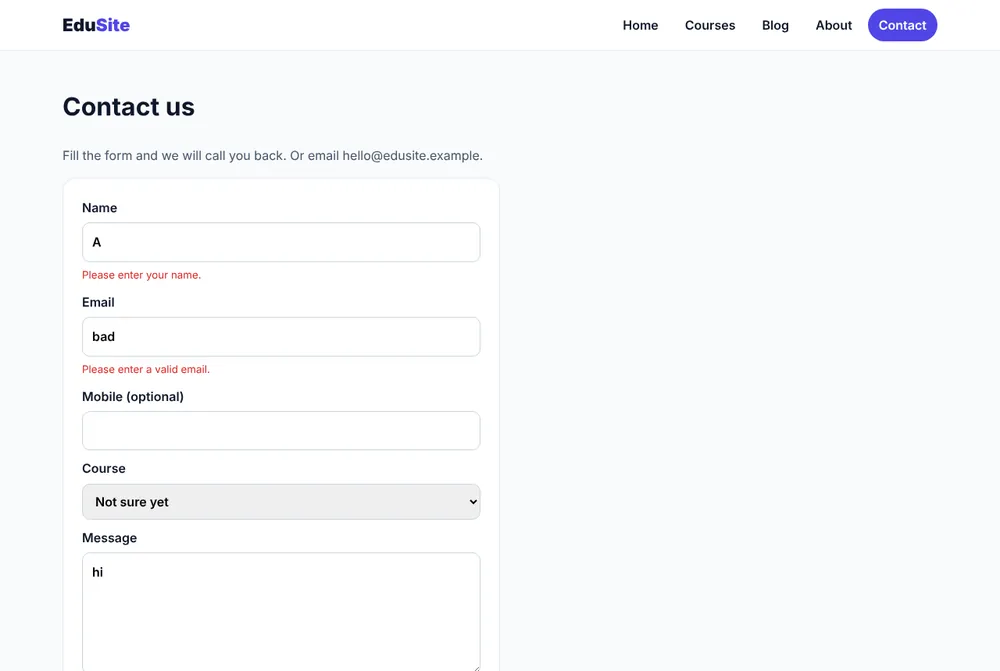
      <h1>Contact us</h1>
      <p className="lead">Fill the form and we will call you back. Or email {site.email}.</p>
      <ContactForm courses={courses} selected={course} />
    </div>
  )
}

Step 5: About page
JSX – app/about/page.jsx
import { site } from '@/lib/site'

export const metadata = {
  title: 'About Us',
  description: `About ${site.name}: who we are, how we teach and why students trust us.`,
  alternates: { canonical: '/about' },
}

export default function AboutPage() {
  return (
    <div className="container section">
      <h1>About {site.name}</h1>
      <div className="prose">
        <p>
          {site.name} is a coding institute in {site.city}. We teach programming in simple Hindi and English with a
          project in every course.
        </p>
        <h2>How we teach</h2>
        <ul>
          <li>Small batches so every student gets attention.</li>
          <li>Theory for 20 minutes, then practice on the computer.</li>
          <li>Weekly tests and one final project.</li>
        </ul>
        <h2>Contact</h2>
        <p>Email: {site.email} · Phone: {site.phone}</p>
      </div>
    </div>
  )
}
Step 6: JSON API for apps
JS – app/api/courses/route.js
import { searchCourses } from '@/lib/courses'

// GET /api/courses?q=python  →  JSON list of matching courses.
// Mobile apps or other websites can use this API.
export async function GET(request) {
  const q = request.nextUrl.searchParams.get('q') || ''
  const data = searchCourses(q).map(({ slug, title, level, fee, duration }) => ({ slug, title, level, fee, duration }))
  return Response.json({ count: data.length, courses: data })
}
Testing
Terminal
$ curl -s "http://localhost:3000/api/courses?q=beginner"
{"count":4,"courses":[{"slug":"c-programming","title":"C Programming","level":"Beginner","fee":2499,"duration":"6 weeks"},
{"slug":"python-ai","title":"Python + AI","level":"Beginner","fee":3499,"duration":"8 weeks"}, …]}
$ cat data/messages.json
[
{
"name": "Riya Sharma",
"email": "riya@example.com",
"phone": "9876543210",
"course": "nextjs",
"message": "Please share the next batch timing.",
"at": "2026-10-19T10:21:07.512Z"
}
]
Checklist
- ✅ Empty submit shows four error messages and keeps typed values.
- ✅ Phone "12345" shows "Enter a 10-digit Indian mobile number."
- ✅ Button shows "Sending…" while pending.
- ✅ After success, a new object appears in
data/messages.json. - ✅
/api/courses?q=pythonreturnscount: 1.
✅ Practice
Add a "Preferred batch" select (Morning / Evening) to the form, validate it on the server and save it with the enquiry.
Frequently Asked Questions
Where are the enquiries saved?
In data/messages.json on the server. For a real institute, replace that part with a MySQL INSERT (see the Database lesson) or send an email.
Can an Android app use the EduSite API?
Yes. GET /api/courses returns JSON that Retrofit can parse, exactly like the PHP API in the Android e-commerce course.
