🏆 Project – Build a Complete Website · Lesson 31
Project: Plan the EduSite Website
What we will build
In the next six lessons you will build EduSite — a complete, SEO-ready website for a coaching institute — using everything from this course: layouts, dynamic routes, Server and Client Components, Server Actions, metadata, sitemap and deployment.
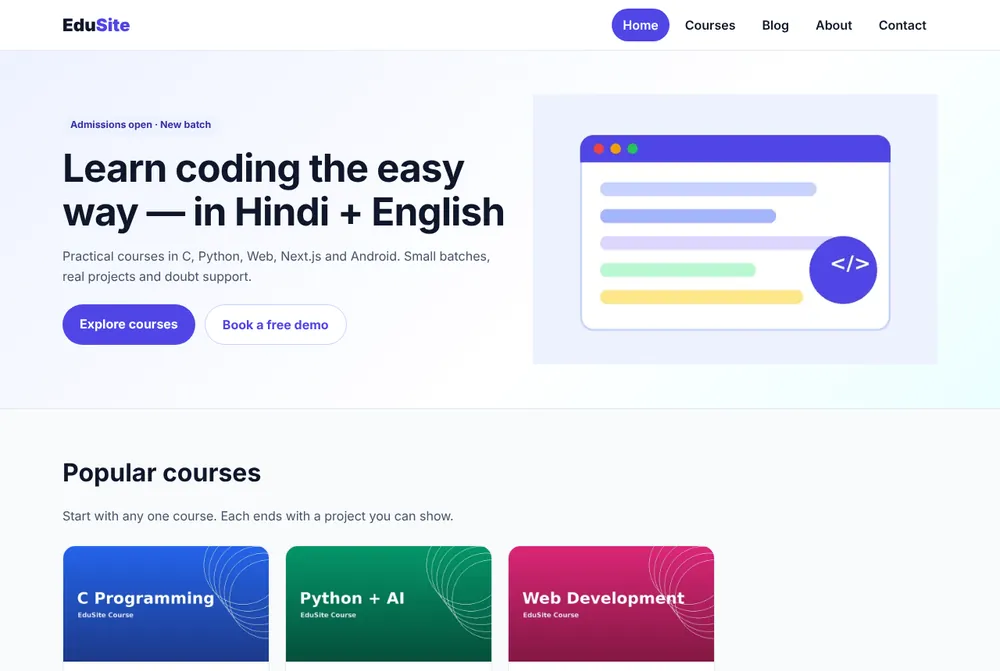
Pages and features
| Page | URL | Next.js features used |
|---|---|---|
| Home | / | Server Component, next/image, CSS Modules |
| Courses | /courses?q= | searchParams, Client Component search |
| Course detail | /courses/[slug] | Dynamic route, generateStaticParams, generateMetadata, JSON-LD |
| Blog | /blog, /blog/[slug] | Markdown files, loading.jsx, SSG |
| About | /about | Static metadata |
| Contact | /contact?course= | Server Action, useActionState, validation |
| API | /api/courses | Route Handler |
| SEO files | /sitemap.xml, /robots.txt, OG image | Metadata file conventions |
Site map and user flow
Final folder structure
📁 edusite/
  📁 app/
    layout.jsx            # root layout: font, metadata, Header, Footer, JSON-LD
    page.jsx              # home page
    page.module.css
    globals.css
    about/page.jsx
    📁 courses/
      page.jsx            # list + search (?q=)
      CourseSearch.jsx    # client component
      [slug]/page.jsx     # course detail (SSG)
    📁 blog/
      page.jsx            # list of posts
      [slug]/page.jsx     # post detail (SSG)
    📁 contact/
      page.jsx
      ContactForm.jsx     # client component (useActionState)
      actions.js          # Server Action
      contact.module.css
    api/courses/route.js  # JSON API
    sitemap.js  robots.js  opengraph-image.jsx  icon.svg
    error.jsx  not-found.jsx
    fonts/Inter.woff2
  📁 components/  Header.jsx  Header.module.css  Footer.jsx  CourseCard.jsx  PostCard.jsx  JsonLd.jsx
  content/posts/*.md      # blog posts
  📁 lib/  site.js  courses.js  posts.js
  public/images/*.png
  proxy.js  next.config.mjs  jsconfig.json  package.json
Step 1: Create the app
Terminal
npx create-next-app@latest edusite
# TypeScript? No · ESLint? Yes · Tailwind? No · src/ directory? No
# App Router? Yes · Turbopack? Yes · import alias? @/*
cd edusite
npm install gray-matter marked     # for the Markdown blog
npm run dev
JSON – package.json (final)
{
  "name": "edusite",
  "version": "1.0.0",
  "private": true,
  "description": "EduSite – complete Next.js website project from the CodingEasily Next.js tutorial",
  "scripts": {
    "dev": "next dev",
    "build": "next build",
    "start": "next start"
  },
  "dependencies": {
    "gray-matter": "4.0.3",
    "marked": "15.0.12",
    "next": "16.3.8",
    "react": "19.2.0",
    "react-dom": "19.2.0"
  }
}
Step 2: lib/site.js — one place for site settings
Name, URL, phone and city are used by the header, footer, metadata, sitemap and JSON-LD. Keep them in one file so a new client needs only one edit.
JS – lib/site.js
// One place for the site-wide settings used by metadata, sitemap and JSON-LD.
export const site = {
  name: 'EduSite',
  tagline: 'Learn coding in Hindi + English',
  description:
    'EduSite is a coaching institute website built with Next.js: courses, blog, contact form and full SEO.',
  url: process.env.SITE_URL || 'http://localhost:3000',
  email: 'hello@edusite.example',
  phone: '+91 90000 00000',
  city: 'Aligarh, Uttar Pradesh',
}
Step 3: lib/courses.js — the course data
JS – lib/courses.js
// Course data. In a real project this could come from MySQL (see the database lesson).
export const courses = [
  {
    slug: 'c-programming',
    title: 'C Programming',
    level: 'Beginner',
    duration: '6 weeks',
    fee: 2499,
    image: '/images/c-programming.png',
    summary: 'Variables, loops, arrays, pointers and 50 practice programs.',
    topics: ['Variables & data types', 'if-else and loops', 'Arrays & strings', 'Functions', 'Pointers', 'File handling'],
  },
  {
    slug: 'python-ai',
    title: 'Python + AI',
    level: 'Beginner',
    duration: '8 weeks',
    fee: 3499,
    image: '/images/python-ai.png',
    summary: 'Python from zero, then data analysis and a first machine learning model.',
    topics: ['Python basics', 'Lists & dictionaries', 'OOP', 'Pandas', 'Matplotlib', 'First ML model'],
  },
  {
    slug: 'web-development',
    title: 'Web Development',
    level: 'Beginner',
    duration: '10 weeks',
    fee: 4999,
    image: '/images/web-development.png',
    summary: 'HTML, CSS, JavaScript and PHP + MySQL with three real projects.',
    topics: ['HTML5', 'CSS3 & Flexbox', 'JavaScript', 'PHP', 'MySQL', 'Hosting'],
  },
  {
    slug: 'nextjs',
    title: 'Next.js',
    level: 'Intermediate',
    duration: '6 weeks',
    fee: 4499,
    image: '/images/nextjs.png',
    summary: 'React + Next.js App Router, APIs, database, SEO and deployment.',
    topics: ['React basics', 'App Router', 'Server Components', 'Server Actions', 'SEO', 'Deployment'],
  },
  {
    slug: 'android-kotlin',
    title: 'Android with Kotlin',
    level: 'Intermediate',
    duration: '10 weeks',
    fee: 5999,
    image: '/images/android-kotlin.png',
    summary: 'Native Android apps: views, RecyclerView, Room, Retrofit and MVVM.',
    topics: ['Kotlin', 'Layouts & views', 'RecyclerView', 'Navigation', 'Room', 'Retrofit'],
  },
  {
    slug: 'mysql-database',
    title: 'MySQL Database',
    level: 'Beginner',
    duration: '4 weeks',
    fee: 1999,
    image: '/images/mysql-database.png',
    summary: 'SQL queries, joins, normalization and a school database project.',
    topics: ['SELECT & WHERE', 'Joins', 'GROUP BY', 'Keys & constraints', 'Normalization', 'Project'],
  },
]

export function getCourse(slug) {
  return courses.find((c) => c.slug === slug)
}

export function searchCourses(q = '') {
  const s = q.trim().toLowerCase()
  if (!s) return courses
  return courses.filter(
    (c) => c.title.toLowerCase().includes(s) || c.summary.toLowerCase().includes(s) || c.level.toLowerCase() === s
  )
}

export const rupees = (n) => '₹' + n.toLocaleString('en-IN')
Later you can replace this array with a MySQL query (see the Database lesson) without changing any page — pages only call getCourse() and searchCourses().
Step 4: images and font
- Put course images (1200×675 PNG) in
public/images/:c-programming.png,python-ai.png,web-development.png,nextjs.png,android-kotlin.png,mysql-database.png, plushero.png(600×400). - Put
Inter.woff2inapp/fonts/(it is in the download ZIP, Open Font License).
What comes next
- 1Part 2 – Root layout, Header, Footer, Home page
- 2Part 3 – Courses list, search and detail pages
- 3Part 4 – Markdown blog
- 4Part 5 – Contact form with Server Action + API
- 5Part 6 – SEO files, error pages and launch
✅ Practice
Create the project, add lib/site.js and lib/courses.js with your own institute name and three courses, and confirm npm run dev starts without errors.
Frequently Asked Questions
Can I download the complete EduSite source code?
Yes. The download card on this page gives a ZIP with every file. Run npm install and npm run dev to start it.
Can I use this project for a real client?
Yes. Change the name, colours, courses and contact details in lib/site.js and lib/courses.js, add real images and deploy.
