📈 Unit 1 – Data Visualisation · Lesson 17
Histogram, Pie और Pandas Plot
Histogram
Histogram numeric data को bins नाम की ranges में बाँटकर दिखाता है कि हर range में कितनी values हैं।
Python
import matplotlib.pyplot as plt
heights = [148, 152, 155, 156, 158, 160, 161, 161, 163, 164, 165, 165, 166,
           167, 168, 168, 169, 170, 171, 172, 174, 175, 177, 180, 184]
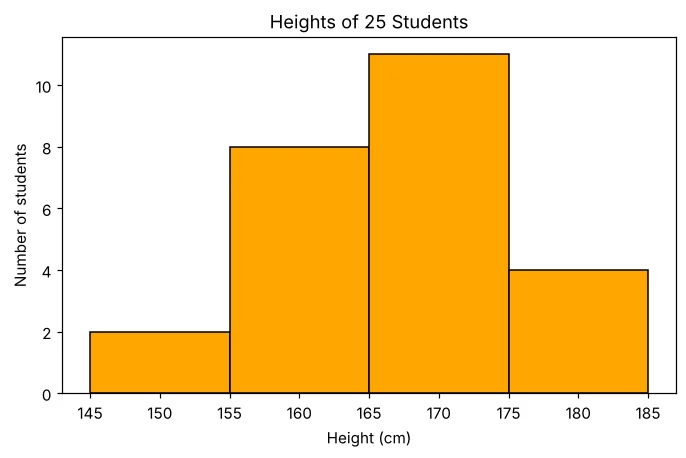
plt.hist(heights, bins=[145, 155, 165, 175, 185], color='orange', edgecolor='black')
plt.title('Heights of 25 Students'); plt.xlabel('Height (cm)'); plt.ylabel('Number of students')
plt.savefig('hist_basic.png')
print('Students:', len(heights))
Students: 25
Bins समझना
Python
import numpy as np
heights = [148, 152, 155, 156, 158, 160, 161, 161, 163, 164, 165, 165, 166,
           167, 168, 168, 169, 170, 171, 172, 174, 175, 177, 180, 184]
counts, edges = np.histogram(heights, bins=[145, 155, 165, 175, 185])
for i in range(len(counts)):
    print(f'{edges[i]}-{edges[i+1]}: {counts[i]}')
145-155: 2
155-165: 8
165-175: 11
175-185: 4
Histogram styles
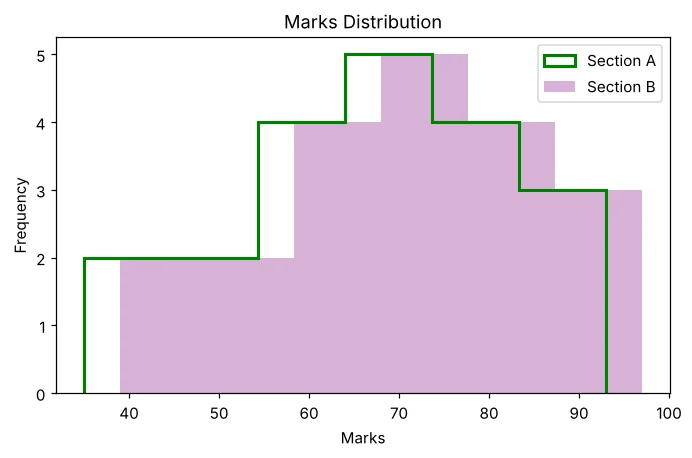
histtype 'bar' (default), 'step' (सिर्फ़ outline) या 'stepfilled' हो सकता है। alpha पारदर्शिता तय करता है।
Python
import matplotlib.pyplot as plt
marks = [35, 42, 48, 51, 55, 58, 61, 63, 64, 67, 69, 71, 72, 74, 75, 78, 81, 84, 88, 93]
plt.hist(marks, bins=6, histtype='step', linewidth=2, color='green', label='Section A')
plt.hist([m + 4 for m in marks], bins=6, histtype='stepfilled', alpha=0.3, color='purple', label='Section B')
plt.title('Marks Distribution'); plt.xlabel('Marks'); plt.ylabel('Frequency'); plt.legend()
plt.savefig('hist_types.png')
print('Chart saved')
Chart saved
Pie chart
Python
import matplotlib.pyplot as plt
heads = ['Rent', 'Food', 'Travel', 'Education', 'Savings']
amount = [12000, 9000, 3000, 6000, 5000]
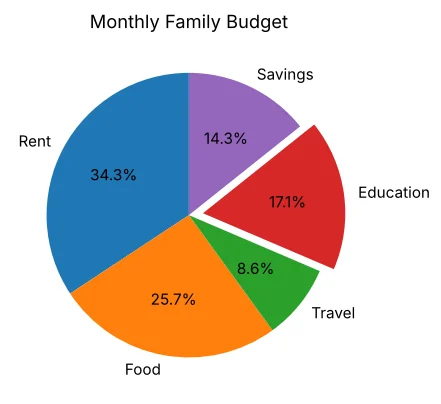
plt.pie(amount, labels=heads, autopct='%1.1f%%', explode=[0, 0, 0, 0.1, 0], startangle=90)
plt.title('Monthly Family Budget')
plt.savefig('pie.png')
print('Education share:', round(6000 / sum(amount) * 100, 1), '%')
Education share: 17.1 %
Scatter plot
Python
import matplotlib.pyplot as plt
hours = [1, 2, 2.5, 3, 3.5, 4, 4.5, 5, 6, 7]
score = [42, 50, 55, 58, 66, 70, 72, 80, 86, 93]
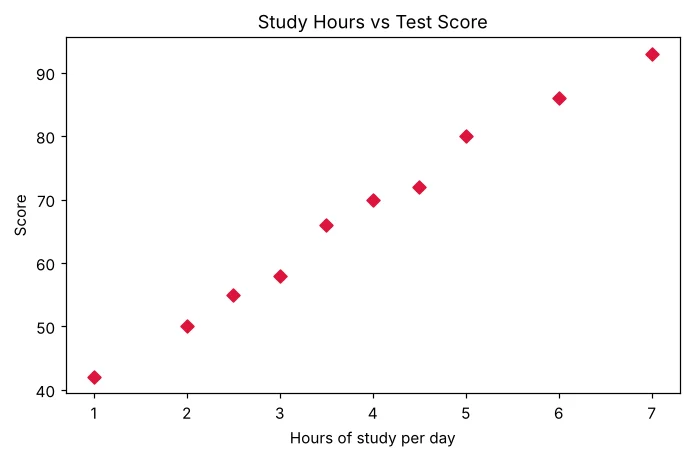
plt.scatter(hours, score, color='crimson', marker='D')
plt.title('Study Hours vs Test Score'); plt.xlabel('Hours of study per day'); plt.ylabel('Score')
plt.savefig('scatter.png')
print('Chart saved')
Chart saved
pandas का plot() function
Series या DataFrame .plot(kind=...) से ख़ुद chart बना सकता है; pandas आपके लिए Matplotlib बुलाता है।
| kind= | Chart |
|---|---|
| 'line' (default) | Line chart |
| 'bar' / 'barh' | Vertical / horizontal bars |
| 'hist' | Histogram |
| 'pie' | Pie chart |
| 'scatter' | Scatter plot (give x= and y=) |
| 'box' | Box plot |
Python
import pandas as pd
import matplotlib.pyplot as plt
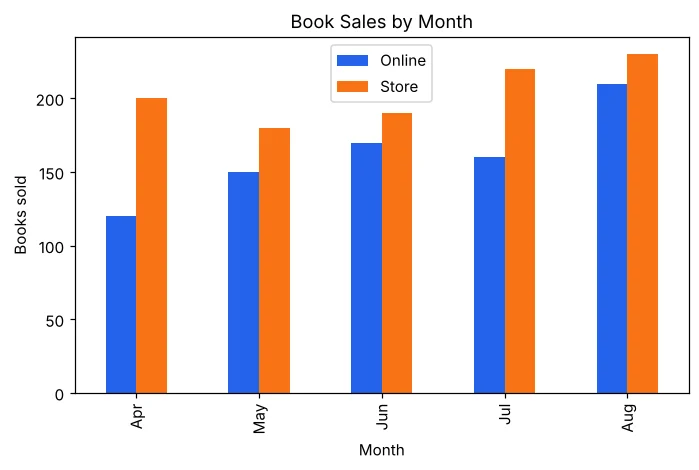
df = pd.DataFrame({'Month': ['Apr', 'May', 'Jun', 'Jul', 'Aug'],
                   'Online': [120, 150, 170, 160, 210],
                   'Store': [200, 180, 190, 220, 230]})
df.plot(x='Month', y=['Online', 'Store'], kind='bar', title='Book Sales by Month', color=['#2563eb', '#f97316'])
plt.ylabel('Books sold')
plt.savefig('pandas_bar.png')
print(df.set_index('Month').sum())
Online 810
Store 1020
dtype: int64
Python
import pandas as pd
import matplotlib.pyplot as plt
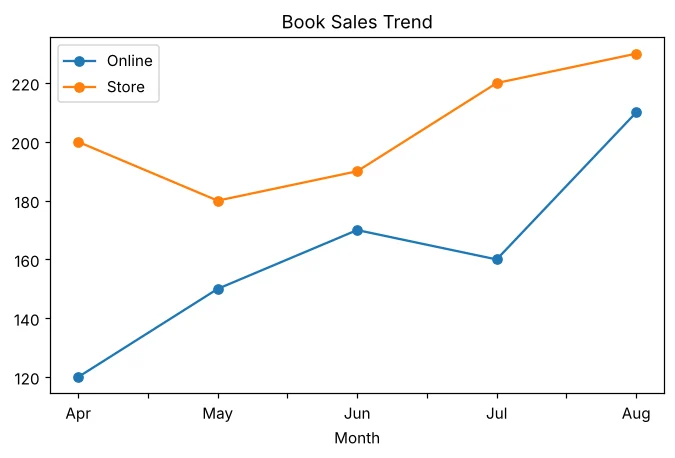
df = pd.DataFrame({'Month': ['Apr', 'May', 'Jun', 'Jul', 'Aug'],
                   'Online': [120, 150, 170, 160, 210],
                   'Store': [200, 180, 190, 220, 230]})
df.plot(x='Month', kind='line', marker='o', title='Book Sales Trend')
plt.savefig('pandas_line.png')
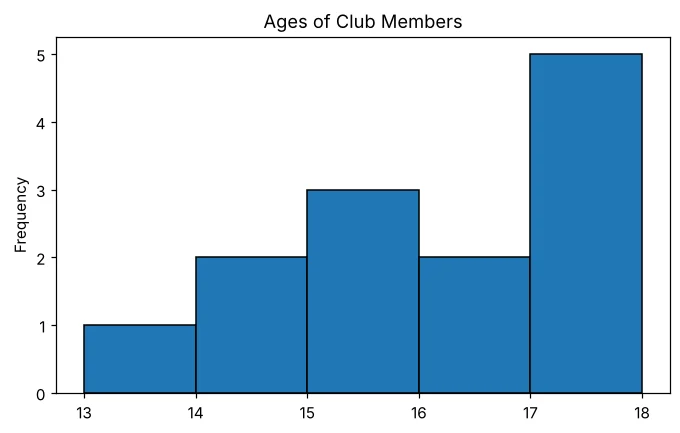
ages = pd.Series([13, 14, 14, 15, 15, 15, 16, 16, 17, 17, 17, 17, 18])
plt.figure()                      # start a NEW empty chart, else it draws on the old one
ages.plot(kind='hist', bins=5, edgecolor='black', title='Ages of Club Members')
plt.savefig('pandas_hist.png')
print('Charts saved')
Charts saved
कौन सा chart चुनें?
📈
LineTrend over time📊
BarCompare categories📶
HistogramDistribution of numbers in ranges🥧
PieParts of a whole (%)⚫
ScatterRelationship between two variablesअक्सर पूछे जाने वाले प्रश्न (FAQ)
Bar chart और histogram में क्या फ़र्क है?
Bar chart अलग-अलग categories की तुलना करता है, bars के बीच जगह होती है। Histogram दिखाता है कि continuous numeric data ranges (bins) में कैसे बँटा है; bars आपस में सटे होते हैं।
bins=[145,155,165] का मतलब क्या है?
Bins ranges हैं: 145–155 और 155–165। किनारे के बराबर value ऊपर वाले bin में जाती है, सिवाय आख़िरी किनारे के, जो आख़िरी bin में शामिल होता है।
Pie chart में autopct क्या करता है?
हर टुकड़े पर प्रतिशत लिखता है; '%1.1f%%' एक दशमलव स्थान और % चिह्न दिखाता है।
