🏆 Project और Revision · Lesson 24
ज़रूरी Programs और Queries
Practical list
ये programs और queries practical file की आम list के अनुसार हैं। इन्हें क्रम से चलाएँ – कुछ पहले वालों की बनाई files इस्तेमाल करते हैं।
🐼
PandasPrograms 1–5📄
CSVProgram 6📈
MatplotlibPrograms 7–9🛢️
SQL10 queriesPandas programs
Python
# 1. Create a Series from a dictionary and from a NumPy array
import pandas as pd
import numpy as np
fruits = pd.Series({'Apple': 120, 'Banana': 40, 'Mango': 90})
squares = pd.Series(np.arange(1, 6) ** 2, index=list('abcde'))
print(fruits)
print(squares)
Apple 120
Banana 40
Mango 90
dtype: int64
a 1
b 4
c 9
d 16
e 25
dtype: int64
Python
# 2. Print the elements of a Series that are above the 75th percentile
import pandas as pd
s = pd.Series([42, 12, 77, 56, 91, 33, 68, 85, 24, 60])
q3 = s.quantile(0.75)
print('75th percentile =', q3)
print(s[s > q3])
75th percentile = 74.75
2 77
4 91
7 85
dtype: int64
Python
# 3. Quarterly sales DataFrame: total sales per category
import pandas as pd
sales = pd.DataFrame({'Category': ['Mobile', 'Laptop', 'Mobile', 'TV', 'Laptop', 'TV', 'Mobile'],
                      'Item': ['A12', 'Inspire', 'N8', 'Smart43', 'Pro14', 'LED32', 'Z5'],
                      'Expenditure': [45000, 120000, 38000, 60000, 98000, 22000, 51000]})
print(sales.groupby('Category')['Expenditure'].sum())
Category
Laptop 218000
Mobile 134000
TV 82000
Name: Expenditure, dtype: int64
Python
# 4. Examination result DataFrame: row labels, column labels, data types, dimensions
import pandas as pd
res = pd.DataFrame({'Eng': [80, 65, 92], 'Maths': [91, 58, 85], 'IP': [95, 70, 88]},
                   index=['Riya', 'Sahil', 'Tanya'])
print('Row labels   :', res.index.tolist())
print('Column labels:', res.columns.tolist())
print('Data types   :', res.dtypes.tolist())
print('Dimensions   :', res.shape)
Row labels : ['Riya', 'Sahil', 'Tanya']
Column labels: ['Eng', 'Maths', 'IP']
Data types : [dtype('int64'), dtype('int64'), dtype('int64')]
Dimensions : (3, 3)
Python
# 5. Filter out duplicate rows
import pandas as pd
df = pd.DataFrame({'Name': ['Asha', 'Ravi', 'Asha', 'Neha', 'Ravi'],
                   'Class': ['XII-A', 'XII-B', 'XII-A', 'XII-A', 'XII-C']})
print(df[df.duplicated()])          # the repeated rows
print(df.drop_duplicates())
Name Class
2 Asha XII-A
Name Class
0 Asha XII-A
1 Ravi XII-B
3 Neha XII-A
4 Ravi XII-C
CSV program
Python
# 6. Import a CSV file into a DataFrame and export after adding a column
import pandas as pd
pd.DataFrame({'Item': ['Pen', 'Book', 'Bag'], 'Qty': [10, 4, 1], 'Rate': [10, 120, 900]}).to_csv('bill.csv', index=False)
bill = pd.read_csv('bill.csv')
bill['Amount'] = bill['Qty'] * bill['Rate']
bill.to_csv('bill_final.csv', index=False)
print(bill)
print('Grand total:', bill['Amount'].sum())
Item Qty Rate Amount
0 Pen 10 10 100
1 Book 4 120 480
2 Bag 1 900 900
Grand total: 1480
Data visualisation programs
Python
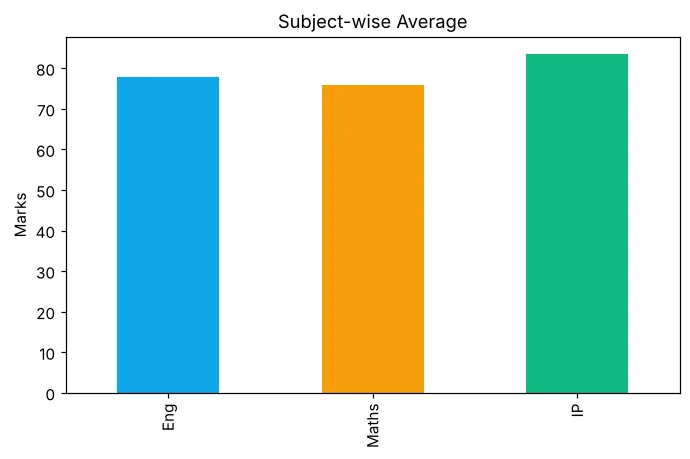
# 7. Analyse school result data and plot it (subject-wise average)
import pandas as pd
import matplotlib.pyplot as plt
res = pd.DataFrame({'Eng': [80, 65, 92, 74], 'Maths': [91, 58, 85, 69], 'IP': [95, 70, 88, 81]},
                   index=['Riya', 'Sahil', 'Tanya', 'Uday'])
avg = res.mean()
print(avg)
avg.plot(kind='bar', color=['#0ea5e9', '#f59e0b', '#10b981'], title='Subject-wise Average')
plt.ylabel('Marks')
plt.savefig('practical_avg.png')
Eng 77.75
Maths 75.75
IP 83.50
dtype: float64
Python
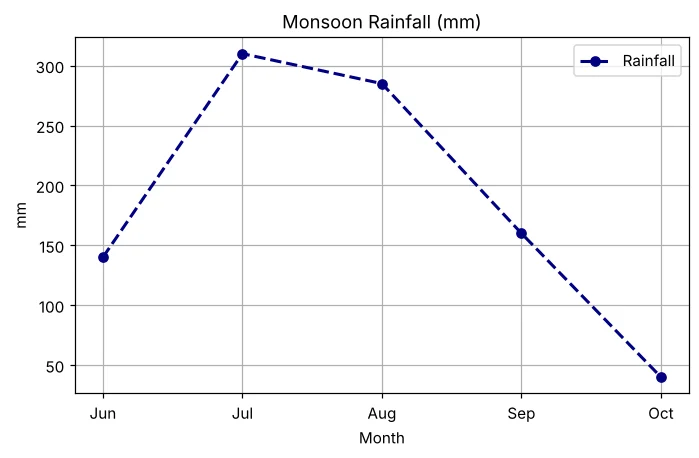
# 8. Line chart of a city's monthly rainfall with full customisation
import matplotlib.pyplot as plt
months = ['Jun', 'Jul', 'Aug', 'Sep', 'Oct']
rain = [140, 310, 285, 160, 40]
plt.plot(months, rain, color='navy', marker='o', linestyle='--', linewidth=2, label='Rainfall')
plt.title('Monsoon Rainfall (mm)'); plt.xlabel('Month'); plt.ylabel('mm')
plt.legend(); plt.grid(True)
plt.savefig('practical_rain.png')
print('Wettest month:', months[rain.index(max(rain))])
Wettest month: Jul
Python
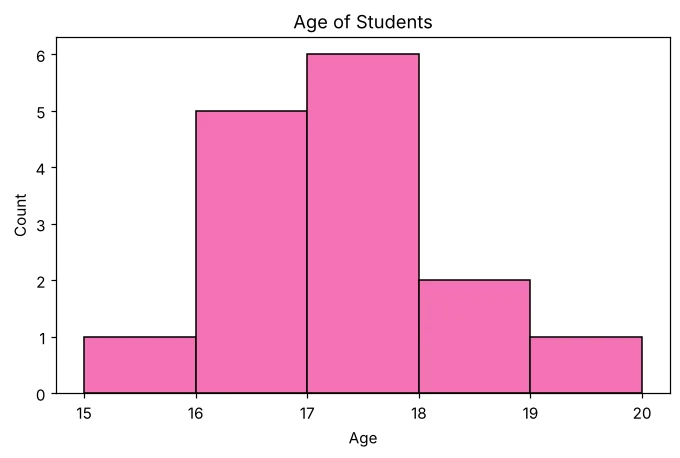
# 9. Histogram of ages
import matplotlib.pyplot as plt
ages = [16, 17, 17, 16, 18, 17, 15, 16, 17, 18, 17, 16, 19, 17, 16]
plt.hist(ages, bins=[15, 16, 17, 18, 19, 20], edgecolor='black', color='#f472b6')
plt.title('Age of Students'); plt.xlabel('Age'); plt.ylabel('Count')
plt.savefig('practical_hist.png')
print('Most common age:', max(set(ages), key=ages.count))
Most common age: 17
SQL query set
पहले STUDENT table बनती है (download में queries.sql देखें)। फिर:
SQL
SELECT * FROM STUDENT;
Output
+--------+---------+--------+-------+------------+---------+
| RollNo | Name    | Gender | Marks | DOB        | City    |
+--------+---------+--------+-------+------------+---------+
|      1 | Ananya  | F      |  91.5 | 2008-03-12 | Delhi   |
|      2 | Bhavesh | M      |  76.0 | 2007-11-30 | Jaipur  |
|      3 | Chhavi  | F      |  84.5 | 2008-07-04 | Delhi   |
|      4 | Dhruv   | M      |  58.0 | 2008-01-21 | Lucknow |
|      5 | Ekta    | F      |  67.5 | 2007-09-15 | Jaipur  |
|      6 | Farhan  | M      |  88.0 | 2008-05-09 | Delhi   |
+--------+---------+--------+-------+------------+---------+
SQL
DELETE FROM STUDENT WHERE RollNo = 4;
SQL
SELECT Name, Marks FROM STUDENT WHERE Marks > 80 ORDER BY Marks DESC;
Output
+--------+-------+
| Name   | Marks |
+--------+-------+
| Ananya |  91.5 |
| Farhan |  88.0 |
| Chhavi |  84.5 |
+--------+-------+
SQL
SELECT MIN(Marks), MAX(Marks), SUM(Marks), ROUND(AVG(Marks), 2) FROM STUDENT;
Output
+------------+------------+------------+----------------------+
| MIN(Marks) | MAX(Marks) | SUM(Marks) | ROUND(AVG(Marks), 2) |
+------------+------------+------------+----------------------+
|       67.5 |       91.5 |      407.5 |                81.50 |
+------------+------------+------------+----------------------+
SQL
SELECT Gender, COUNT(*) FROM STUDENT GROUP BY Gender ORDER BY Gender;
Output
+--------+----------+
| Gender | COUNT(*) |
+--------+----------+
| F      |        3 |
| M      |        2 |
+--------+----------+
SQL
SELECT City, ROUND(AVG(Marks), 1) AS AvgMarks FROM STUDENT GROUP BY City HAVING COUNT(*) > 1 ORDER BY City;
Output
+--------+----------+
| City   | AvgMarks |
+--------+----------+
| Delhi  |     88.0 |
| Jaipur |     71.8 |
+--------+----------+
SQL
SELECT POWER(3, 4), ROUND(456.789, 1), ROUND(456.789, -2), MOD(29, 6);
Output
+-------------+-------------------+--------------------+------------+
| POWER(3, 4) | ROUND(456.789, 1) | ROUND(456.789, -2) | MOD(29, 6) |
+-------------+-------------------+--------------------+------------+
|          81 |             456.8 |                500 |          5 |
+-------------+-------------------+--------------------+------------+
SQL
SELECT UCASE(Name), LENGTH(Name), LEFT(Name, 3), INSTR(Name, 'a') FROM STUDENT;
Output
+-------------+--------------+---------------+------------------+
| UCASE(Name) | LENGTH(Name) | LEFT(Name, 3) | INSTR(Name, 'a') |
+-------------+--------------+---------------+------------------+
| ANANYA      |            6 | Ana           |                1 |
| BHAVESH     |            7 | Bha           |                3 |
| CHHAVI      |            6 | Chh           |                4 |
| EKTA        |            4 | Ekt           |                4 |
| FARHAN      |            6 | Far           |                2 |
+-------------+--------------+---------------+------------------+
SQL
SELECT Name, MONTHNAME(DOB) AS BirthMonth, YEAR(DOB) AS BirthYear, DAYNAME(DOB) AS BornOn FROM STUDENT;
Output
+---------+------------+-----------+-----------+
| Name    | BirthMonth | BirthYear | BornOn    |
+---------+------------+-----------+-----------+
| Ananya  | March      |      2008 | Wednesday |
| Bhavesh | November   |      2007 | Friday    |
| Chhavi  | July       |      2008 | Friday    |
| Ekta    | September  |      2007 | Saturday  |
| Farhan  | May        |      2008 | Friday    |
+---------+------------+-----------+-----------+
SQL
SELECT Name, MID(City, 2, 3) AS Part FROM STUDENT WHERE City LIKE '%i';
Output
+--------+------+
| Name   | Part |
+--------+------+
| Ananya | elh  |
| Chhavi | elh  |
| Farhan | elh  |
+--------+------+
Download
इस course का हर program .py में (output comments में), सारी SQL .sql files में और project data।
अक्सर पूछे जाने वाले प्रश्न (FAQ)
Class 12 IP practical exam में क्या होता है?
आमतौर पर एक pandas program, एक Matplotlib chart, एक table पर SQL queries, project और viva, साथ में practical file। अपने school की latest scheme देखें।
क्या ये outputs असली हैं?
हाँ। हर program Python 3 और pandas 2 पर, हर query MySQL-compatible server पर चलाई गई, और charts असल में बनी images हैं।
