🏆 Project और Revision · Lesson 23
Project Based Learning (Sample Project)
Project-based learning क्या है?
Project-based learning में आप एक असली समस्या को शुरू से अंत तक हल करके सीखते हैं – data इकट्ठा करना, code लिखना, results का analysis और प्रस्तुति। इससे वे skills बनती हैं जो सिर्फ़ exams नहीं जाँच सकते: planning, teamwork और communication।
Project हल करने का तरीका
- 1समस्या और users पहचानें
- 2Plan: tasks, tools और समय-सीमा तय करें
- 3Data इकट्ठा करें (survey, Google Form, CSV, MySQL)
- 4pandas से data process और analyse करें
- 5Matplotlib से charts बनाकर समझें
- 6Test, document और result प्रस्तुत करें
Teamwork
🗣️
Communicationप्रगति और समस्याएँ खुलकर बताएँ।🧩
काम बाँटेंहर सदस्य का एक हिस्सा – data, code, charts, report।🤝
सम्मानविचार सुनें; मिलकर तय करें।⏰
समय-सीमाShared checklist पर tasks track करें।Project ideas
- School result analysis (नीचे दिखाया)
- Canteen की बिक्री और stock analysis
- अपने शहर का मौसम या air-quality data
- Library book issue analysis
- छात्रों के screen time और नींद पर survey
- Cricket / IPL खिलाड़ियों के आँकड़े
Sample project: Result Analysis
उद्देश्य: class के marks का analysis करके औसत, topper, grade distribution और section-wise प्रदर्शन निकालना। Tools: Python, pandas, Matplotlib, CSV।
Step 1: Data इकट्ठा
Python
# Step 1 – create the data file (in a real project you collect this from a survey or form)
import pandas as pd
data = {'Roll': range(1, 13),
        'Name': ['Aarav', 'Bela', 'Chirag', 'Diya', 'Eshan', 'Farah', 'Gopal', 'Hina',
                 'Ishaan', 'Jiya', 'Kunal', 'Lata'],
        'Section': ['A', 'B', 'A', 'B', 'A', 'B', 'A', 'B', 'A', 'B', 'A', 'B'],
        'English': [78, 85, 62, 90, 71, 88, 55, 93, 67, 80, 74, 69],
        'Maths': [92, 74, 58, 81, 88, 67, 49, 95, 73, 61, 84, 77],
        'IP': [95, 89, 70, 92, 84, 79, 61, 98, 76, 83, 90, 72]}
pd.DataFrame(data).to_csv('class12_result.csv', index=False)
print('class12_result.csv created with', len(data['Roll']), 'students')
class12_result.csv created with 12 students
Step 2: Process
Python
# Step 2 – read, add Total, Percent and Grade
import pandas as pd
df = pd.read_csv('class12_result.csv')
df['Total'] = df[['English', 'Maths', 'IP']].sum(axis=1)
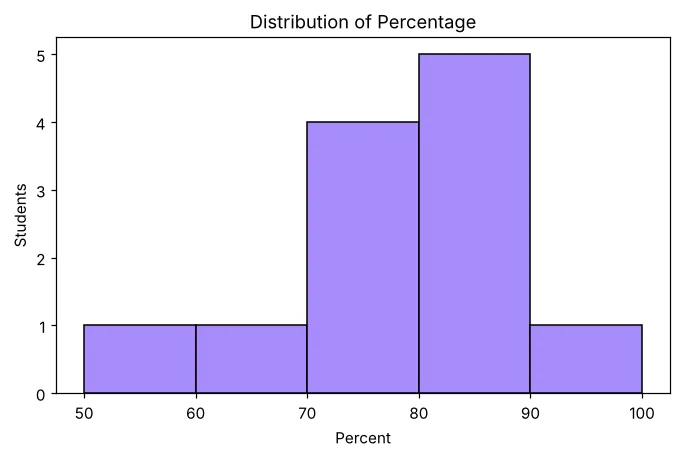
df['Percent'] = (df['Total'] / 3).round(1)
def grade(p):
    if p >= 90: return 'A1'
    if p >= 80: return 'A2'
    if p >= 70: return 'B1'
    if p >= 60: return 'B2'
    return 'C'
df['Grade'] = df['Percent'].apply(grade)
df.to_csv('class12_processed.csv', index=False)
print(df[['Name', 'Section', 'Total', 'Percent', 'Grade']])
Name Section Total Percent Grade
0 Aarav A 265 88.3 A2
1 Bela B 248 82.7 A2
2 Chirag A 190 63.3 B2
3 Diya B 263 87.7 A2
4 Eshan A 243 81.0 A2
5 Farah B 234 78.0 B1
6 Gopal A 165 55.0 C
7 Hina B 286 95.3 A1
8 Ishaan A 216 72.0 B1
9 Jiya B 224 74.7 B1
10 Kunal A 248 82.7 A2
11 Lata B 218 72.7 B1
Step 3: Analyse
Python
# Step 3 – analysis
import pandas as pd
df = pd.read_csv('class12_processed.csv')
print('Class average %   :', round(df['Percent'].mean(), 2))
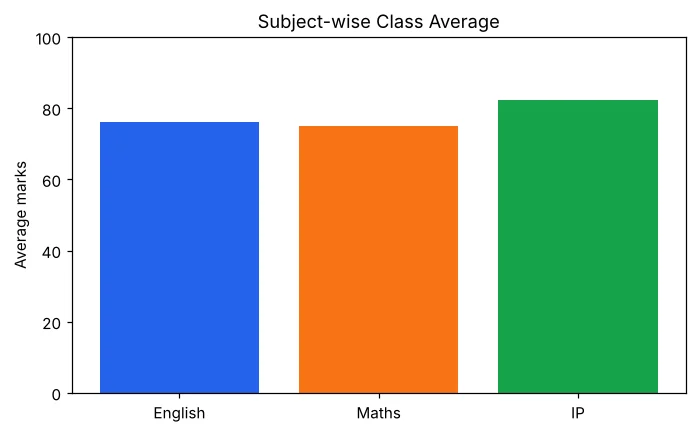
print('Subject averages  :'); print(df[['English', 'Maths', 'IP']].mean().round(1))
print('Topper            :', df.loc[df['Total'].idxmax(), 'Name'])
print('Section-wise mean :'); print(df.groupby('Section')['Percent'].mean().round(2))
print('Grade count       :'); print(df['Grade'].value_counts().sort_index())
Class average % : 77.78
Subject averages :
English 76.0
Maths 74.9
IP 82.4
dtype: float64
Topper : Hina
Section-wise mean :
Section
A 73.72
B 81.85
Name: Percent, dtype: float64
Grade count :
Grade
A1 1
A2 5
B1 4
B2 1
C 1
Name: count, dtype: int64
Step 4: Charts
Python
# Step 4 – charts
import pandas as pd
import matplotlib.pyplot as plt
df = pd.read_csv('class12_processed.csv')
avg = df[['English', 'Maths', 'IP']].mean()
plt.bar(avg.index, avg.values, color=['#2563eb', '#f97316', '#16a34a'])
plt.title('Subject-wise Class Average'); plt.ylabel('Average marks'); plt.ylim(0, 100)
plt.savefig('project_subject_avg.png')
plt.figure()
plt.hist(df['Percent'], bins=[50, 60, 70, 80, 90, 100], edgecolor='black', color='#a78bfa')
plt.title('Distribution of Percentage'); plt.xlabel('Percent'); plt.ylabel('Students')
plt.savefig('project_hist.png')
plt.figure()
gc = df['Grade'].value_counts().sort_index()
plt.pie(gc.values, labels=gc.index, autopct='%1.0f%%')
plt.title('Grade Share')
plt.savefig('project_pie.png')
print('3 charts saved')
3 charts saved

Step 5: Menu program
Python
# Step 5 – menu-driven program that ties everything together
import pandas as pd
df = pd.read_csv('class12_processed.csv')
while True:
    print('1.Show all 2.Search by name 3.Students above % 4.Exit')
    ch = input('Choice: ')
    if ch == '1':
        print(df[['Roll', 'Name', 'Percent', 'Grade']].to_string(index=False))
    elif ch == '2':
        n = input('Name: ')
        r = df[df['Name'].str.lower() == n.lower()]
        print(r[['Name', 'English', 'Maths', 'IP', 'Percent']].to_string(index=False) if len(r) else 'Not found')
    elif ch == '3':
        p = float(input('Minimum %: '))
        print(df[df['Percent'] >= p]['Name'].tolist())
    else:
        print('Thank you'); break
1.Show all 2.Search by name 3.Students above % 4.Exit
Choice: 2
Name: hina
Name English Maths IP Percent
Hina 93 95 98 95.3
1.Show all 2.Search by name 3.Students above % 4.Exit
Choice: 3
Minimum %: 85
['Aarav', 'Diya', 'Hina']
1.Show all 2.Search by name 3.Students above % 4.Exit
Choice: 4
Thank you
Project report लिखना
- Certificate और acknowledgement
- परिचय और उद्देश्य
- इस्तेमाल किया hardware और software
- Data का विवरण (columns और स्रोत)
- Comments के साथ source code
- Output screenshots और charts
- निष्कर्ष और आगे की संभावनाएँ
- Bibliography (इस्तेमाल की websites और किताबें)
अक्सर पूछे जाने वाले प्रश्न (FAQ)
Class 12 IP project में क्या होना चाहिए?
असल ज़िंदगी की समस्या, CSV या MySQL में data, processing और analysis का pandas code, Matplotlib charts, menu या report, और documentation – उद्देश्य, tools, code, output screenshots और निष्कर्ष।
क्या project group में कर सकते हैं?
हाँ, आमतौर पर 2–3 छात्रों के group में। काम बाँटें – data collection, code, charts और report – और नियमित मिलें।
