Computer Vision और OpenCV Basics
Computer vision क्या है?
Computer vision computers को images और video समझना सिखाता है: number plates पढ़ना, documents scan करना, shelf पर products गिनना, attendance के लिए चेहरे पहचानना या सड़क की दरारें जाँचना। OpenCV इसकी सबसे ज़्यादा इस्तेमाल होने वाली open-source library है, और Python में image बस pixel values का एक NumPy array है।
pip install opencv-python matplotlib
Step 1: image एक NumPy array है
हम scikit-learn के साथ आने वाली एक असली photo इस्तेमाल करते हैं, ताकि आप बिना कुछ download किए हर उदाहरण चला सकें।
import cv2
from sklearn.datasets import load_sample_image

rgb = load_sample_image("flower.jpg")          # NumPy array in RGB order
img = cv2.cvtColor(rgb, cv2.COLOR_RGB2BGR)     # OpenCV works in BGR order
cv2.imwrite("flower.jpg", img)                 # save it like any photo

img = cv2.imread("flower.jpg")                 # how you load your own photo
print("type :", type(img).__name__, img.dtype)
print("shape:", img.shape, "→ height, width, channels")
print("pixel at row 100, col 200 (B, G, R):", img[100, 200])
print("brightest value:", img.max(), "| darkest:", img.min())cv2.imread channels Blue-Green-Red क्रम में देता है। Matplotlib को RGB चाहिए, इसलिए दिखाने से पहले cv2.cvtColor(img, cv2.COLOR_BGR2RGB) करें, वरना लाल फूल नीले दिखेंगे।
Step 2: resize, crop, grayscale, blur
import cv2
import matplotlib.pyplot as plt
from sklearn.datasets import load_sample_image

img = cv2.cvtColor(load_sample_image("flower.jpg"), cv2.COLOR_RGB2BGR)

small = cv2.resize(img, (320, 214))                        # (width, height)
crop = img[100:330, 180:480]                               # rows, columns – plain NumPy slicing
gray = cv2.cvtColor(img, cv2.COLOR_BGR2GRAY)
blur = cv2.GaussianBlur(img, (21, 21), 0)                  # kernel size must be odd

print("small:", small.shape, "| crop:", crop.shape, "| gray:", gray.shape)

show = [("original", img), ("crop", crop), ("grayscale", gray), ("blur", blur)]
fig, axes = plt.subplots(1, 4, figsize=(12, 2.8), dpi=100)
for ax, (title, im) in zip(axes, show):
    ax.imshow(im if im.ndim == 2 else cv2.cvtColor(im, cv2.COLOR_BGR2RGB), cmap="gray")
    ax.set_title(title); ax.axis("off")
fig.tight_layout(); fig.savefig("basics.png")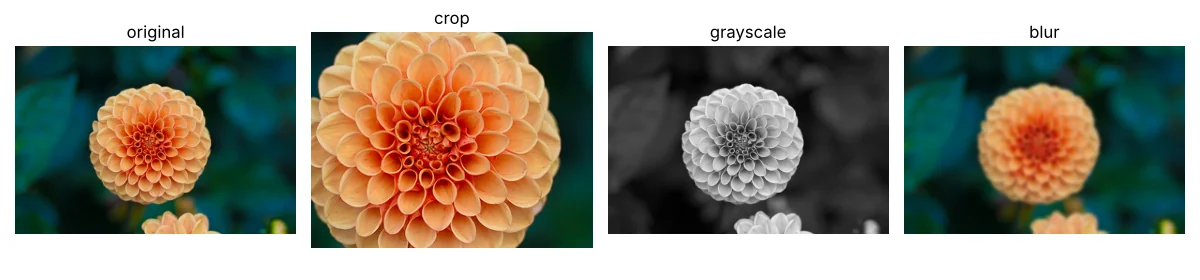
Grayscale image में सिर्फ़ एक channel होता है, इसलिए उसकी shape से आख़िरी “3” हट जाता है। कई algorithms grayscale पर चलते हैं क्योंकि रंग की ज़रूरत नहीं और data तीन गुना कम होता है।
Step 3: edges और thresholding
import cv2
import matplotlib.pyplot as plt
from sklearn.datasets import load_sample_image

gray = cv2.cvtColor(load_sample_image("china.jpg"), cv2.COLOR_RGB2GRAY)

edges = cv2.Canny(gray, 100, 200)                                   # strong intensity changes
_, binary = cv2.threshold(gray, 0, 255, cv2.THRESH_BINARY + cv2.THRESH_OTSU)   # Otsu picks the cut-off
print("edge pixels:", int((edges > 0).sum()), "of", edges.size)

fig, axes = plt.subplots(1, 3, figsize=(12, 3.2), dpi=100)
for ax, (t, im) in zip(axes, [("grayscale", gray), ("Canny edges", edges), ("Otsu threshold", binary)]):
    ax.imshow(im, cmap="gray"); ax.set_title(t); ax.axis("off")
fig.tight_layout(); fig.savefig("edges.png")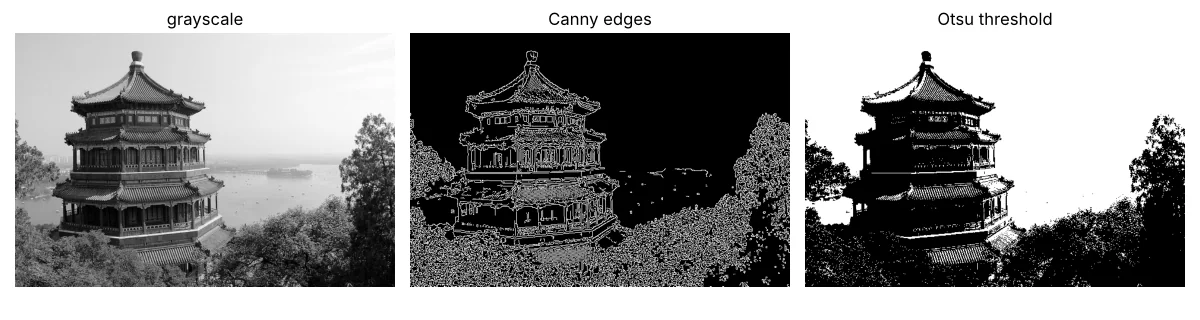
| Technique | क्या देता है | किसमें उपयोग |
|---|---|---|
| Canny | जहाँ चमक अचानक बदले वहाँ पतली lines | Document borders, lane lines, shapes |
| Threshold | सिर्फ़ black/white image | Text scan करना, objects को background से अलग करना |
| पहले Blur | Edges/threshold से पहले noise हटाता है | Phone photos पर साफ़ नतीजे |
Step 4: contours से objects गिनें
Factory का आम काम: tray पर coins (या tablets, या biscuits) गिनना। हम एक test tray बनाते हैं ताकि सही जवाब पता हो, फिर OpenCV हर object की रेखा (contour) ढूँढता है।
import cv2
import numpy as np

rng = np.random.default_rng(3)
tray = np.full((300, 500, 3), (60, 90, 40), np.uint8)               # green tray (BGR)
coins = [(70, 70, 32), (180, 90, 26), (300, 70, 36), (420, 100, 30),
         (100, 210, 28), (240, 210, 40), (390, 220, 25)]
for x, y, r in coins:
    cv2.circle(tray, (x, y), r, (40, 180, 220), -1)                  # golden coins
tray = cv2.add(tray, rng.integers(0, 25, tray.shape, dtype=np.uint8))  # camera noise

gray = cv2.cvtColor(tray, cv2.COLOR_BGR2GRAY)
blur = cv2.GaussianBlur(gray, (5, 5), 0)
_, mask = cv2.threshold(blur, 0, 255, cv2.THRESH_BINARY + cv2.THRESH_OTSU)
contours, _ = cv2.findContours(mask, cv2.RETR_EXTERNAL, cv2.CHAIN_APPROX_SIMPLE)
contours = [c for c in contours if cv2.contourArea(c) > 200]         # ignore tiny specks

print("coins found:", len(contours), "| actual:", len(coins))
for c in sorted(contours, key=cv2.contourArea, reverse=True)[:3]:
    (x, y), r = cv2.minEnclosingCircle(c)
    print(f"  coin at ({x:.0f}, {y:.0f}) radius ≈ {r:.0f}px")

out = tray.copy()
cv2.drawContours(out, contours, -1, (0, 0, 255), 3)
cv2.putText(out, f"{len(contours)} coins", (10, 290), cv2.FONT_HERSHEY_SIMPLEX, 0.9, (255, 255, 255), 2)
cv2.imwrite("counted.png", out)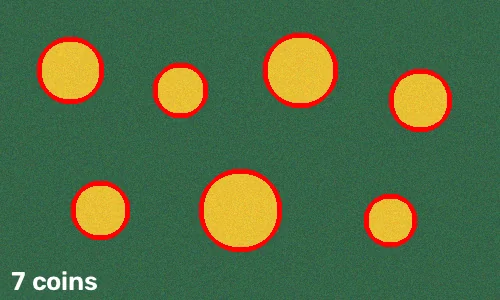
Step 5: अपनी photo पर face detection
OpenCV के साथ pre-trained Haar cascade face detectors आते हैं। एक group photo को class.jpg नाम से इस script के पास save करके चलाएँ। यह सिर्फ़ चेहरे ढूँढता है – यह नहीं जानता कि वे कौन हैं।
import cv2

detector = cv2.CascadeClassifier(cv2.data.haarcascades + "haarcascade_frontalface_default.xml")
img = cv2.imread("class.jpg")
gray = cv2.cvtColor(img, cv2.COLOR_BGR2GRAY)
faces = detector.detectMultiScale(gray, scaleFactor=1.1, minNeighbors=5, minSize=(40, 40))
print("faces found:", len(faces))
for (x, y, w, h) in faces:
    cv2.rectangle(img, (x, y), (x + w, y + h), (0, 255, 0), 2)
cv2.imwrite("class_faces.jpg", img)लोगों की photos personal data हैं। अपनी photos इस्तेमाल करें या अनुमति लें, दूसरों के चेहरे online tools पर कभी upload न करें, और attendance systems के लिए school या company के नियम मानें।
Haar cascades तेज़ पर पुराने हैं। आधुनिक projects deep-learning detectors (OpenCV का DNN module, MediaPipe, YOLO) इस्तेमाल करते हैं, जो तिरछे चेहरे और कम रोशनी बहुत बेहतर संभालते हैं।
Loop में webcam video
import cv2

cap = cv2.VideoCapture(0)                  # 0 = default webcam
while True:
    ok, frame = cap.read()
    if not ok:
        break
    edges = cv2.Canny(cv2.cvtColor(frame, cv2.COLOR_BGR2GRAY), 80, 160)
    cv2.imshow("edges – press q to quit", edges)
    if cv2.waitKey(1) & 0xFF == ord("q"):
        break
cap.release()
cv2.destroyAllWindows()
Video बस प्रति सेकंड कई images है; ऊपर की हर technique frame-by-frame काम करती है।
Project ideas
| Project | Techniques |
|---|---|
| Document scanner (page crop और सीधा करना) | Canny, contours, perspective transform |
| Production line के लिए tablet/biscuit counter | Threshold, contours, area filter |
| रंग से object tracker (गेंद) | HSV colour mask, contours, video loop |
| Attendance helper (सहमति के साथ) | Face detection + recognition model |
Photo credits
scikit-learn के साथ आने वाली sample photos: Flickr पर vultilion की flower.jpg और danielbuechele की china.jpg, licence CC BY 2.0। ऊपर के बदले हुए रूप इसी page के code से बने हैं।
अभ्यास
- अपनी photo load करके shape छापें और grayscale copy save करें।
- Canny thresholds को (50, 150) और (150, 250) करके तुलना करें।
- Step 4 में दो छूते हुए coins जोड़कर देखें गिनती का क्या होता है – फिर अलग करने के लिए
cv2.erodeआज़माएँ। - HSV image पर
cv2.inRangeसे सिर्फ़ लाल pixels का mask बनाएँ।
सारांश
- Images NumPy arrays हैं: (height, width, channels); OpenCV BGR इस्तेमाल करता है।
- Slicing से crop,
cv2.resizeसे resize,cv2.cvtColorसे convert। - Blur → threshold/Canny → contours objects ढूँढने और गिनने की classic pipeline है।
- Haar cascades चेहरे जल्दी ढूँढते हैं; deep-learning detectors ज़्यादा सटीक हैं।
- लोगों की photos को निजी data मानें।
