Computer Vision with OpenCV
In this lesson: Computer vision with OpenCV — read, resize, grayscale, edge detection and face detection — beginner Python code. In Hindi & English.
What is computer vision?
Computer vision teaches computers to understand images and video: reading number plates, scanning documents, counting products on a shelf, detecting faces for attendance or checking cracks in a road. OpenCV is the most widely used open-source library for it, and in Python an image is simply a NumPy array of pixel values.
pip install opencv-python matplotlib
Step 1: an image is a NumPy array
We use a real photo that ships with scikit-learn, so you can run every example without downloading anything.
import cv2
from sklearn.datasets import load_sample_image

rgb = load_sample_image("flower.jpg")          # NumPy array in RGB order
img = cv2.cvtColor(rgb, cv2.COLOR_RGB2BGR)     # OpenCV works in BGR order
cv2.imwrite("flower.jpg", img)                 # save it like any photo

img = cv2.imread("flower.jpg")                 # how you load your own photo
print("type :", type(img).__name__, img.dtype)
print("shape:", img.shape, "→ height, width, channels")
print("pixel at row 100, col 200 (B, G, R):", img[100, 200])
print("brightest value:", img.max(), "| darkest:", img.min())cv2.imread returns channels in Blue-Green-Red order. Matplotlib expects RGB, so convert with cv2.cvtColor(img, cv2.COLOR_BGR2RGB) before showing, or your red flowers will look blue.
Step 2: resize, crop, grayscale, blur
import cv2
import matplotlib.pyplot as plt
from sklearn.datasets import load_sample_image

img = cv2.cvtColor(load_sample_image("flower.jpg"), cv2.COLOR_RGB2BGR)

small = cv2.resize(img, (320, 214))                        # (width, height)
crop = img[100:330, 180:480]                               # rows, columns – plain NumPy slicing
gray = cv2.cvtColor(img, cv2.COLOR_BGR2GRAY)
blur = cv2.GaussianBlur(img, (21, 21), 0)                  # kernel size must be odd

print("small:", small.shape, "| crop:", crop.shape, "| gray:", gray.shape)

show = [("original", img), ("crop", crop), ("grayscale", gray), ("blur", blur)]
fig, axes = plt.subplots(1, 4, figsize=(12, 2.8), dpi=100)
for ax, (title, im) in zip(axes, show):
    ax.imshow(im if im.ndim == 2 else cv2.cvtColor(im, cv2.COLOR_BGR2RGB), cmap="gray")
    ax.set_title(title); ax.axis("off")
fig.tight_layout(); fig.savefig("basics.png")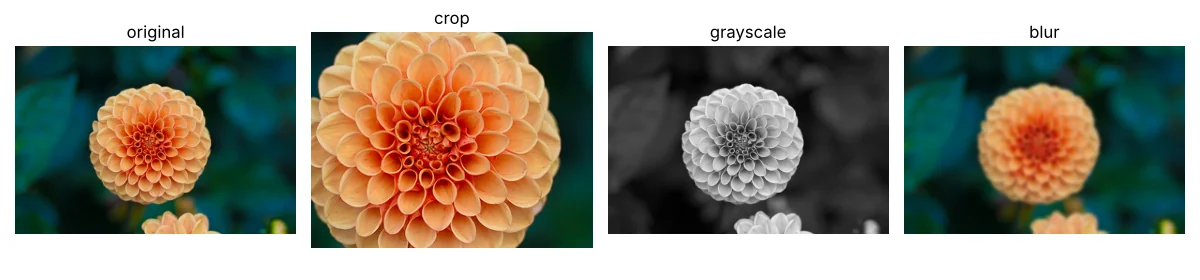
A grayscale image has only one channel, so its shape loses the last “3”. Many algorithms work on grayscale because colour is not needed and it is three times less data.
Step 3: edges and thresholding
import cv2
import matplotlib.pyplot as plt
from sklearn.datasets import load_sample_image

gray = cv2.cvtColor(load_sample_image("china.jpg"), cv2.COLOR_RGB2GRAY)

edges = cv2.Canny(gray, 100, 200)                                   # strong intensity changes
_, binary = cv2.threshold(gray, 0, 255, cv2.THRESH_BINARY + cv2.THRESH_OTSU)   # Otsu picks the cut-off
print("edge pixels:", int((edges > 0).sum()), "of", edges.size)

fig, axes = plt.subplots(1, 3, figsize=(12, 3.2), dpi=100)
for ax, (t, im) in zip(axes, [("grayscale", gray), ("Canny edges", edges), ("Otsu threshold", binary)]):
    ax.imshow(im, cmap="gray"); ax.set_title(t); ax.axis("off")
fig.tight_layout(); fig.savefig("edges.png")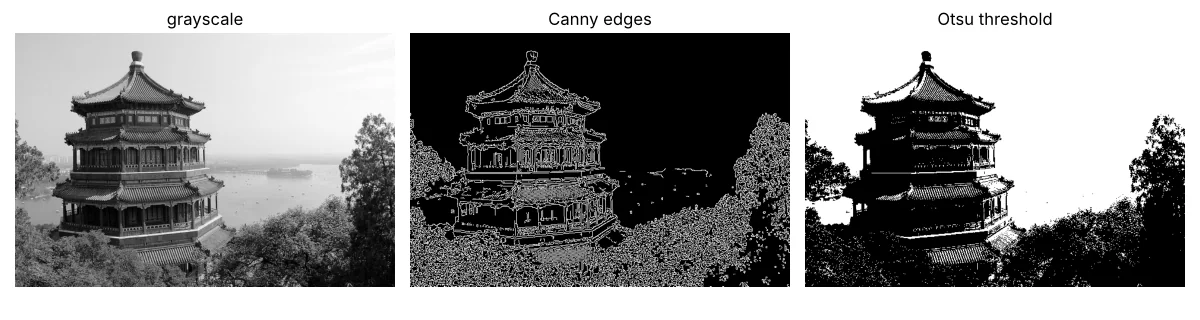
| Technique | What it gives | Used for |
|---|---|---|
| Canny | Thin lines where brightness changes sharply | Document borders, lane lines, shapes |
| Threshold | Pure black/white image | Scanning text, separating objects from background |
| Blur first | Removes noise before edges/threshold | Cleaner results on phone photos |
Step 4: count objects with contours
A classic factory task: count coins (or tablets, or biscuits) on a tray. We draw a test tray so the answer is known, then let OpenCV find each object’s outline (contour).
import cv2
import numpy as np

rng = np.random.default_rng(3)
tray = np.full((300, 500, 3), (60, 90, 40), np.uint8)               # green tray (BGR)
coins = [(70, 70, 32), (180, 90, 26), (300, 70, 36), (420, 100, 30),
         (100, 210, 28), (240, 210, 40), (390, 220, 25)]
for x, y, r in coins:
    cv2.circle(tray, (x, y), r, (40, 180, 220), -1)                  # golden coins
tray = cv2.add(tray, rng.integers(0, 25, tray.shape, dtype=np.uint8))  # camera noise

gray = cv2.cvtColor(tray, cv2.COLOR_BGR2GRAY)
blur = cv2.GaussianBlur(gray, (5, 5), 0)
_, mask = cv2.threshold(blur, 0, 255, cv2.THRESH_BINARY + cv2.THRESH_OTSU)
contours, _ = cv2.findContours(mask, cv2.RETR_EXTERNAL, cv2.CHAIN_APPROX_SIMPLE)
contours = [c for c in contours if cv2.contourArea(c) > 200]         # ignore tiny specks

print("coins found:", len(contours), "| actual:", len(coins))
for c in sorted(contours, key=cv2.contourArea, reverse=True)[:3]:
    (x, y), r = cv2.minEnclosingCircle(c)
    print(f"  coin at ({x:.0f}, {y:.0f}) radius ≈ {r:.0f}px")

out = tray.copy()
cv2.drawContours(out, contours, -1, (0, 0, 255), 3)
cv2.putText(out, f"{len(contours)} coins", (10, 290), cv2.FONT_HERSHEY_SIMPLEX, 0.9, (255, 255, 255), 2)
cv2.imwrite("counted.png", out)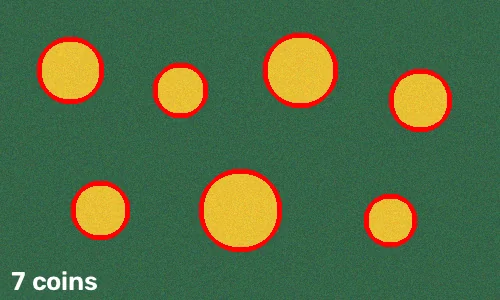
Step 5: face detection on your own photo
OpenCV ships with pre-trained Haar cascade face detectors. Save a group photo as class.jpg next to this script and run it. It finds faces only – it does not know who they are.
import cv2

detector = cv2.CascadeClassifier(cv2.data.haarcascades + "haarcascade_frontalface_default.xml")
img = cv2.imread("class.jpg")
gray = cv2.cvtColor(img, cv2.COLOR_BGR2GRAY)
faces = detector.detectMultiScale(gray, scaleFactor=1.1, minNeighbors=5, minSize=(40, 40))
print("faces found:", len(faces))
for (x, y, w, h) in faces:
    cv2.rectangle(img, (x, y), (x + w, y + h), (0, 255, 0), 2)
cv2.imwrite("class_faces.jpg", img)Photos of people are personal data. Use your own photos or ask permission, never upload other people’s faces to online tools, and follow your school’s or company’s rules for attendance systems.
Haar cascades are fast but old. Modern projects use deep-learning detectors (OpenCV’s DNN module, MediaPipe, YOLO), which handle side faces and poor light much better.
Webcam video in a loop
import cv2

cap = cv2.VideoCapture(0)                  # 0 = default webcam
while True:
    ok, frame = cap.read()
    if not ok:
        break
    edges = cv2.Canny(cv2.cvtColor(frame, cv2.COLOR_BGR2GRAY), 80, 160)
    cv2.imshow("edges – press q to quit", edges)
    if cv2.waitKey(1) & 0xFF == ord("q"):
        break
cap.release()
cv2.destroyAllWindows()
A video is just many images per second; every technique above works frame by frame.
Project ideas
| Project | Techniques |
|---|---|
| Document scanner (crop and straighten a page) | Canny, contours, perspective transform |
| Tablet/biscuit counter for a production line | Threshold, contours, area filter |
| Colour-based object tracker (a ball) | HSV colour mask, contours, video loop |
| Attendance helper (with consent) | Face detection + a recognition model |
Photo credits
Sample photos bundled with scikit-learn: flower.jpg by vultilion and china.jpg by danielbuechele on Flickr, licensed CC BY 2.0. The processed versions above were made with the code on this page.
Practice tasks
- Load your own photo, print its shape, and save a grayscale copy.
- Change the Canny thresholds to (50, 150) and (150, 250) and compare.
- Add two touching coins in Step 4 and see what happens to the count – then try
cv2.erodeto separate them. - Make a mask of only red pixels using
cv2.inRangeon an HSV image.
Summary
- Images are NumPy arrays: (height, width, channels); OpenCV uses BGR.
- Crop with slicing, resize with
cv2.resize, convert withcv2.cvtColor. - Blur → threshold/Canny → contours is the classic pipeline for finding and counting objects.
- Haar cascades detect faces quickly; deep-learning detectors are more accurate.
- Treat photos of people as private data.
