📈 Unit 1 – Data Visualisation · Lesson 16
Matplotlib: Line & Bar Charts
What is data visualisation?
Data visualisation means showing data as pictures – charts and graphs – so patterns are seen at a glance. Python's Matplotlib library draws them; its pyplot module is imported as plt.
Command prompt
pip install matplotlib
pyplot basics
- 1import matplotlib.pyplot as plt
- 2Prepare x and y data (lists, Series)
- 3Call a chart function: plot(), bar(), hist(), pie()
- 4Add title, labels, legend
- 5plt.show() to display or plt.savefig() to save
Line chart
Python
import matplotlib.pyplot as plt
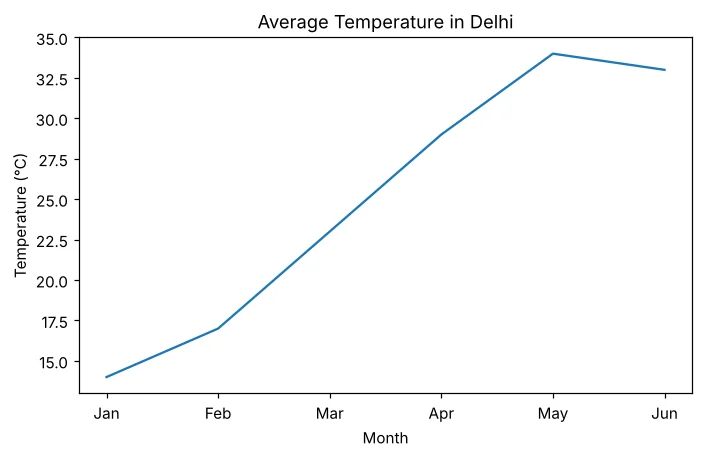
months = ['Jan', 'Feb', 'Mar', 'Apr', 'May', 'Jun']
temp = [14, 17, 23, 29, 34, 33]
plt.plot(months, temp)
plt.title('Average Temperature in Delhi')
plt.xlabel('Month')
plt.ylabel('Temperature (°C)')
plt.savefig('line_basic.png')
print('Chart saved')
Chart saved
Customising a plot
Python
import matplotlib.pyplot as plt
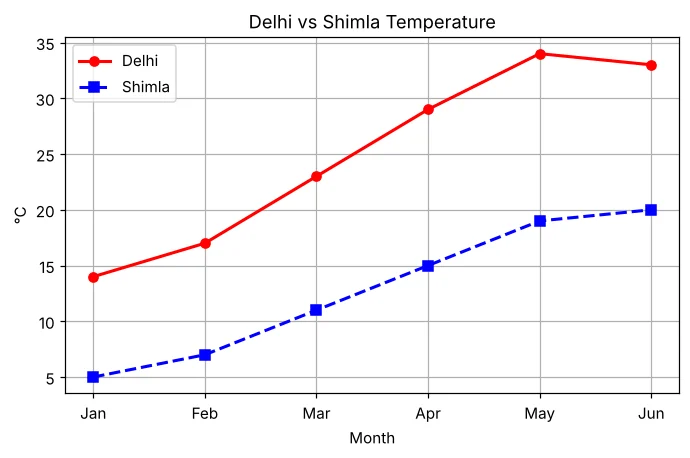
months = ['Jan', 'Feb', 'Mar', 'Apr', 'May', 'Jun']
delhi = [14, 17, 23, 29, 34, 33]
shimla = [5, 7, 11, 15, 19, 20]
plt.plot(months, delhi, color='red', marker='o', linestyle='-', linewidth=2, label='Delhi')
plt.plot(months, shimla, color='blue', marker='s', linestyle='--', linewidth=2, label='Shimla')
plt.title('Delhi vs Shimla Temperature')
plt.xlabel('Month'); plt.ylabel('°C')
plt.legend()
plt.grid(True)
plt.savefig('line_custom.png')
print('Chart saved')
Chart saved
Bar chart
Python
import matplotlib.pyplot as plt
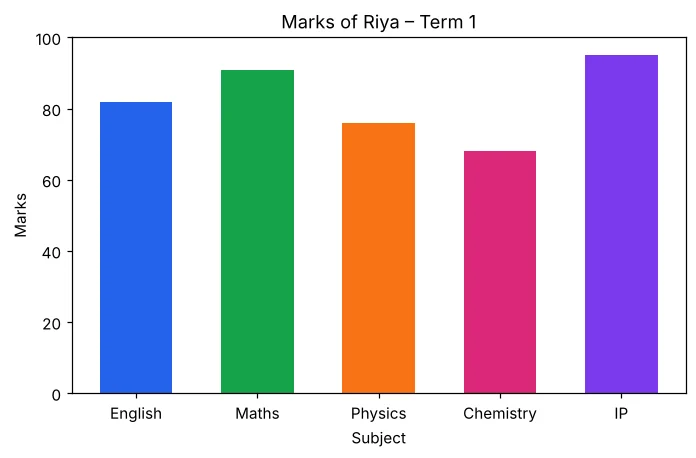
subjects = ['English', 'Maths', 'Physics', 'Chemistry', 'IP']
marks = [82, 91, 76, 68, 95]
plt.bar(subjects, marks, color=['#2563eb', '#16a34a', '#f97316', '#db2777', '#7c3aed'], width=0.6)
plt.title('Marks of Riya – Term 1')
plt.xlabel('Subject'); plt.ylabel('Marks')
plt.ylim(0, 100)
plt.savefig('bar_basic.png')
print('Chart saved')
Chart saved
Multiple bar chart
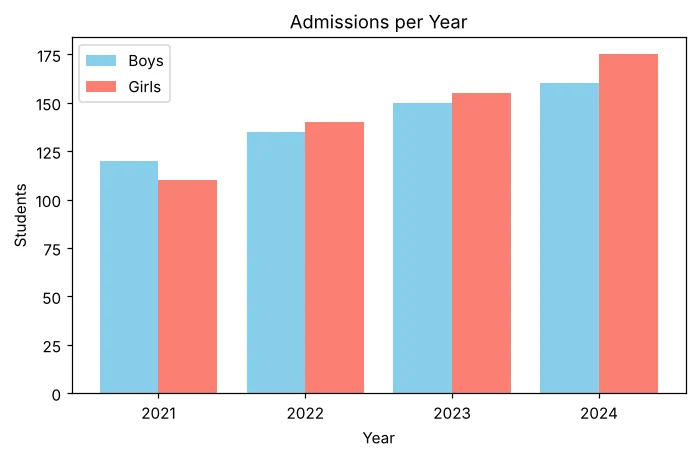
Shift bars left and right of each x position so two series stand side by side.
Python
import matplotlib.pyplot as plt
import numpy as np
years = ['2021', '2022', '2023', '2024']
boys = [120, 135, 150, 160]
girls = [110, 140, 155, 175]
x = np.arange(len(years))
plt.bar(x - 0.2, boys, width=0.4, label='Boys', color='skyblue')
plt.bar(x + 0.2, girls, width=0.4, label='Girls', color='salmon')
plt.xticks(x, years)
plt.title('Admissions per Year'); plt.xlabel('Year'); plt.ylabel('Students')
plt.legend()
plt.savefig('bar_grouped.png')
print('Chart saved')
Chart saved
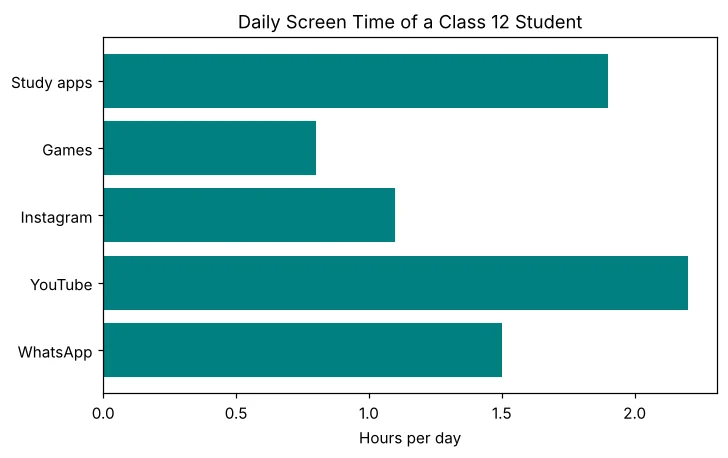
Horizontal bar chart
Python
import matplotlib.pyplot as plt
apps = ['WhatsApp', 'YouTube', 'Instagram', 'Games', 'Study apps']
hours = [1.5, 2.2, 1.1, 0.8, 1.9]
plt.barh(apps, hours, color='teal')
plt.title('Daily Screen Time of a Class 12 Student')
plt.xlabel('Hours per day')
plt.savefig('barh.png')
print('Chart saved')
Chart saved
Plotting DataFrame columns
Python
import pandas as pd
import matplotlib.pyplot as plt
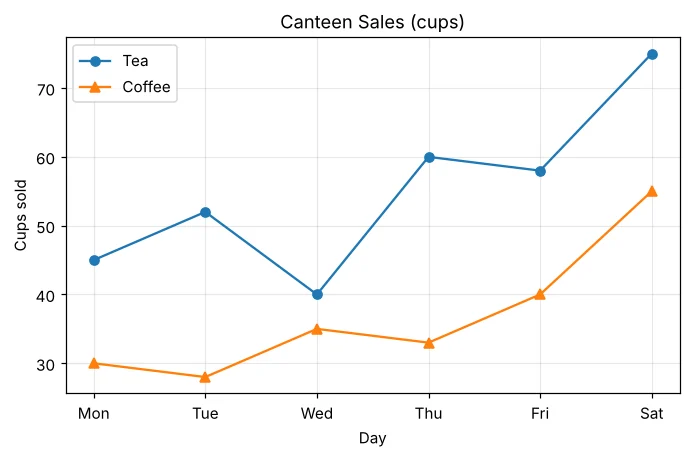
df = pd.DataFrame({'Day': ['Mon', 'Tue', 'Wed', 'Thu', 'Fri', 'Sat'],
                   'Tea': [45, 52, 40, 60, 58, 75],
                   'Coffee': [30, 28, 35, 33, 40, 55]})
plt.plot(df['Day'], df['Tea'], marker='o', label='Tea')
plt.plot(df['Day'], df['Coffee'], marker='^', label='Coffee')
plt.title('Canteen Sales (cups)'); plt.xlabel('Day'); plt.ylabel('Cups sold')
plt.legend(); plt.grid(alpha=0.3)
plt.savefig('line_from_df.png')
print('Best tea day:', df.loc[df['Tea'].idxmax(), 'Day'])
Best tea day: Sat
Parameters summary
| Function / parameter | Use |
|---|---|
| plt.plot(x, y) | Line chart |
| plt.bar(x, h) / plt.barh(y, w) | Vertical / horizontal bars |
| title(), xlabel(), ylabel() | Text on the chart |
| color / c | 'red', 'b', '#16a34a'… |
| marker | 'o' circle, 's' square, '^' triangle, '*' star |
| linestyle / ls | '-' solid, '--' dashed, ':' dotted, '-.' |
| linewidth / lw, width | Line thickness / bar width |
| label + legend() | Key that names each series |
| grid(), xticks(), ylim() | Grid lines, tick labels, axis range |
| savefig(), show() | Save to file / display |
Frequently Asked Questions
What is the difference between plt.show() and plt.savefig()?
show() opens the chart in a window; savefig("file.png") saves it as an image file. Call savefig before show.
When should I use a line chart and when a bar chart?
Use a line chart for change over time (trend). Use a bar chart to compare separate categories.
Why is the legend empty?
legend() shows the label= given in plot() or bar(). Without label there is nothing to show.
