📈 Unit 1 – Data Visualisation · Lesson 17
Histogram, Pie & Pandas Plot
Histogram
A histogram groups numeric data into ranges called bins and shows how many values fall in each range.
Python
import matplotlib.pyplot as plt
heights = [148, 152, 155, 156, 158, 160, 161, 161, 163, 164, 165, 165, 166,
           167, 168, 168, 169, 170, 171, 172, 174, 175, 177, 180, 184]
plt.hist(heights, bins=[145, 155, 165, 175, 185], color='orange', edgecolor='black')
plt.title('Heights of 25 Students'); plt.xlabel('Height (cm)'); plt.ylabel('Number of students')
plt.savefig('hist_basic.png')
print('Students:', len(heights))
Students: 25
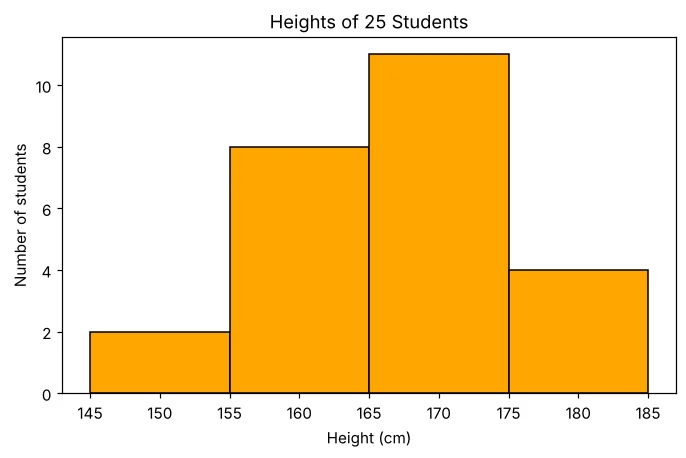
Understanding bins
Python
import numpy as np
heights = [148, 152, 155, 156, 158, 160, 161, 161, 163, 164, 165, 165, 166,
           167, 168, 168, 169, 170, 171, 172, 174, 175, 177, 180, 184]
counts, edges = np.histogram(heights, bins=[145, 155, 165, 175, 185])
for i in range(len(counts)):
    print(f'{edges[i]}-{edges[i+1]}: {counts[i]}')
145-155: 2
155-165: 8
165-175: 11
175-185: 4
Histogram styles
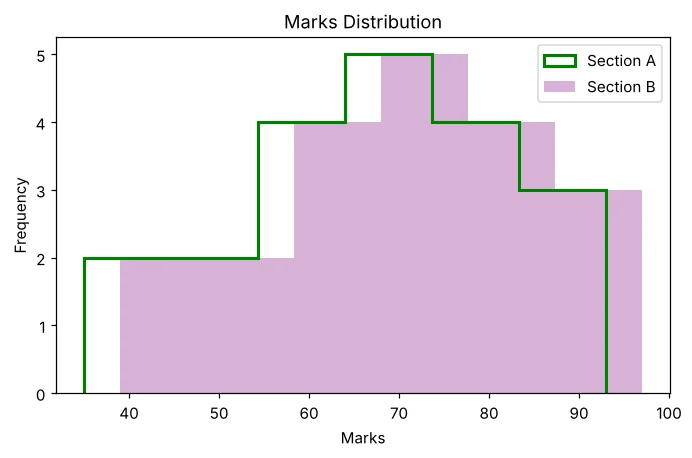
histtype can be 'bar' (default), 'step' (outline) or 'stepfilled'. alpha sets transparency.
Python
import matplotlib.pyplot as plt
marks = [35, 42, 48, 51, 55, 58, 61, 63, 64, 67, 69, 71, 72, 74, 75, 78, 81, 84, 88, 93]
plt.hist(marks, bins=6, histtype='step', linewidth=2, color='green', label='Section A')
plt.hist([m + 4 for m in marks], bins=6, histtype='stepfilled', alpha=0.3, color='purple', label='Section B')
plt.title('Marks Distribution'); plt.xlabel('Marks'); plt.ylabel('Frequency'); plt.legend()
plt.savefig('hist_types.png')
print('Chart saved')
Chart saved
Pie chart
Python
import matplotlib.pyplot as plt
heads = ['Rent', 'Food', 'Travel', 'Education', 'Savings']
amount = [12000, 9000, 3000, 6000, 5000]
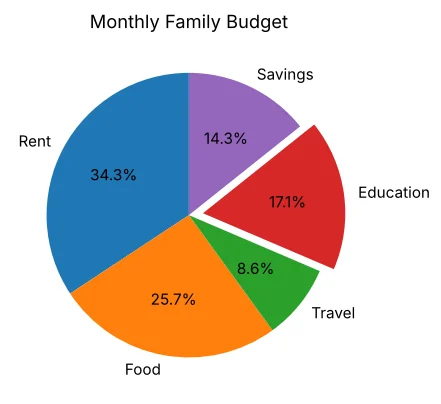
plt.pie(amount, labels=heads, autopct='%1.1f%%', explode=[0, 0, 0, 0.1, 0], startangle=90)
plt.title('Monthly Family Budget')
plt.savefig('pie.png')
print('Education share:', round(6000 / sum(amount) * 100, 1), '%')
Education share: 17.1 %
Scatter plot
Python
import matplotlib.pyplot as plt
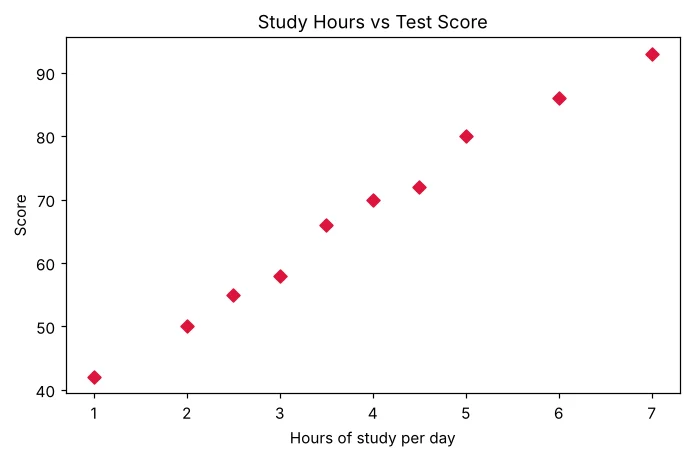
hours = [1, 2, 2.5, 3, 3.5, 4, 4.5, 5, 6, 7]
score = [42, 50, 55, 58, 66, 70, 72, 80, 86, 93]
plt.scatter(hours, score, color='crimson', marker='D')
plt.title('Study Hours vs Test Score'); plt.xlabel('Hours of study per day'); plt.ylabel('Score')
plt.savefig('scatter.png')
print('Chart saved')
Chart saved
The pandas plot() function
A Series or DataFrame can draw itself with .plot(kind=...); pandas calls Matplotlib for you.
| kind= | Chart |
|---|---|
| 'line' (default) | Line chart |
| 'bar' / 'barh' | Vertical / horizontal bars |
| 'hist' | Histogram |
| 'pie' | Pie chart |
| 'scatter' | Scatter plot (give x= and y=) |
| 'box' | Box plot |
Python
import pandas as pd
import matplotlib.pyplot as plt
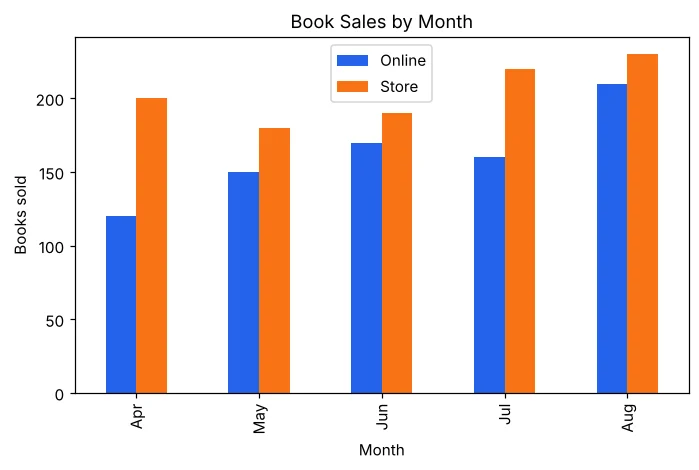
df = pd.DataFrame({'Month': ['Apr', 'May', 'Jun', 'Jul', 'Aug'],
                   'Online': [120, 150, 170, 160, 210],
                   'Store': [200, 180, 190, 220, 230]})
df.plot(x='Month', y=['Online', 'Store'], kind='bar', title='Book Sales by Month', color=['#2563eb', '#f97316'])
plt.ylabel('Books sold')
plt.savefig('pandas_bar.png')
print(df.set_index('Month').sum())
Online 810
Store 1020
dtype: int64
Python
import pandas as pd
import matplotlib.pyplot as plt
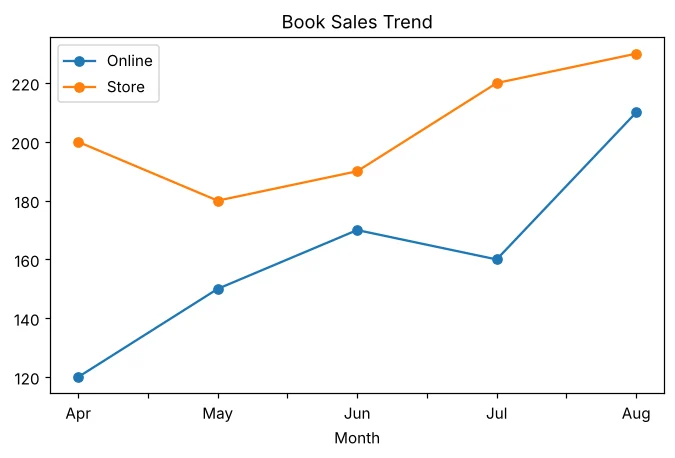
df = pd.DataFrame({'Month': ['Apr', 'May', 'Jun', 'Jul', 'Aug'],
                   'Online': [120, 150, 170, 160, 210],
                   'Store': [200, 180, 190, 220, 230]})
df.plot(x='Month', kind='line', marker='o', title='Book Sales Trend')
plt.savefig('pandas_line.png')
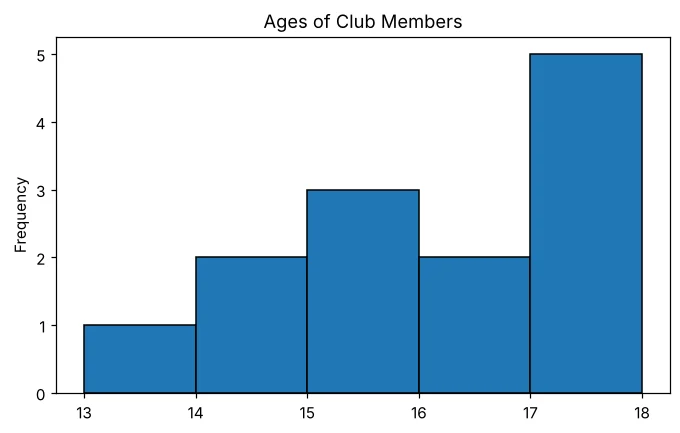
ages = pd.Series([13, 14, 14, 15, 15, 15, 16, 16, 17, 17, 17, 17, 18])
plt.figure()                      # start a NEW empty chart, else it draws on the old one
ages.plot(kind='hist', bins=5, edgecolor='black', title='Ages of Club Members')
plt.savefig('pandas_hist.png')
print('Charts saved')
Charts saved
Which chart to use?
📈
LineTrend over time📊
BarCompare categories📶
HistogramDistribution of numbers in ranges🥧
PieParts of a whole (%)⚫
ScatterRelationship between two variablesFrequently Asked Questions
What is the difference between a bar chart and a histogram?
A bar chart compares separate categories with gaps between bars. A histogram shows how continuous numeric data is distributed in ranges (bins); bars touch each other.
What does bins=[145,155,165] mean?
Bins are the ranges: 145–155 and 155–165. A value equal to an edge goes into the higher bin, except the last edge, which is included in the last bin.
What does autopct do in a pie chart?
It writes the percentage on each slice; '%1.1f%%' shows one decimal place followed by a % sign.
