🏆 Project & Revision · Lesson 23
Project Based Learning (Sample Project)
What is project-based learning?
In project-based learning you learn by solving a real problem from start to finish – collecting data, writing code, analysing results and presenting them. It builds skills that exams alone cannot test: planning, teamwork and communication.
Approach for solving a project
- 1Identify the problem and the users
- 2Plan: list tasks, tools and a timeline
- 3Collect data (survey, Google Form, CSV, MySQL)
- 4Process and analyse data with pandas
- 5Visualise with Matplotlib and interpret
- 6Test, document and present the result
Teamwork
🗣️
CommunicationShare progress and problems openly.🧩
Divide workEach member owns a part – data, code, charts, report.🤝
RespectListen to ideas; decide together.⏰
DeadlinesTrack tasks on a shared checklist.Project ideas
- School result analysis (shown below)
- Canteen sales and stock analysis
- Weather or air-quality data of your city
- Library book issue analysis
- Survey on students' screen time and sleep
- Cricket / IPL player statistics
Sample project: Result Analysis
Aim: analyse the marks of a class to find averages, the topper, grade distribution and section-wise performance. Tools: Python, pandas, Matplotlib, CSV.
Step 1: Collect data
Python
# Step 1 – create the data file (in a real project you collect this from a survey or form)
import pandas as pd
data = {'Roll': range(1, 13),
        'Name': ['Aarav', 'Bela', 'Chirag', 'Diya', 'Eshan', 'Farah', 'Gopal', 'Hina',
                 'Ishaan', 'Jiya', 'Kunal', 'Lata'],
        'Section': ['A', 'B', 'A', 'B', 'A', 'B', 'A', 'B', 'A', 'B', 'A', 'B'],
        'English': [78, 85, 62, 90, 71, 88, 55, 93, 67, 80, 74, 69],
        'Maths': [92, 74, 58, 81, 88, 67, 49, 95, 73, 61, 84, 77],
        'IP': [95, 89, 70, 92, 84, 79, 61, 98, 76, 83, 90, 72]}
pd.DataFrame(data).to_csv('class12_result.csv', index=False)
print('class12_result.csv created with', len(data['Roll']), 'students')
class12_result.csv created with 12 students
Step 2: Process
Python
# Step 2 – read, add Total, Percent and Grade
import pandas as pd
df = pd.read_csv('class12_result.csv')
df['Total'] = df[['English', 'Maths', 'IP']].sum(axis=1)
df['Percent'] = (df['Total'] / 3).round(1)
def grade(p):
    if p >= 90: return 'A1'
    if p >= 80: return 'A2'
    if p >= 70: return 'B1'
    if p >= 60: return 'B2'
    return 'C'
df['Grade'] = df['Percent'].apply(grade)
df.to_csv('class12_processed.csv', index=False)
print(df[['Name', 'Section', 'Total', 'Percent', 'Grade']])
Name Section Total Percent Grade
0 Aarav A 265 88.3 A2
1 Bela B 248 82.7 A2
2 Chirag A 190 63.3 B2
3 Diya B 263 87.7 A2
4 Eshan A 243 81.0 A2
5 Farah B 234 78.0 B1
6 Gopal A 165 55.0 C
7 Hina B 286 95.3 A1
8 Ishaan A 216 72.0 B1
9 Jiya B 224 74.7 B1
10 Kunal A 248 82.7 A2
11 Lata B 218 72.7 B1
Step 3: Analyse
Python
# Step 3 – analysis
import pandas as pd
df = pd.read_csv('class12_processed.csv')
print('Class average %   :', round(df['Percent'].mean(), 2))
print('Subject averages  :'); print(df[['English', 'Maths', 'IP']].mean().round(1))
print('Topper            :', df.loc[df['Total'].idxmax(), 'Name'])
print('Section-wise mean :'); print(df.groupby('Section')['Percent'].mean().round(2))
print('Grade count       :'); print(df['Grade'].value_counts().sort_index())
Class average % : 77.78
Subject averages :
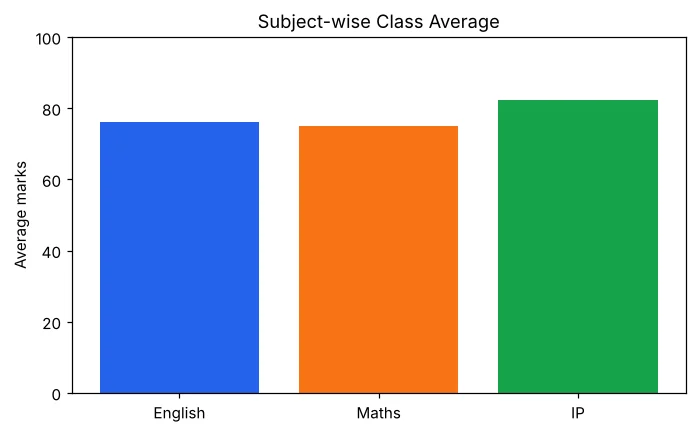
English 76.0
Maths 74.9
IP 82.4
dtype: float64
Topper : Hina
Section-wise mean :
Section
A 73.72
B 81.85
Name: Percent, dtype: float64
Grade count :
Grade
A1 1
A2 5
B1 4
B2 1
C 1
Name: count, dtype: int64
Step 4: Visualise
Python
# Step 4 – charts
import pandas as pd
import matplotlib.pyplot as plt
df = pd.read_csv('class12_processed.csv')
avg = df[['English', 'Maths', 'IP']].mean()
plt.bar(avg.index, avg.values, color=['#2563eb', '#f97316', '#16a34a'])
plt.title('Subject-wise Class Average'); plt.ylabel('Average marks'); plt.ylim(0, 100)
plt.savefig('project_subject_avg.png')
plt.figure()
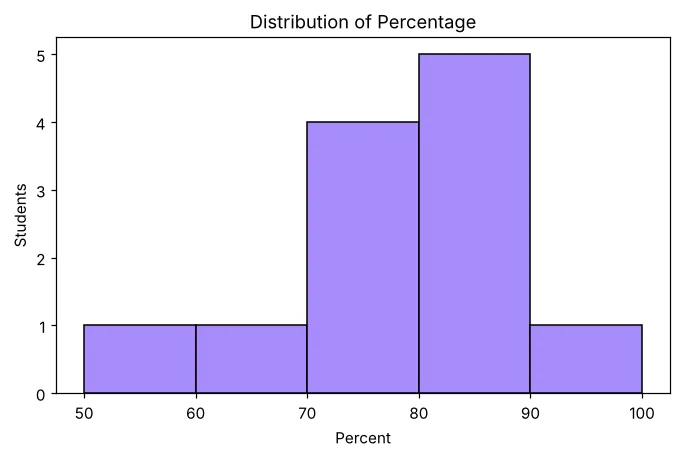
plt.hist(df['Percent'], bins=[50, 60, 70, 80, 90, 100], edgecolor='black', color='#a78bfa')
plt.title('Distribution of Percentage'); plt.xlabel('Percent'); plt.ylabel('Students')
plt.savefig('project_hist.png')
plt.figure()
gc = df['Grade'].value_counts().sort_index()
plt.pie(gc.values, labels=gc.index, autopct='%1.0f%%')
plt.title('Grade Share')
plt.savefig('project_pie.png')
print('3 charts saved')
3 charts saved

Step 5: Menu program
Python
# Step 5 – menu-driven program that ties everything together
import pandas as pd
df = pd.read_csv('class12_processed.csv')
while True:
    print('1.Show all 2.Search by name 3.Students above % 4.Exit')
    ch = input('Choice: ')
    if ch == '1':
        print(df[['Roll', 'Name', 'Percent', 'Grade']].to_string(index=False))
    elif ch == '2':
        n = input('Name: ')
        r = df[df['Name'].str.lower() == n.lower()]
        print(r[['Name', 'English', 'Maths', 'IP', 'Percent']].to_string(index=False) if len(r) else 'Not found')
    elif ch == '3':
        p = float(input('Minimum %: '))
        print(df[df['Percent'] >= p]['Name'].tolist())
    else:
        print('Thank you'); break
1.Show all 2.Search by name 3.Students above % 4.Exit
Choice: 2
Name: hina
Name English Maths IP Percent
Hina 93 95 98 95.3
1.Show all 2.Search by name 3.Students above % 4.Exit
Choice: 3
Minimum %: 85
['Aarav', 'Diya', 'Hina']
1.Show all 2.Search by name 3.Students above % 4.Exit
Choice: 4
Thank you
Writing the project report
- Certificate and acknowledgement
- Introduction and aim
- Hardware and software used
- Data description (columns and source)
- Source code with comments
- Output screenshots and charts
- Conclusion and future scope
- Bibliography (websites and books you used)
Frequently Asked Questions
What should a Class 12 IP project contain?
A real-life problem, data in CSV or MySQL, pandas code for processing and analysis, Matplotlib charts, a menu or report, and documentation – aim, tools, code, output screenshots and conclusion.
Can the project be done in a group?
Yes, usually in groups of 2–3 students. Divide the work – data collection, code, charts and report – and meet regularly.
