React में Props
Props क्या हैं?
Props (properties का छोटा रूप) से आप component के अंदर data भेजते हैं — बिल्कुल HTML tag के attributes की तरह। एक ही component अलग-अलग props मिलने पर अलग content दिखा सकता है।
Props भेजना और पढ़ना
function Greeting(props) {
  return <p>Hello, {props.name}! You are in class {props.cls}.</p>
}

export default function Page() {
  return (
    <>
      <Greeting name="Riya" cls={10} />
      <Greeting name="Aman" cls={12} />
    </>
  )
}React सारे attributes को props नाम के एक object में इकट्ठा करके function को पहले argument के रूप में देता है।
Destructuring और default values
हर जगह props.something लिखना लंबा हो जाता है। ज़्यादातर developers props को destructure करते हैं और optional वालों को default value देते हैं:
// Destructure props directly in the function brackets
function Price({ amount, currency = '₹', discount = 0 }) {
  const final = amount - (amount * discount) / 100
  return (
    <p>
      {currency}{final.toLocaleString('en-IN')}
      {discount > 0 && <small> ({discount}% off)</small>}
    </p>
  )
}

<Price amount={4999} />               // ₹4,999
<Price amount={4999} discount={20} /> // ₹3,999.2 (20% off)
कोई भी value prop बन सकती है
function Course({ title, fee, topics, isNew, onEnquire, teacher }) {
  return (
    <div>
      <h3>{title} {isNew && '🆕'}</h3>
      <p>Fee: ₹{fee} · Teacher: {teacher.name}</p>
      <ul>{topics.map((t) => <li key={t}>{t}</li>)}</ul>
      <button onClick={onEnquire}>Enquire</button>
    </div>
  )
}

<Course
  title="Python + AI"              // string
  fee={3499}                       // number
  isNew                            // boolean true
  topics={['Basics', 'Pandas']}    // array
  teacher={{ name: 'Gagan Sir' }}  // object
  onEnquire={() => alert('Thanks!')} // function (Client Component only)
/>{ }। Object के लिए double braces देखिए: बाहर वाले = JavaScript, अंदर वाले = object।children prop
Component के opening और closing tag के बीच जो भी रखते हैं, वह children बनकर आता है। Layouts और wrappers ऐसे ही काम करते हैं — Next.js का layout.jsx भी page को children के रूप में पाता है।
// components/Box.jsx — a wrapper that accepts any content
export default function Box({ title, children }) {
  return (
    <section style={{ border: '1px solid #e2e8f0', borderRadius: 12, padding: 16 }}>
      <h2>{title}</h2>
      {children}
    </section>
  )
}

// usage — everything between <Box> and </Box> is "children"
<Box title="Admissions open">
  <p>New batch starts on 1 November.</p>
  <a href="/contact">Book a demo</a>
</Box>
One-way data flow
Props सिर्फ़ नीचे जाते हैं। Child parent का data edit नहीं कर सकता। अगर child को parent को कुछ बताना है (जैसे "button click हुआ"), तो parent एक function prop के रूप में भेजता है और child उसे call करता है।
असली example: EduSite का CourseCard
// components/CourseCard.jsx (from the EduSite project)
import Image from 'next/image'
import Link from 'next/link'
import { rupees } from '@/lib/courses'

export default function CourseCard({ course }) {
  return (
    <article className="card">
      <Link href={`/courses/${course.slug}`}>
        <Image src={course.image} alt={course.title} width={600} height={338} />
      </Link>
      <div style={{ padding: 18 }}>
        <span className="badge">{course.level}</span>
        <h3>{course.title}</h3>
        <p>{course.summary}</p>
        <p><b>{rupees(course.fee)}</b> · {course.duration}</p>
      </div>
    </article>
  )
}

// app/page.jsx
{courses.slice(0, 3).map((c) => <CourseCard key={c.slug} course={c} />)}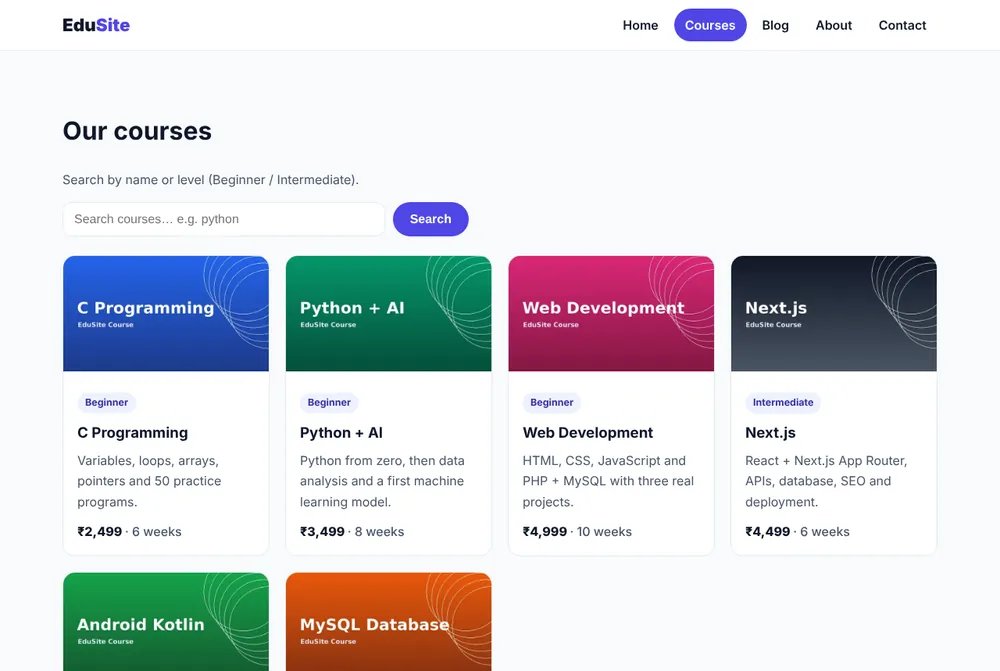
आम गलतियाँ
fee="2499"string भेजता है;fee * 2जैसी maths चल भी जाए पर comparisons बिगड़ते हैं।fee={2499}लिखें।- Child के अंदर prop बदलना (
props.name = 'x') — allowed नहीं; state use करें। - Object के चारों ओर braces भूलना:
style={color:'red'}→style={{ color: 'red' }}होना चाहिए। - Server Component से Client Component को
onClickfunction भेजना — handler को Client Component के अंदर ले जाएँ।
सारांश
- Props parent से child को HTML attributes की तरह data भेजते हैं।
- उन्हें destructure करें और defaults दें:
function X({ a, b = 1 })। childrentags के बीच का content है।- Props read-only हैं और एक दिशा में बहते हैं: नीचे।
name, roll, marks (array) props वाला StudentCard component बनाइए। Total दिखाइए और total 270 से ज़्यादा हो तो "Topper ⭐" दिखाइए।
