🏆 Project – पूरी Website बनाएँ · Lesson 31
Project: EduSite Website की Planning
हम क्या बनाएँगे
अगले छह lessons में आप EduSite बनाएँगे — coaching institute के लिए पूरी, SEO-ready website — इस course की हर चीज़ use करके: layouts, dynamic routes, Server और Client Components, Server Actions, metadata, sitemap और deployment।
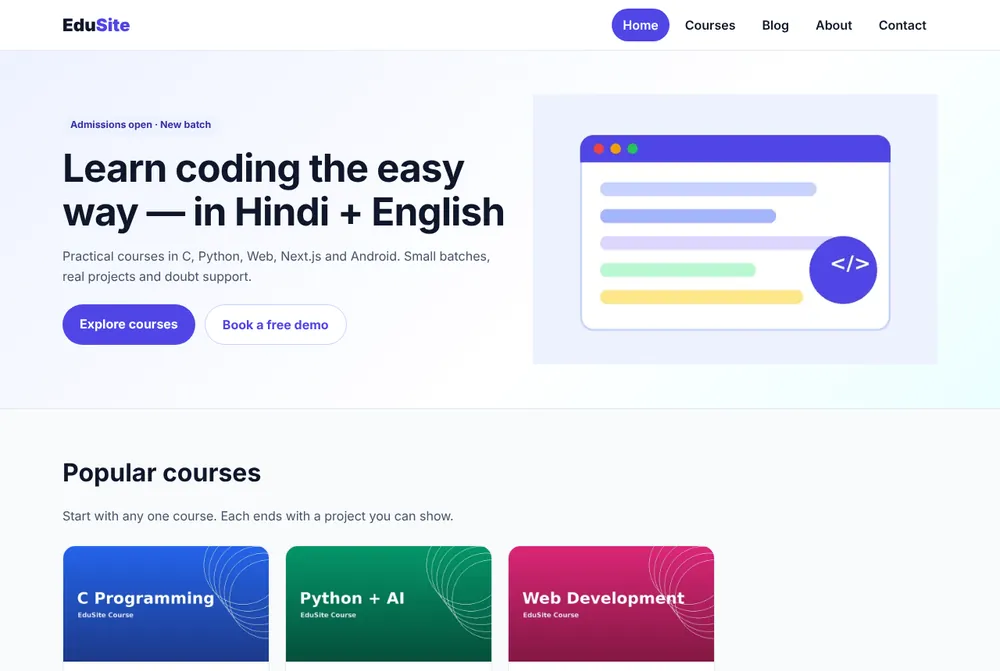
Pages और features
| Page | URL | Use होने वाले Next.js features |
|---|---|---|
| Home | / | Server Component, next/image, CSS Modules |
| Courses | /courses?q= | searchParams, Client Component search |
| Course detail | /courses/[slug] | Dynamic route, generateStaticParams, generateMetadata, JSON-LD |
| Blog | /blog, /blog/[slug] | Markdown files, loading.jsx, SSG |
| About | /about | Static metadata |
| Contact | /contact?course= | Server Action, useActionState, validation |
| API | /api/courses | Route Handler |
| SEO files | /sitemap.xml, /robots.txt, OG image | Metadata file conventions |
Site map और user flow
Final folder structure
📁 edusite/
  📁 app/
    layout.jsx            # root layout: font, metadata, Header, Footer, JSON-LD
    page.jsx              # home page
    page.module.css
    globals.css
    about/page.jsx
    📁 courses/
      page.jsx            # list + search (?q=)
      CourseSearch.jsx    # client component
      [slug]/page.jsx     # course detail (SSG)
    📁 blog/
      page.jsx            # list of posts
      [slug]/page.jsx     # post detail (SSG)
    📁 contact/
      page.jsx
      ContactForm.jsx     # client component (useActionState)
      actions.js          # Server Action
      contact.module.css
    api/courses/route.js  # JSON API
    sitemap.js  robots.js  opengraph-image.jsx  icon.svg
    error.jsx  not-found.jsx
    fonts/Inter.woff2
  📁 components/  Header.jsx  Header.module.css  Footer.jsx  CourseCard.jsx  PostCard.jsx  JsonLd.jsx
  content/posts/*.md      # blog posts
  📁 lib/  site.js  courses.js  posts.js
  public/images/*.png
  proxy.js  next.config.mjs  jsconfig.json  package.json
Step 1: App बनाइए
Terminal
npx create-next-app@latest edusite
# TypeScript? No · ESLint? Yes · Tailwind? No · src/ directory? No
# App Router? Yes · Turbopack? Yes · import alias? @/*
cd edusite
npm install gray-matter marked     # for the Markdown blog
npm run dev
JSON – package.json (final)
{
  "name": "edusite",
  "version": "1.0.0",
  "private": true,
  "description": "EduSite – complete Next.js website project from the CodingEasily Next.js tutorial",
  "scripts": {
    "dev": "next dev",
    "build": "next build",
    "start": "next start"
  },
  "dependencies": {
    "gray-matter": "4.0.3",
    "marked": "15.0.12",
    "next": "16.3.8",
    "react": "19.2.0",
    "react-dom": "19.2.0"
  }
}
Step 2: lib/site.js — site settings एक जगह
Name, URL, phone और city header, footer, metadata, sitemap और JSON-LD में use होते हैं। इन्हें एक file में रखें ताकि नए client के लिए सिर्फ़ एक edit लगे।
JS – lib/site.js
// One place for the site-wide settings used by metadata, sitemap and JSON-LD.
export const site = {
  name: 'EduSite',
  tagline: 'Learn coding in Hindi + English',
  description:
    'EduSite is a coaching institute website built with Next.js: courses, blog, contact form and full SEO.',
  url: process.env.SITE_URL || 'http://localhost:3000',
  email: 'hello@edusite.example',
  phone: '+91 90000 00000',
  city: 'Aligarh, Uttar Pradesh',
}
Step 3: lib/courses.js — course data
JS – lib/courses.js
// Course data. In a real project this could come from MySQL (see the database lesson).
export const courses = [
  {
    slug: 'c-programming',
    title: 'C Programming',
    level: 'Beginner',
    duration: '6 weeks',
    fee: 2499,
    image: '/images/c-programming.png',
    summary: 'Variables, loops, arrays, pointers and 50 practice programs.',
    topics: ['Variables & data types', 'if-else and loops', 'Arrays & strings', 'Functions', 'Pointers', 'File handling'],
  },
  {
    slug: 'python-ai',
    title: 'Python + AI',
    level: 'Beginner',
    duration: '8 weeks',
    fee: 3499,
    image: '/images/python-ai.png',
    summary: 'Python from zero, then data analysis and a first machine learning model.',
    topics: ['Python basics', 'Lists & dictionaries', 'OOP', 'Pandas', 'Matplotlib', 'First ML model'],
  },
  {
    slug: 'web-development',
    title: 'Web Development',
    level: 'Beginner',
    duration: '10 weeks',
    fee: 4999,
    image: '/images/web-development.png',
    summary: 'HTML, CSS, JavaScript and PHP + MySQL with three real projects.',
    topics: ['HTML5', 'CSS3 & Flexbox', 'JavaScript', 'PHP', 'MySQL', 'Hosting'],
  },
  {
    slug: 'nextjs',
    title: 'Next.js',
    level: 'Intermediate',
    duration: '6 weeks',
    fee: 4499,
    image: '/images/nextjs.png',
    summary: 'React + Next.js App Router, APIs, database, SEO and deployment.',
    topics: ['React basics', 'App Router', 'Server Components', 'Server Actions', 'SEO', 'Deployment'],
  },
  {
    slug: 'android-kotlin',
    title: 'Android with Kotlin',
    level: 'Intermediate',
    duration: '10 weeks',
    fee: 5999,
    image: '/images/android-kotlin.png',
    summary: 'Native Android apps: views, RecyclerView, Room, Retrofit and MVVM.',
    topics: ['Kotlin', 'Layouts & views', 'RecyclerView', 'Navigation', 'Room', 'Retrofit'],
  },
  {
    slug: 'mysql-database',
    title: 'MySQL Database',
    level: 'Beginner',
    duration: '4 weeks',
    fee: 1999,
    image: '/images/mysql-database.png',
    summary: 'SQL queries, joins, normalization and a school database project.',
    topics: ['SELECT & WHERE', 'Joins', 'GROUP BY', 'Keys & constraints', 'Normalization', 'Project'],
  },
]

export function getCourse(slug) {
  return courses.find((c) => c.slug === slug)
}

export function searchCourses(q = '') {
  const s = q.trim().toLowerCase()
  if (!s) return courses
  return courses.filter(
    (c) => c.title.toLowerCase().includes(s) || c.summary.toLowerCase().includes(s) || c.level.toLowerCase() === s
  )
}

export const rupees = (n) => '₹' + n.toLocaleString('en-IN')
बाद में इस array को किसी page को बदले बिना MySQL query से बदल सकते हैं (Database lesson देखें) — pages सिर्फ़ getCourse() और searchCourses() call करते हैं।
Step 4: images और font
- Course images (1200×675 PNG)
public/images/में रखें:c-programming.png,python-ai.png,web-development.png,nextjs.png,android-kotlin.png,mysql-database.png, औरhero.png(600×400)। Inter.woff2कोapp/fonts/में रखें (download ZIP में है, Open Font License)।
आगे क्या
- 1Part 2 – Root layout, Header, Footer, Home page
- 2Part 3 – Courses list, search और detail pages
- 3Part 4 – Markdown blog
- 4Part 5 – Server Action + API के साथ Contact form
- 5Part 6 – SEO files, error pages और launch
✅ Practice
Project बनाइए, अपने institute के नाम और तीन courses के साथ lib/site.js और lib/courses.js जोड़िए, और confirm कीजिए कि npm run dev बिना error के चलता है।
अक्सर पूछे जाने वाले प्रश्न (FAQ)
क्या EduSite का पूरा source code download कर सकते हैं?
हाँ। इस page का download card हर file वाला ZIP देता है। शुरू करने के लिए npm install और npm run dev चलाइए।
क्या यह project असली client के लिए use कर सकते हैं?
हाँ। lib/site.js और lib/courses.js में name, colours, courses और contact details बदलिए, असली images जोड़िए और deploy कीजिए।
